QA in CI/CD Pipelines: Best Practices, Tools, and Emerging Trends
Key Takeaways
- CI/CD without embedded QA speeds up defects as much as features. Quality gates make delivery safe.
- A proper test pyramid with more units and fewer E2E tests is critical for fast, stable pipelines.
- Security testing, including SAST, DAST, SCA, and secrets scanning, must run automatically at every stage.
- AI-driven testing reduces effort but needs human review to avoid technical debt.
- High-performing teams treat QA as an engineering discipline, not a final step.
- Track metrics like defect escape rate, flaky tests, pipeline time, and MTTR to improve continuously.
Introduction
A faulty software update from cybersecurity firm CrowdStrike triggered one of the largest IT outages in recent history. The issue caused widespread system crashes across Microsoft Windows environments, impacting millions of devices globally. Among the hardest hit was Delta Air Lines, which was forced to cancel over 7,000 flights, disrupting travel plans for more than 1.3 million passengers.
This incident highlights a critical reality for modern software teams. Speed without strong quality assurance can break the entire system.
Today, organizations rely heavily on Continuous Integration and Continuous Delivery CI/CD services to ship updates faster. However, as systems become more complex and interconnected, even a small failure in testing or validation can lead to massive business and operational consequences.
Despite widespread adoption of DevOps practices, many teams still struggle with:
- Inadequate test coverage in pipelines
- Poor validation of third-party integrations
- Flaky or unreliable automated tests
- Lack of real-time monitoring after deployment
This is where QA in CI/CD pipelines becomes essential.
Whether you're building a QA strategy from scratch or auditing a pipeline that's too slow, this guide gives you a complete, practical picture of what QA in CI/CD looks like in 2026.

What is a QA Pipeline?
A QA pipeline is an automated or streamlined process for ensuring the quality, reliability, and functionality of software before it is deployed. It incorporates multiple testing phases into the CI/CD pipeline to detect bugs early and keep the code clean.
An efficient QA pipeline consists of various parts such as unit tests, integration tests, UI testing, and performance testing. It reduces the likelihood of release failures, shortens development cycles, and reduces the risk of bugs being introduced into production.
Benefits include faster feedback loops, improved traceability, reduced manual testing efforts, and seamless integration with CI/CD tools such as Jenkins, GitHub Actions, or GitLab CI.
By automating repetitive tasks and enforcing code quality gates, the QA pipeline promotes collaboration between QA engineers and developers, enabling faster and more stable product releases.
Why is QA Important in CI/CD?
Organizations that introduce automated QA into their CI/CD routines have experienced faster release cycles than those that solely rely on manual QA. This indicates the critical and effective function of a strong QA integration. QA in CI/CD serves as a safety net throughout the process, enabling developers to focus on their code rather than looking back for regression issues in production.
Need for Automation Testing in CI/CD Pipeline
Manual testing is increasingly unsustainable. The following are the clear advantages of CI/CD pipeline automation testing:
- Faster feedback with tests running in minutes, enabling quick issue detection and faster releases.
- Parallel and cross-browser testing improves coverage while reducing execution time.
- Automated environment setup eliminates manual effort and ensures consistency across systems.
- Continuous testing helps teams meet quality and security standards at scale.
While manual testing can be reserved for specific testing types and modules, such as exploratory testing, it is best to automate testing for seamless integration of QA in the CI/CD pipeline.
How to Integrate QA into CI/CD Pipelines (Step-by-Step Guide)
Integrating QA into a CI/CD pipeline requires more than installing a testing tool and pointing it at your repository. The steps below cover everything from auditing your current setup to enforcing quality gates, choosing the right tools, and keeping the pipeline healthy over time.
| Step | Action | What It Achieves |
| 1. Audit your pipeline | Map existing stages, identify gaps in test coverage, measure current pipeline run time | Establishes a baseline before adding any new tooling |
| 2. Select the right tools | Match CI/CD tools (GitHub Actions, GitLab CI, Jenkins) and test frameworks to your stack and compliance needs | Prevents toolchain sprawl and ensures tools work together |
| 3. Align QA with developers at sprint planning | Involve QA engineers before code is written to define acceptance criteria and flag testability issues | Reduces rework, shortens feedback loops, and distributes quality responsibility |
| 4. Implement the test pyramid | Structure tests as unit (70-80%), integration (15-20%), and E2E (5-10%) and map each to a pipeline stage | Keeps pipelines fast and makes failures easier to isolate |
| 5. Set quality gates with hard thresholds | Enforce minimum 80% code coverage, block high/critical security findings, target pipeline completion under 15 minutes | Removes ambiguity and enforces quality automatically under deadline pressure |
| 6. Monitor pipeline health continuously | Track flaky test rate, pipeline run time, and defect escape rate using tools like Allure or Datadog | Catches pipeline degradation before it compounds into larger problems |
| 7. Document the pipeline as living infrastructure | Maintain runbooks, ADRs, and rollback playbooks alongside the application code | Allows new engineers to contribute safely and enables continuous process improvement |
5 Key Components of a QA Pipeline
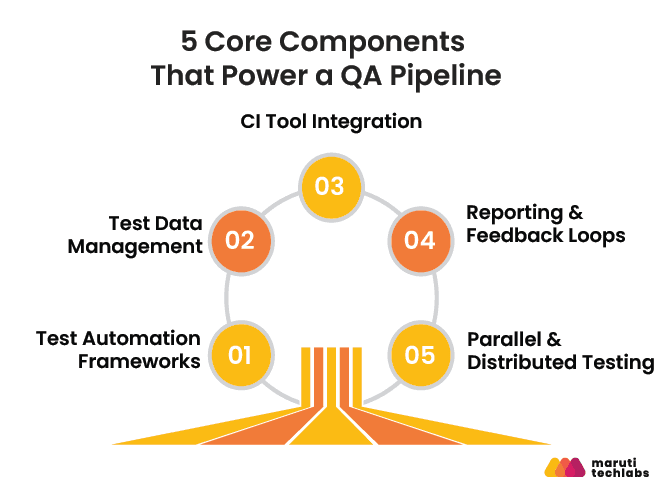
A QA pipeline is an automated workflow within the SDLC that continuously validates code through testing, CI integration, feedback mechanisms, and quality checks. A robust QA pipeline includes multiple interconnected components to ensure thorough and efficient testing:
1. Test Automation Frameworks
These frameworks (like Selenium, Cypress, or Playwright) automate repetitive test cases for faster and more consistent validation. They support unit, integration, and UI testing to maintain code integrity across environments and updates.
2. Test Data Management
Realistic and anonymized test data are important in testing and validating application logic under real-world conditions. Mockaroo or synthetic data generators simulate various use cases, ensuring confidentiality and compliance.
3. CI Tool Integration
QA pipelines are tightly integrated with CI tools like Jenkins, CircleCI, GitHub Actions, or GitLab CI/CD. These tools automatically run tests on each code push, maintaining continuous code validation and enabling rapid regression detection.
4. Reporting & Feedback Loops
Test reports, logs, and dashboards give you insight into test results. By integrating feedback tools (Allure Reports, Slack notifications, etc.), developers and QA teams are notified of failures as soon as they happen.
5. Parallel & Distributed Testing
Tests are executed concurrently on multiple environments or machines in order to reduce the execution time. This will help to minimize the testing bottlenecks and make the release cycles much faster, particularly in large projects.
Best Practices for QA in CI/CD Pipelines
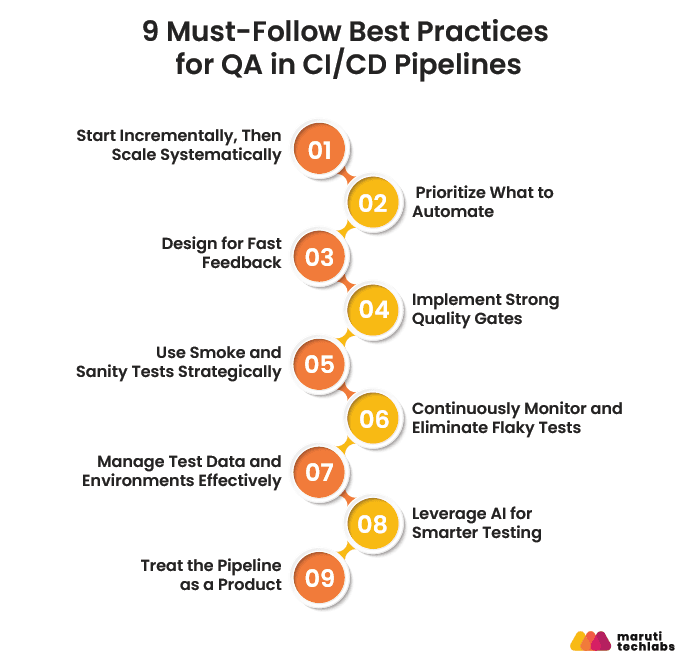
Integrating QA in a CI/CD pipeline requires a structured approach that balances speed, reliability, and coverage while minimizing pipeline bottlenecks. The following best practices help engineering teams design scalable testing strategies, maintain high-quality releases, and continuously optimize pipeline performance.
1. Start Incrementally, Then Scale Systematically
Start small and gradually increase the scope of automation testing. Implementing QA in the CI/CD process is gradual. Start testing with critical workflows and then progressively test more parts of the pipeline. This provides stability and enables teams to learn and optimize as they grow.
2. Focus on What to Automate
Not every test is suitable for automation. Identify and focus on critical user paths, critical modules, and regression areas. Focus on what delivers more value with a risk-based approach.
3. Design for Fast Feedback (Parallel + Selective Testing)
Time is the most crucial aspect of CI/CD. Execute tests in parallel, implement test sharding, and selectively run tests depending on code changes. This minimizes pipeline time and yet provides good coverage.
4. Implement Strong Quality Gates
Establish clear, enforceable standards and expectations for code quality, test coverage, and security. Pipelines should automatically block builds that fail to meet these requirements.
5. Use Smoke and Sanity Tests Strategically
Core functionality should be validated in automated smoke tests following each deployment. Complement these with confidence checks for specific modules to quickly confirm that recent changes behave as expected.
6. Continuously Monitor and Eliminate Flaky Tests
Flaky tests cause low trust in the pipeline and delay teams. Monitor test reliability, identify unreliable tests, and repair them as a priority. Keeping your test suite stable is key to developers' trust.
7. Manage Test Data and Environments Effectively
Use consistent and reliable test environments with containerization and ephemeral environments. Keep production data clean to prevent false positives and inconsistent results.
8. Leverage AI for Smarter Testing
Today, AI is being used more and more in modern pipelines to create test cases, identify changes that are likely to cause failures, and uncover patterns in failures. This is a way to maximize the test coverage and improve overall pipeline efficiency.
9. Treat the Pipeline as a Product
Create pipeline configurations, maintain a version control system of the pipeline code, and create failure runbooks. A successful pipeline helps you get on board faster and continue improving.
By following these practices, teams can build CI/CD pipelines that not only automate testing but also deliver fast, reliable, and scalable quality assurance.
Advantages of Test Automation for CI/CD Pipeline
Integrating QA into CI/CD pipelines transforms how teams deliver software by making releases faster, safer, and more predictable. As a result, teams reduce production risks and empower developers with faster feedback loops that boost productivity.
| Benefit | What It Means in Practice | Metric |
| Faster feedback loops | Automated tests return results within minutes of a commit, not days | Feedback time reduced from days to under 5 minutes |
| Increased test coverage | Automation enables tests to run across more browsers, devices, and scenarios than manual testing allows | Coverage increases of 50%+ reported vs manual-only approaches |
| Consistent test execution | Automated tests run the same way every time, eliminating human error and environmental inconsistencies | Near-zero variability in test execution across runs |
| Reduced time to market | Continuous automated testing removes the manual QA bottleneck before each release | Release cycles speed up and help teams ship updates efficiently |
| Lower defect escape rate | Bugs are caught earlier in the pipeline, where they cost less to fix | Fixing a bug in production costs 15x more than catching it at the unit test stage |
| Scalability | Automated pipelines scale with the codebase without proportional increases in QA headcount | The World Quality Report highlights that AI-assisted QA is improving test maintenance efficiency and reducing manual effort. |
What Challenges do Teams Face in QA within CI/CD?
Modern CI/CD pipelines promise speed, but without a strong QA foundation, they often introduce bottlenecks that slow everything down. From flaky tests to inconsistent environments and overloaded pipelines, these challenges can quietly slow down efficiency. Addressing them early is key to building a fast, reliable, and scalable delivery process.
1. Flaky Tests Slowing Down Builds
Flaky tests are unreliable or nondeterministic, leading to false positives, false negatives, and delayed builds. This can eventually lead to decreased trust in the pipeline and hinder development processes over time.
Solution: Use a stabilization suite to isolate and tag flaky tests away from core test flows. Regularly test, debug, and refactor them to ensure a stable and reliable test suite.
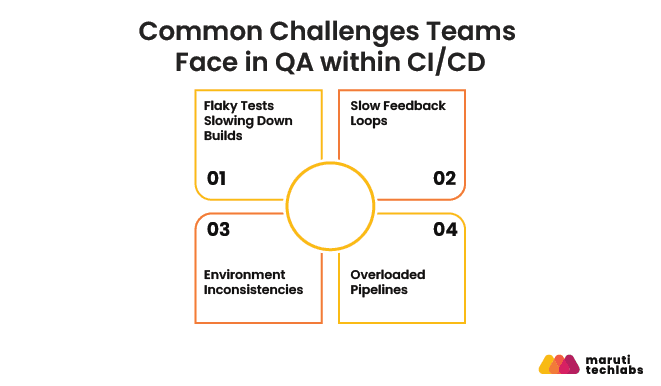
Slow test result turnaround times hinder development cycles and make it difficult for developers to quickly identify and resolve issues.
Solution: Use a test pyramid approach, perform fast unit and critical integration tests early, and longer-running UI tests later. This will allow critical issues to be identified and addressed in a timely fashion, without stalling the pipeline.
3. Environment Inconsistencies
It can sometimes be difficult to ensure that tests are consistent across development, staging, and CI environments. This makes debugging more difficult and decreases trust in test results.
Solution: Standardize environments using containerization tools such as Docker. Maintain uniform configurations, dependencies, and test data throughout the entire pipeline.
4. Overloaded Pipelines
Executing the entire test suite on every commit can slow down pipelines, increase resource usage, and create unnecessary bottlenecks. This impacts developer productivity and release velocity.
Solution: Use Test Orchestration Tools like TestRail or Launchable, and implement test impact analysis to execute only the impacted tests due to recent code changes. This helps to maintain pipelines at their peak efficiency without sacrificing coverage.
Tools for Building QA Pipelines in CI/CD
Building a QA pipeline in CI/CD requires combining multiple categories of tools that work together seamlessly. This typically includes pipeline orchestrators to manage workflows, automation frameworks to execute tests, and reporting or analytics layers to track results and insights. These tools help teams achieve continuous testing, faster feedback, and consistent quality across every stage of the delivery pipeline.
Category | Tool | Best For |
| CI/CD Orchestration | GitHub Actions | Native GitHub integration, large ecosystem of pre-built actions |
| CI/CD Orchestration | GitLab CI/CD | Teams using GitLab SCM, strong environment-specific deployment support |
| CI/CD Orchestration | Jenkins | Legacy pipelines, extensive plugin ecosystem |
| CI/CD Orchestration | CircleCI | Complex parallel and matrix test configurations |
| Test Automation | Playwright | E2E and browser testing, fast and reliable in headless CI environments |
| Test Automation | Cypress | Developer-friendly E2E and component testing |
| Test Automation | Selenium | Cross-browser testing for legacy suites |
| Test Automation | Appium | Mobile test automation for iOS and Android |
| AI-Native Testing | QA Wolf | AI-generated Playwright test code from natural language |
| AI-Native Testing | Mabl | Self-healing test automation with ML-based auto-repair |
| AI-Native Testing | Autify | No-code automation with AI self-healing capabilities |
| Security Scanning | Semgrep | SAST on every commit and PR, low false-positive rate |
| Security Scanning | Snyk | SCA and container scanning, strong developer experience |
| Security Scanning | OWASP ZAP | DAST in staging environments, open source |
| Security Scanning | Trivy | Container and IaC vulnerability scanning |
| Performance Testing | k6 | Script-based load testing with native CI/CD integration |
| Performance Testing | Gatling | High-concurrency performance testing for complex scenarios |
| Reporting and Observability | Allure | Rich test result visualization and trend reporting |
| Reporting and Observability | Datadog | Full-stack observability, synthetic monitoring, APM |
| Test Data Management | Mockaroo | Realistic synthetic data generation for test environments |
The Test Pyramid in CI/CD
The test pyramid is the most important structural principle in CI/CD quality engineering. It describes how to distribute automated tests across three layers so that the pipeline stays fast, failures stay easy to diagnose, and coverage stays comprehensive.
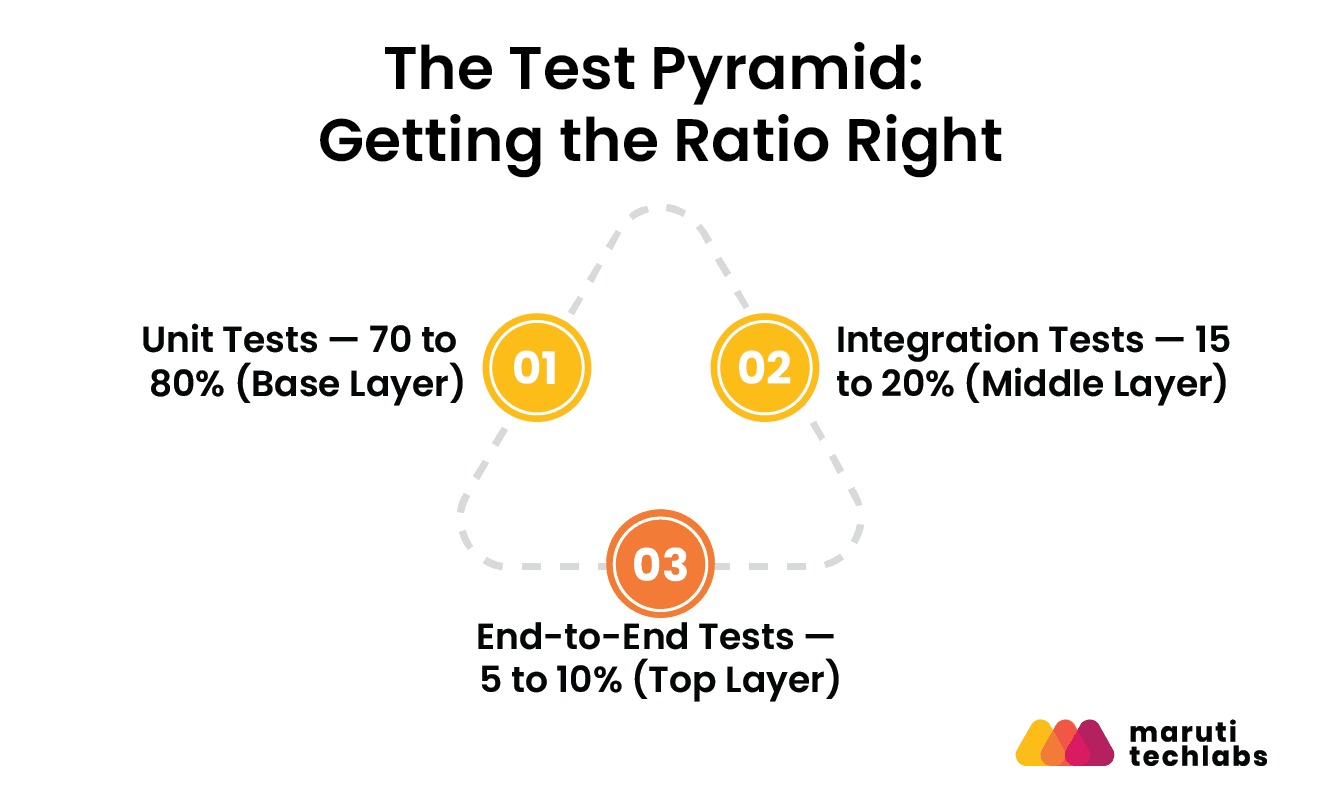
1. Unit Tests (Base Layer — 70 to 80% of all tests)
Unit tests validate individual functions and components in isolation. They have no external dependencies, run in milliseconds, and should form the broad base of the pyramid. Every commit should trigger the unit test suite. If unit tests take more than a few minutes to run, the suite needs refactoring.
2. Integration Tests (Middle Layer — 15 to 20% of all tests)
Integration tests validate that multiple components work together correctly, including services calling APIs, modules sharing state, and database interactions. They are slower than unit tests but faster than E2E tests and should run on every pull request.
3. End-to-End Tests (Top Layer — 5 to 10% of all tests)
E2E tests simulate real user journeys through the full application stack. They are the slowest and most expensive tests to run and maintain, so they should be reserved for the most critical user paths only. They run in staging environments before production promotion.
Why the Test Pyramid Matters in CI/CD?
The Test Pyramid gives CI/CD pipelines a structure that keeps feedback fast without compromising coverage. Unit tests form the bulk of the suite, integration tests validate component interactions, and a handful of E2E tests confirm real-world behavior. Together, they let teams move quickly without sacrificing release stability.
Layer | Test Type | When It Runs | Target Share | Speed |
| Base | Unit tests | Every commit | 70 to 80% | Milliseconds per test |
| Middle | Integration tests | Every pull request | 15 to 20% | Seconds per test |
| Top | End-to-end tests | Staging before production | 5 to 10% | Minutes per test |
Role of AI Testing in CI/CD Pipelines
AI is quickly becoming a core part of how modern QA teams operate in CI/CD pipelines. Instead of relying only on manual or scripted testing, teams are now using AI to generate test cases, identify high-risk changes, and speed up test execution.
Almost 90% of organizations are exploring generative AI for quality engineering (QE), according to the Capgemini World Quality Report (WQR) 2025-26. But a fraction of these have leveraged it across the enterprise, which means that the majority of teams are still figuring things out.
Likewise, Deloitte points to a broader shift towards agentic AI, which it predicts will be widespread within the next several years. This means that AI isn't replacing QA, but it's transforming how testing is conducted in fast-moving CI/CD environments.
How is AI Transforming CI/CD Pipelines Today?
AI is actively reshaping CI/CD pipelines by automating test maintenance, generating test cases, and making smarter decisions about what to run and when. Here is what it does:
Self-Healing Tests: AI detects when a test failure is caused by a UI or selector change rather than a genuine bug and automatically updates the affected script. This reduces test maintenance overhead significantly for teams with large Playwright or Selenium suites.
AI-Generated Test Cases: Tools such as QA Wolf and Autify can generate executable test code from natural-language user journeys or acceptance criteria. Teams leveraging this feature view AI-generated content as a starting point, rather than an end product.
Risk-Based Test Selection: When analyzing code changes and historical failure data, AI can help determine which tests are most likely to detect failures for a specific commit and run only those tests rather than the entire test suite. This allows for a pipeline to execute more quickly without sacrificing meaningful coverage.
Agentic Testing: The emerging frontier is fully autonomous test agents that read pull requests, generate test suites, execute them, analyze failures, and surface reports without human direction at each step.
How AI Will Shape CI/CD Testing in 2026 and Beyond?
AI testing in CI/CD is expected to shift from early experimentation to more practical, production-scale adoption. The focus will move toward improving efficiency, reducing manual effort, and making pipelines more intelligent and self-optimizing.
- Increased use of AI for autonomous test case generation and maintenance
- Intelligent test selection based on code changes and risk signals
- Real-time failure analysis with faster root cause identification
- Rise of agentic AI for automated remediation and workflow actions
- Greater emphasis on governance, explainability, and human oversight
- Scaling AI-driven testing across large and complex engineering environments
The Hidden Risks of AI-Driven Testing
According to the World Quality Report 2025-26, unsupervised AI produces a significant number of low-quality tests, resulting in a faster rate of technical debt than quality gains in coverage. 58% of organizations struggle to effectively leverage AI tools, while 60% face challenges with secure, scalable test data.
The teams seeing the best results apply the same discipline to AI-generated tests that they apply to human-written ones: review for coverage value, remove duplicates, and ensure every test has a clear reason to exist.
QA in CI/CD vs Traditional QA: Comparison Table
QA in CI/CD embeds testing directly into the development pipeline, which provides continuous, automated feedback with every code change. Whereas traditional QA treats testing as a separate, late-stage phase that often relies on manual execution and delayed validation. This difference impacts the team in detecting issues, responding to changes, and delivering reliable software.
The table below compares these two approaches across key dimensions such as speed, automation, feedback cycles, and scalability.
Dimension | Traditional QA | QA in CI/CD |
| When testing happens | After development is complete | Continuously, at every pipeline stage |
| Test execution | Primarily manual | Primarily automated |
| Feedback speed | Days to weeks | Minutes |
| Defect detection point | Late in the cycle, close to release | Early, at the commit or pull request stage |
| Cost to fix defects | High. Context is lost, and rework is significant | Low. The developer still has full context |
| Environment management | Manual setup and teardown | Automated provisioning via containers |
| Security testing | Separate pre-release audit | Embedded as SAST, DAST, and SCA in the pipeline |
| Test coverage | Limited by manual capacity | Scales with the codebase via automation |
| Release frequency | Weekly, monthly, or quarterly | Daily or on demand |
| QA engineer role | Test execution and bug reporting | Quality strategy, toolchain ownership, and pipeline governance |
| Risk of production defects | Higher — fewer automated gates | Lower — multiple quality gates before deployment |
Conclusion
CI/CD pipelines were built to make software delivery faster, but speed without quality assurance does not accelerate delivery. It accelerates the rate at which broken software reaches your users. The teams shipping reliably are the ones who have made quality a pipeline property rather than a final checkpoint, where every commit is tested, every pull request is scanned, and every deployment is monitored automatically.
Building a mature QA pipeline is an ongoing engineering discipline that compounds over time. Every improvement to test coverage, every flaky test fixed, and every quality gate tightened makes the next deployment safer and faster than the one before it.
FAQs
1. What is continuous integration in testing?
Continuous integration (CI) in testing is the automated process of running test cases every time new code is pushed. It ensures that code changes don’t break existing features and helps catch bugs early in the development cycle.
2. How does AI change QA in CI/CD pipelines in 2026?
AI improves QA in several ways, such as creating tests, prioritizing them on high-risk code changes, identifying flaky tests, and finding patterns of test failures. For more complex pipelines, AI can also recommend solutions and streamline test runs, transitioning teams from reactive testing to predictive quality engineering.
3. What is the most popular CI tool?
Jenkins is one of the most popular CI tools because of its extensibility, its large plugin ecosystem, and robust community support. There are other alternatives to integrate DevOps seamlessly using GitHub Actions and GitLab CI.
4. What tools should I use for DevSecOps in my pipeline?
A strong DevSecOps pipeline typically includes SAST tools (like CodeQL or Semgrep), SCA tools (like Snyk or Dependabot), container scanning tools (like Trivy), and secrets detection tools (like GitGuardian). These tools help identify vulnerabilities early and enforce security throughout the pipeline.
5. What are the types of testing in a CI/CD pipeline?
Common testing types include unit testing, integration testing, API testing, UI/end-to-end testing, performance testing, security testing, and smoke testing. These are usually structured in a test pyramid, with fast unit tests at the base and fewer end-to-end tests at the top.
How We Built a Scalable Patent Search Platform for an Intellectual Property Management Firm?
We partnered with a Delaware-based IP management firm handling 500+ patent submissions annually. They had no dedicated testing environment, inconsistent deployments, and a partially containerized application that was hard to scale.
We built a Kubernetes-based environment for safe pre-deployment testing, implemented a CI/CD pipeline to automate rollouts, and transitioned their standalone applications to Kubernetes.
The impact:
- Improved feature deployment speed with Kubernetes and CI/CD.
- Reduced operational costs through automation and resource optimization.
- Built a scalable application using Kubernetes.
- Enabled users to manage subscriptions independently.
- Cut on-demand cloud costs by 60%.
- Increased platform stability and performance.
Beyond execution, our quality engineering services cover the full delivery workflow, including test automation strategy, quality gate enforcement, DevSecOps integration, performance and load testing, and QA for AI- and LLM-powered systems.