![[GetPaidStock.com]-65b9d3432ecc1.webp](https://cdn.marutitech.com/thumbnail_Get_Paid_Stock_com_65b9d3432ecc1_c1b16b05fb.webp)
![[GetPaidStock.com]-65b9d3432ecc1.webp](https://cdn.marutitech.com/large_Get_Paid_Stock_com_65b9d3432ecc1_c1b16b05fb.webp)
Legal Practice Management Software: How to Choose the Right Solution for Your Law Firm (2026)
Key Takeaways
- Legal practice management software consolidates case files, billing, calendaring, and client communication into a single system, with pricing that generally runs $49 to $150 per user per month.
- Six functional categories make up the broader legal tech landscape, and most firms need practice management plus at least one or two others, such as document management or legal research.
- Six features are non-negotiable in any platform: matter management, secure document storage, billing and time tracking, calendaring with deadline tracking, conflict-of-interest checking, and a secure client portal.
- Clio, MyCase, Filevine, Caret Legal, and PracticePanther each serve different firm profiles, from solo practitioners to litigation-heavy mid-size firms.
- Data breaches now average $4.44 million globally and $10.22 million in the U.S., making security certification a selection criterion rather than an afterthought.
- Firms choosing between platforms should weigh workflow fit and data migration support over price alone, and pilot a platform with real case data before signing a multi-year contract.
Introduction
A law firm adopts a new case management system to modernize its operations. Nobody runs a full security review first. Months later, a data breach exposes sensitive client files. Regulatory penalties follow, along with reputational damage and a handful of clients who quietly move their business to competitors.
This is a case of every law firm that invested in the wrong legal tech partner without any scrutiny. It's the outcome firms risk every time they choose legal technology on reputation or referral alone, without checking whether the software actually fits their firm. The stakes keep rising.
Gartner projects the global legal technology market will reach $50 billion by 2027, driven largely by generative AI adoption across law firms and legal departments. More vendors, more overlapping feature sets, and more firms locking into costly, multi-year commitments after a single 30-minute demo.
Legal tech uses specially crafted software to streamline various aspects of legal practice, increasing efficiency, reducing manual work, improving accuracy, and enhancing the overall delivery of legal services. By choosing the right Legal tech solutions, firms can optimize operations, reduce costs, and better meet clients' needs.
So, before choosing any technology, it is better to assess it from all angles and choose the right one.
This guide focuses specifically on legal practice management software, the category that touches nearly every part of a firm's daily operations. Case files, billing, client communication, calendaring, and compliance all run through it.
Through this guide, we will help you choose the right legal software solution provider with a nine-step selection framework, along with their features, pricing, and overall review.

See how Maruti Techlabs helped a 1,000-attorney Am Law 200 firm turn hours of document review and drafting into minutes with a custom AI platform built at 95%+ accuracy.
What Happens When Law Firms Fall Behind on Technology?
When law firms fall behind on technology, the impact goes beyond slower processes. Manual work consumes more attorney and staff time, client communication becomes less convenient, security controls can become harder to manage, and firms may struggle to compete with practices that have more efficient digital workflows. The consequences typically show up across four areas.
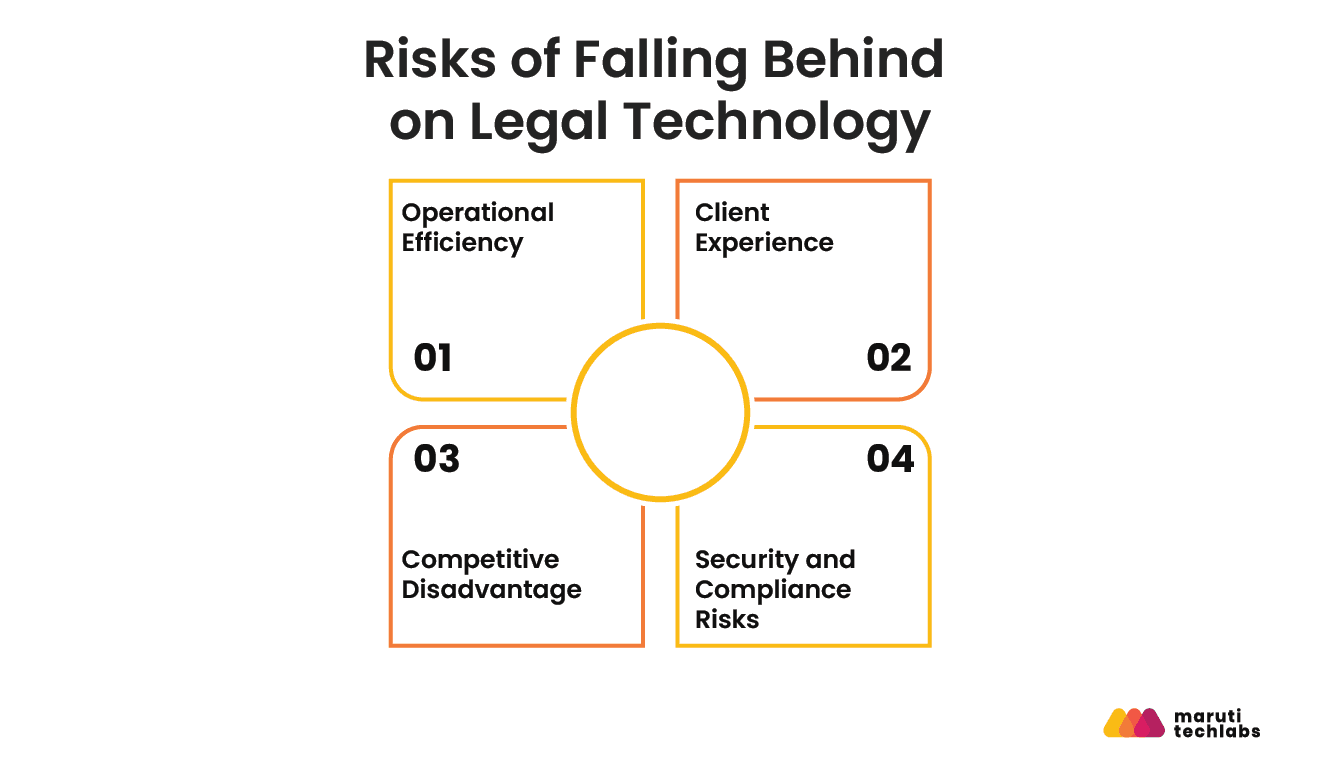
Operational Efficiency
When routine work still depends heavily on manual processes, attorneys and staff spend time on administrative tasks that technology could handle more efficiently. That limits the firm's capacity without necessarily increasing its output.
According to Wolters Kluwer's 2026 Future Ready Lawyer Survey, 62% of legal professionals report weekly time savings of 6–20% from technology adoption, averaging close to 10% of the workweek. For firms that have not modernized comparable workflows, that time can remain tied up in repetitive administrative work instead of billable, strategic, or client-facing activities.
Client Experience
Technology gaps are also visible to clients. Firms that rely heavily on email chains, phone calls, and manual document exchanges can make routine interactions feel slower and less convenient.
The ABA's 2023 Websites & Marketing TechReport found that only 35% of law firms offer clients access to a secure client portal. That leaves a clear gap between what clients may expect from digital services and what some firms currently provide.
Joshua Lenon, Lawyer in Residence at Clio, has also highlighted the convenience clients associate with portals, noting that firms have seen a steady rise in client portal use since the pandemic.
Competitive Disadvantage
Falling behind technologically can eventually become a business-development problem. Firms that cannot provide fast responses, digital case visibility, convenient document access, or transparent billing may appear less accessible than competitors that can.
The issue is not that every firm needs to adopt every new technology. It is whether outdated processes create friction that clients and prospective clients can avoid by choosing another firm.
Security and Compliance Risks
Security is where the consequences of outdated technology become more serious. Legal firms handle sensitive client information, financial records, contracts, and privileged communications, making weak security controls particularly costly.
According to IBM's 2025 Cost of a Data Breach Report, the global average cost of a data breach reached $4.44 million, while breaches at U.S. organizations averaged $10.22 million, the highest of any country in the report.
Modern legal practice management platforms can help address these risks through controls such as encryption, role-based access, authentication, and audit trails integrated into everyday workflows. Firms relying on fragmented or outdated systems may struggle to maintain consistent access controls, monitor activity, and demonstrate compliance.
Ultimately, the technology gap is not just an IT problem. It can affect how much work a firm can handle, how clients experience its services, how effectively it competes, and how well it protects sensitive information. That makes technology selection a business and workflow decision, not simply a software purchase.
Types of Legal Technology Software: What Does Your Firm Actually Need?
Legal tech isn't one category of software. It's six, and most firms end up running more than one at the same time. Knowing which category solves which problem is the first step toward narrowing a crowded market down to a shortlist.
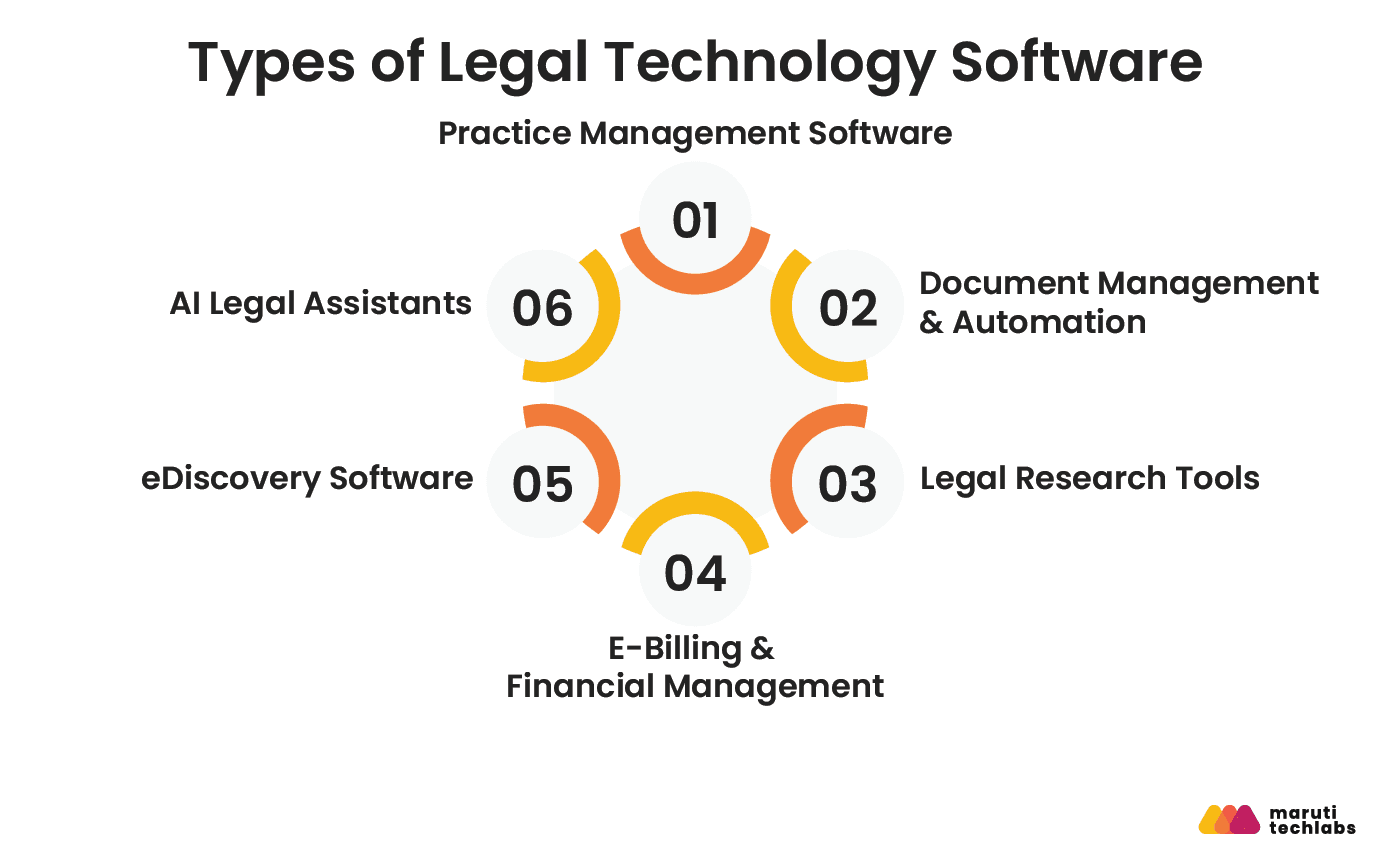
Practice Management Software
All-in-one platforms that handle case files, calendaring, billing, and client communication in a single system. This is the operational backbone most firms start with.
| Examples include Clio, MyCase, and Filevine. |
Document Management & Automation
Secure storage, version control, and automated drafting for the documents a firm produces every day. Firms with high document volume or complex matter files rely on this layer to keep everything organized and auditable.
| Examples include NetDocuments, iManage, and ContractPodAi. |
Legal Research Tools
Case law databases paired with AI-assisted search, used to build arguments and check precedent. Every practicing attorney touches this category in some form.
| Examples include Westlaw, LexisNexis, and Fastcase. |
E-Billing & Financial Management
Time tracking, invoicing, and collections, often built to LEDES (Legal Electronic Data Exchange Standard) billing standards that insurance defense and corporate clients require. Firms with heavy hourly billing or insurance-defense work lean on this category most.
| Examples include Tabs3, TimeSolv, and Bill4Time. |
eDiscovery Software
Document review and production tools built for litigation, handling the volume and defensibility requirements that general practice management software can't. Litigation-heavy firms and firms handling investigations or public records requests need this category specifically.
| Examples include Relativity, Everlaw, and Logikcull (now part of Reveal) |
AI Legal Assistants
Drafting, research summarization, and contract analysis powered by generative AI, layered on top of (not replacing) a firm's core research and practice management stack.
| Examples include Harvey, Thomson Reuters CoCounsel, and Lexis+ with Protégé, the platform LexisNexis renamed from Lexis+ AI in February 2026. |
What Are the Must-Have Features in Legal Practice Management Software?
The must-have features include matter and document management, billing and time tracking, deadline management, conflict checking, and secure client communication.
Growing firms may also need AI-assisted workflows, reporting, integrations, mobile access, and multi-office support.
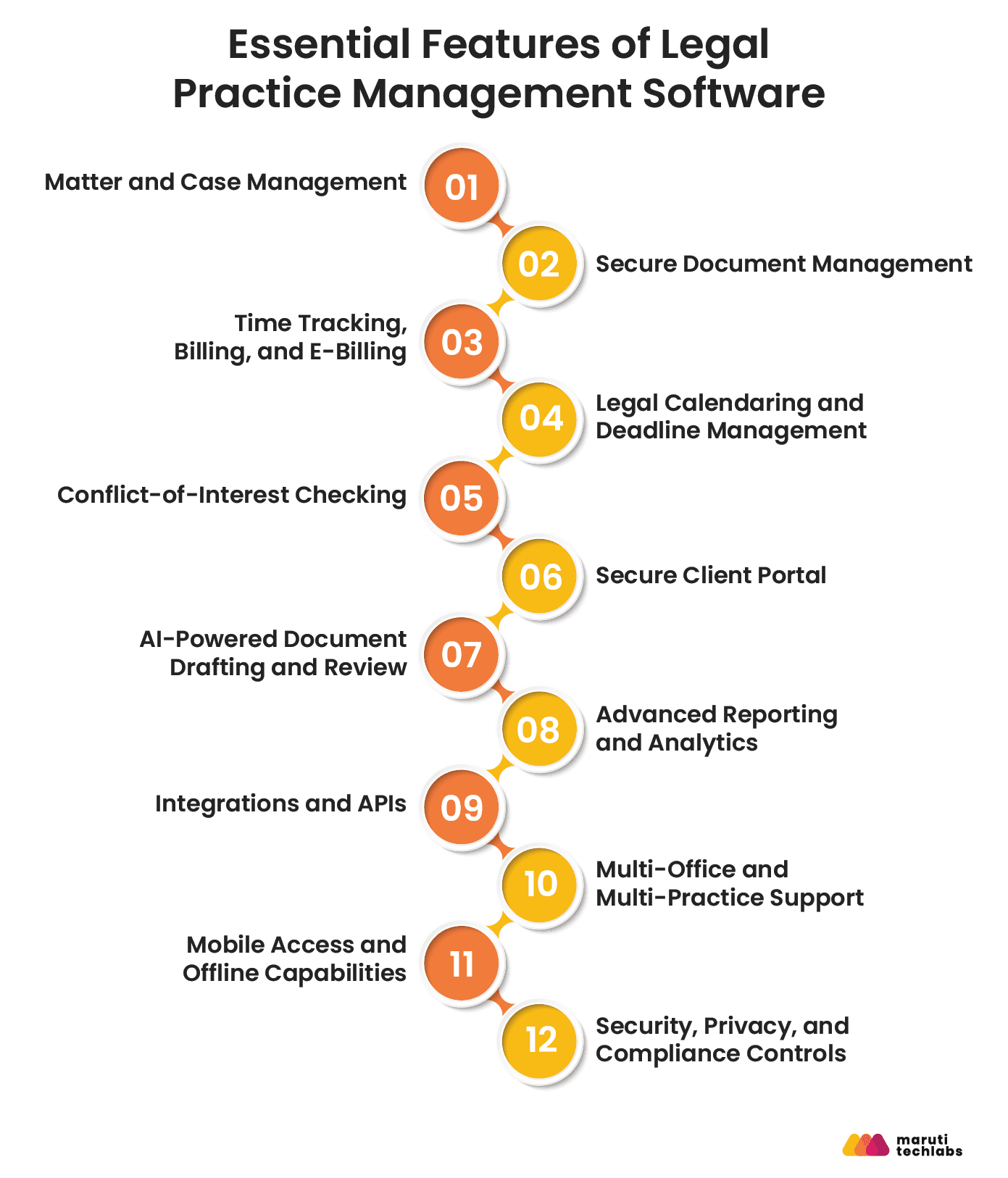
The right feature set depends on the firm's size, workflows, practice areas, and operational complexity, not the number of features a vendor offers. Let’s look at some non-negotiable features for every law firm.
1. Matter and Case Management
Matter management should provide a single source of truth for every client and case. At a minimum, the system should centralize matter details, contacts, tasks, notes, communications, documents, deadlines, and billing information.
Look for:
- Centralized matter and client records
- Custom fields for practice-specific information
- Task assignment and status tracking
- Matter timelines and activity histories
- Role-based access permissions
- Search across matters, documents, and client information
The goal is not simply to store case information. A good practice management platform should connect the information surrounding a matter so attorneys and staff can understand its status without searching across email, spreadsheets, shared drives, and separate applications.
For example, Clio Manage connects case information with contacts, documents, calendar events, notes, time entries, and billing within the matter.
What to verify during a demo: Can your team reproduce a typical matter workflow inside the platform without relying on spreadsheets or manual workarounds?
2. Secure Document Management
Legal practices handle contracts, pleadings, evidence, correspondence, discovery material, and confidential client records. Document management therefore needs more than basic cloud storage.
The software should support:
- Centralized document storage
- Version history
- Access and permission controls
- Document search
- Secure sharing
- Audit trails
- Backup and recovery capabilities
Version control is particularly important when multiple attorneys or staff members work on the same matter. The system should make it clear which document is current, who changed it, and when the change occurred.
For example, Clio's document management capabilities include permission controls and version history for files stored within its platform.
For firms operating across jurisdictions, document-management requirements may also need to account for data residency, privacy regulations, client contractual requirements, and sector-specific obligations.
3. Time Tracking, Billing, and E-Billing
Billing functionality should connect billable activity to the appropriate matter without forcing attorneys and staff to reconstruct their work at the end of the day or month.
Core capabilities should include:
- Billable and non-billable time tracking
- Expense tracking
- Multiple billing rates
- Custom billing arrangements
- Automated invoice generation
- Online payments
- Trust or client-account workflows where applicable
- E-billing support for clients with structured billing requirements
For firms serving corporate clients, LEDES billing can also be an important requirement. It should be evaluated based on the firm's client base rather than assumed to be necessary for every practice.
Clio, for example, currently supports time and expense tracking, LEDES billing, split billing, alternative fee arrangements, payment plans, and online payments.
What to verify: Ask the vendor to demonstrate the complete workflow from time capture to invoice generation, approval, delivery, payment, and financial reporting.
4. Legal Calendaring and Deadline Management
Deadline management is a core risk-control function, not simply a scheduling feature.
Legal practice management software should allow firms to:
- Track matter-specific deadlines
- Manage court dates and appointments
- Set automated reminders
- Assign deadline-related tasks
- Calculate dates based on applicable court rules where supported
- Maintain an auditable history of deadline changes
This capability becomes particularly important for litigation practices, where missed deadlines can have serious consequences.
Some platforms now incorporate jurisdiction-specific court-rule calculations. Clio, for example, states that its calendaring functionality can automatically calculate related court events based on selected court rules and jurisdictions.
However, firms should not assume that a vendor's "automated deadline" feature covers every jurisdiction or matter type. Ask which courts, jurisdictions, holidays, and rule sets are actually supported.
5. Conflict-of-Interest Checking
Conflict checking should be part of the firm's intake and matter-opening process rather than an isolated administrative exercise.
Look for the ability to search across:
- Current and former clients
- Related parties
- Opposing parties
- Attorneys and organizations
- Historical matters
- Custom conflict fields
The system should also provide appropriate permissions and an audit trail so firms can document how conflicts were identified and handled.
For larger firms, conflict checking becomes more complex because the relevant information may span multiple offices, practice groups, and historical matters. Integration with existing conflict databases may therefore be more important than simply having a built-in search function.
6. Secure Client Portal
A secure client portal gives clients a controlled channel for communication, document exchange, case updates, invoices, and payments without forcing attorneys to manage sensitive information through fragmented email threads.
A useful client portal should support:
- Secure document sharing
- Client messaging
- Case updates
- Appointment or deadline information
- Invoice and payment access
- Mobile access
- Communication history
MyCase, for example, provides a client portal for case updates, invoices, account statements, document sharing, and payments.
This is more than a convenience feature. Centralizing client communication can reduce information fragmentation and give firms a clearer record of interactions.
What Advanced Features Do Growing Law Firms Need?
Once the core operational requirements are covered, growing firms should evaluate capabilities that improve scalability, automation, analytics, and integration.
7. AI-Powered Document Drafting and Review
AI can reduce manual work involved in drafting, reviewing, summarizing, and extracting information from legal documents. But AI should be evaluated as an augmentation layer, not as a substitute for attorney judgment.
Potential use cases include:
- Document summarization
- Contract review
- Clause extraction
- Draft generation
- Matter chronology creation
- Information extraction
- Research assistance
The evaluation should go beyond asking whether a platform "has AI." Firms should ask what models and data sources it uses, whether it uses customer data for model training, how it handles prompts and outputs, what human-review controls exist, and how it addresses confidentiality and security.
The ABA's 2024 Legal Technology Survey found that AI adoption was still uneven across firms, reinforcing the need to evaluate AI against an actual workflow rather than treating it as a mandatory checkbox.
8. Advanced Reporting and Analytics
As a firm grows, operational data becomes useful for more than record-keeping.
Advanced reporting can help leadership monitor:
- Billable hours
- Realization and collection rates
- Matter profitability
- Workload by attorney or practice group
- Case volume
- Client acquisition and conversion
- Accounts receivable
- Operational bottlenecks
Custom dashboards become particularly valuable when partners and operations teams need visibility across multiple practice areas or offices.
9. Integrations and APIs
A practice management platform should not become another isolated system.
Evaluate whether it integrates with the tools your firm already depends on, including:
- Accounting software
- Email and calendars
- Document management systems
- E-signature platforms
- Payment providers
- CRM and intake tools
- Legal research platforms
- Court and e-filing systems
- Business intelligence tools
An API is especially important for larger firms with custom workflows or internal applications.
Clio currently advertises more than 250 app integrations, while MyCase provides integrations across accounting, communications, intake, and other workflow categories.
The key question is not "How many integrations does the vendor have?" It is “Can this platform exchange the specific data our workflows require without creating duplicate entries?”
10. Multi-Office and Multi-Practice Support
Growing firms may need centralized administration while allowing different practice groups or offices to operate according to their own workflows.
Relevant capabilities include:
- Multiple offices and locations
- Practice-specific workflows
- Role-based permissions
- Centralized reporting
- Multiple billing structures
- Shared templates
- Segmented data access
- Cross-office collaboration
This should be evaluated before a firm outgrows its initial platform. Migrating systems after years of accumulated matter and billing data can be significantly more disruptive than selecting for scalability upfront.
11. Mobile Access and Offline Capabilities
Mobile access matters when attorneys work from courtrooms, client offices, hearings, travel locations, or home.
A useful mobile experience should let users access relevant matters, review documents, communicate with clients, track time, manage tasks, and view schedules without a desktop environment.
Offline functionality is more specialized. Firms should evaluate it based on actual working conditions rather than treating it as a universal requirement.
12. Security, Privacy, and Compliance Controls
Evaluate security across the entire platform rather than reducing it to a single certification badge.
At minimum, firms should investigate:
- Encryption in transit and at rest
- Multi-factor authentication
- Role-based access controls
- Audit logging
- Backup and disaster recovery
- Vulnerability management
- Incident response procedures
- Data retention and deletion policies
- Data export capabilities
- Independent security audits or certifications
- Data-processing and privacy terms
SOC 2 Type II can provide useful assurance about a vendor's controls, but certification alone does not establish that a platform is appropriate for a particular law firm. Firms should review the scope of the audit, applicable controls, contractual commitments, and the vendor's incident-response and data-handling practices.
For example, Filevine's current security documentation states that its information-security program undergoes an annual SOC 2 Type II audit and references additional ISO control frameworks.
Cloud adoption itself is no longer unusual in legal practice. For firms serving clients across jurisdictions, security evaluation should also consider applicable privacy and data-residency requirements. A US law firm, an EU-facing legal team, and a healthcare-focused practice may have materially different compliance requirements.
A Practical Feature Priority Matrix
The easiest way to evaluate legal practice management software is to separate essential capabilities from growth capabilities.
| Feature | Solo & Small Firms | Mid-Size Firms | Large/Enterprise Firms |
| Matter/case management | Essential | Essential | Essential |
| Document management | Essential | Essential | Essential |
| Time tracking & billing | Essential | Essential | Essential |
| Deadline management | Essential | Essential | Essential |
| Conflict checking | Essential | Essential | Essential |
Secure client portal | Essential | Essential | Essential |
| Integrations/API | Important | Essential | Essential |
| Advanced reporting | Useful | Important | Essential |
| AI-assisted workflows | Optional | Important | Use-case dependent |
| Multi-office support | Optional | Important | Essential |
| Advanced security controls | Essential | Essential | Essential |
| Mobile access | Useful | Important | Important |
| Offline access | Use-case dependent | Use-case dependent | Use-case dependent |
The right platform is therefore not the one with the most features. It is the one that covers the firm's mandatory workflows securely, integrates with the systems already in use, and provides enough headroom for the firm's next stage of growth.
Before moving to pricing or vendor comparisons, firms should turn this feature list into a weighted evaluation scorecard. Assign higher scores to capabilities tied directly to revenue, compliance, client service, and operational risk, then use the same scorecard for every vendor demonstration. This makes the selection process more objective and prevents impressive but low-value features from dominating the decision.
What Are the Top Legal Practice Management Software Platforms in 2026?
The best legal practice management software depends on your firm's size, practice areas, workflow complexity, billing requirements, and integration needs. Clio, MyCase, Filevine, CARET Legal, and PracticePanther are five established platforms worth evaluating, but they are designed around different priorities.
For example, Clio emphasizes broad practice management and integrations, MyCase combines case management with billing, client communication, and automation, Filevine is geared toward complex legal workflows and larger teams, CARET Legal combines practice management with document management and accounting; while PracticePanther places strong emphasis on billing, payments, accounting, and financial workflows.
The right choice is therefore not the platform with the longest feature list. It is the one that best fits your firm's workflows and can scale without creating unnecessary operational complexity.
Legal Practice Management Software Comparison
| Platform | Best for | Pricing* | Key strengths | Key consideration |
| Clio | Small to mid-size firms seeking broad practice management and integrations | Starts at $49/user/month | Case management, billing, client portal, calendaring, large integration ecosystem | Advanced requirements may require higher-tier plans or additional products |
| MyCase | Small and growing firms wanting an integrated practice and billing platform | $50-$130/user/month annually | Case management, billing, client portal, automation, legal AI, integrations | Advanced capabilities sit in higher-priced tiers |
| Filevine | Mid-size and larger firms managing complex legal workflows | Custom pricing | Matter management, document management, workflow automation, legal AI | Pricing and configuration require a vendor consultation |
| CARET Legal | Small to mid-size firms needing practice management plus billing, accounting, and document management | Starts at $79/user/month annually for Enterprise | Practice management, document management, billing, accounting, analytics, integrations | One-time implementation fees apply |
| PracticePanther | Firms prioritizing billing, payments, and financial management | $49-$114/user/month | Billing, payments, client portal, time tracking, accounting, workflows | Advanced accounting capabilities require the higher Business Pro tier |
*Pricing reflects publicly available vendor pricing checked in September 2026. Prices, plans, features, taxes, implementation fees, and regional availability can change. Verify pricing directly with the vendor before making a purchasing decision.
1. Clio: Best for Broad Practice Management and Integrations
Clio is a strong option for firms that want a mature practice management platform with broad integration capabilities.
Its practice management offering covers core workflows such as case and matter management, document management, calendaring, time tracking, billing, payments, and client communication. Clio also has a large integration ecosystem, which can be important for firms that want to connect their practice management platform with accounting, CRM, productivity, document, and other legal applications.
Clio's current pricing starts at $49 per user per month, with higher-tier options available. The vendor also offers a free trial and states that its plans include support, training, and data migration assistance.
Best for: Small to mid-size firms that want a broad practice management foundation and flexibility to connect other tools.
Standout capability: A broad ecosystem around the core practice management platform.
Potential limitation: Firms with highly specialized enterprise workflows should evaluate whether the standard platform and available integrations can accommodate their processes without extensive customization.
2. MyCase: Best for Small and Growing Firms
MyCase combines case and contact management, time tracking, invoicing, trust accounting, document storage, client communication, and reporting in a single platform.
Its current pricing is more nuanced than the figures in the SEO brief. When billed annually, MyCase lists Basic at $50/user/month, Pro at $100/user/month, and Advanced at $130/user/month. Monthly pricing is $60, $120, and $150 respectively. The platform offers a 10-day free trial with no credit card required.
The higher tiers add capabilities such as automated workflows, client intake, legal CRM functionality, two-way texting, eSignature, expanded reporting, AI-powered assistance, additional integrations, conflict-check tracking, split billing, and an open API.
Best for: Solo practitioners and small to growing firms that want case management, billing, client communication, and automation in one system.
Standout capability: Strong combination of practice management, billing, client communication, and workflow automation.
Potential limitation: Firms needing advanced functionality may need to move into the significantly more expensive Pro or Advanced tiers.
3. Filevine: Best for Complex Legal Workflows
Filevine takes a different approach from simple, transparent SaaS pricing models. Its platform is built around configurable legal workflows and matter management, making it particularly relevant for firms handling complex or high-volume legal work.
The platform combines matter management, document management, document assembly, billing, payments, workflow capabilities, and AI-powered tools. Filevine's current product documentation describes the platform as an AI-powered SaaS platform with core legal operations tools and metered access to selected AI capabilities.
Its current public pricing page does not provide a standard per-user price for the core platform. Instead, Filevine states that packages are customized according to the organization's requirements and directs prospective customers to request a tailored proposal.
That makes the SEO team's previously suggested "$55-$115/user/month" range unsuitable for publication as a current pricing claim.
Best for: Mid-size and larger firms with complex workflows, high matter volumes, or significant customization requirements.
Standout capability: Configurable legal workflows combined with matter-centric AI and operations tools.
Potential limitation: Custom pricing makes direct cost comparison harder, and implementation may require more planning than a straightforward out-of-the-box deployment.
4. CARET Legal: Best for Integrated Practice Management, Billing, and Accounting
CARET Legal combines practice management with document management, billing, accounting, calendaring, reporting, client communication, and integrations.
CARET Legal currently lists its Enterprise plan at $79 per user per month when billed annually, with one-time implementation fees. The vendor states that its plans include support and training.
Its feature set includes case and matter management, document management, billing, accounting, time tracking, reporting and analytics, client communication, data security, integrations, and a mobile application.
CARET Legal can therefore be particularly relevant to firms that want to reduce the number of disconnected systems used to manage legal work and financial operations.
Best for: Small and mid-size firms that want practice management tightly connected to billing, accounting, and document workflows.
Standout capability: Broad operational coverage across legal work and firm administration.
Potential limitation: Implementation costs and onboarding requirements should be included in the total cost of ownership calculation.
5. PracticePanther: Best for Billing, Payments, and Financial Workflows
PracticePanther is a legal practice management platform with particularly strong billing, payment, and accounting capabilities.
Its current plans range from $49/user/month for Solo to $114/user/month for Business Pro. PracticePanther also offers a 7-day trial without requiring a credit card.
Core functionality across the plans includes contact and matter management, billable time and expense tracking, a secure client portal, unlimited data storage, and mobile applications. Higher tiers add features such as custom fields, custom security roles, intake forms, eSignature, LEDES billing, and attorney revenue reporting. Business Pro adds PantherAccounting Plus for trust accounting, operating accounting, reconciliation, and financial management.
Best for: Firms that place a high priority on billing, payments, trust accounting, and financial workflows.
Standout capability: Deep integration between practice management and financial operations.
Potential limitation: Firms primarily looking for sophisticated matter workflows or highly complex enterprise configurations should compare its capabilities carefully against platforms such as Filevine.
Which Legal Practice Management Software Is Right for Your Firm
A useful way to narrow the options is to start with your firm's operating model rather than the vendor's feature list.
- Solo attorneys: Look for straightforward case management, billing, calendaring, document storage, and client communication. Clio, MyCase, and PracticePanther are worth evaluating.
- Small firms: Prioritize ease of adoption, billing, client portals, integrations, and workflow automation. Clio, MyCase, CARET Legal, and PracticePanther can all fit this profile depending on requirements.
- Mid-size firms: Focus more heavily on customization, reporting, integrations, permissions, document management, and scalability. Clio, CARET Legal, and Filevine are strong candidates to compare.
- Larger or complex firms: Evaluate workflow configurability, security, APIs, data governance, reporting, implementation support, and integration architecture. Filevine may be particularly relevant, while enterprise-level evaluations of other platforms should be based on specific requirements rather than firm size alone.
The most important distinction is between buying software to manage today's workload and selecting a platform that can support the firm's operating model three to five years from now.
Before signing a contract, compare each shortlisted platform against the same requirements: core matter workflows, integrations, security controls, data migration, billing, client communication, reporting, implementation support, and total cost of ownership.
And do not evaluate the software in isolation. A platform may have every feature your firm needs and still deliver poor ROI if it does not integrate with your existing systems or if attorneys and staff struggle to adopt it.
| Editorial note: This comparison is not a sponsored ranking. The platforms are presented based on publicly available product and pricing information and their fit for different law-firm operating requirements. Pricing and product capabilities can change, so firms should verify current commercial terms directly with vendors before purchasing. |
9 Steps to Choose the Right Legal Practice Management Software
The right legal practice management software should fit your firm's workflows, scale with its needs, integrate with the systems you already use, and justify its cost through measurable operational improvements. Choosing it requires more than comparing feature lists. Use these nine steps to evaluate the software against your firm's actual requirements.
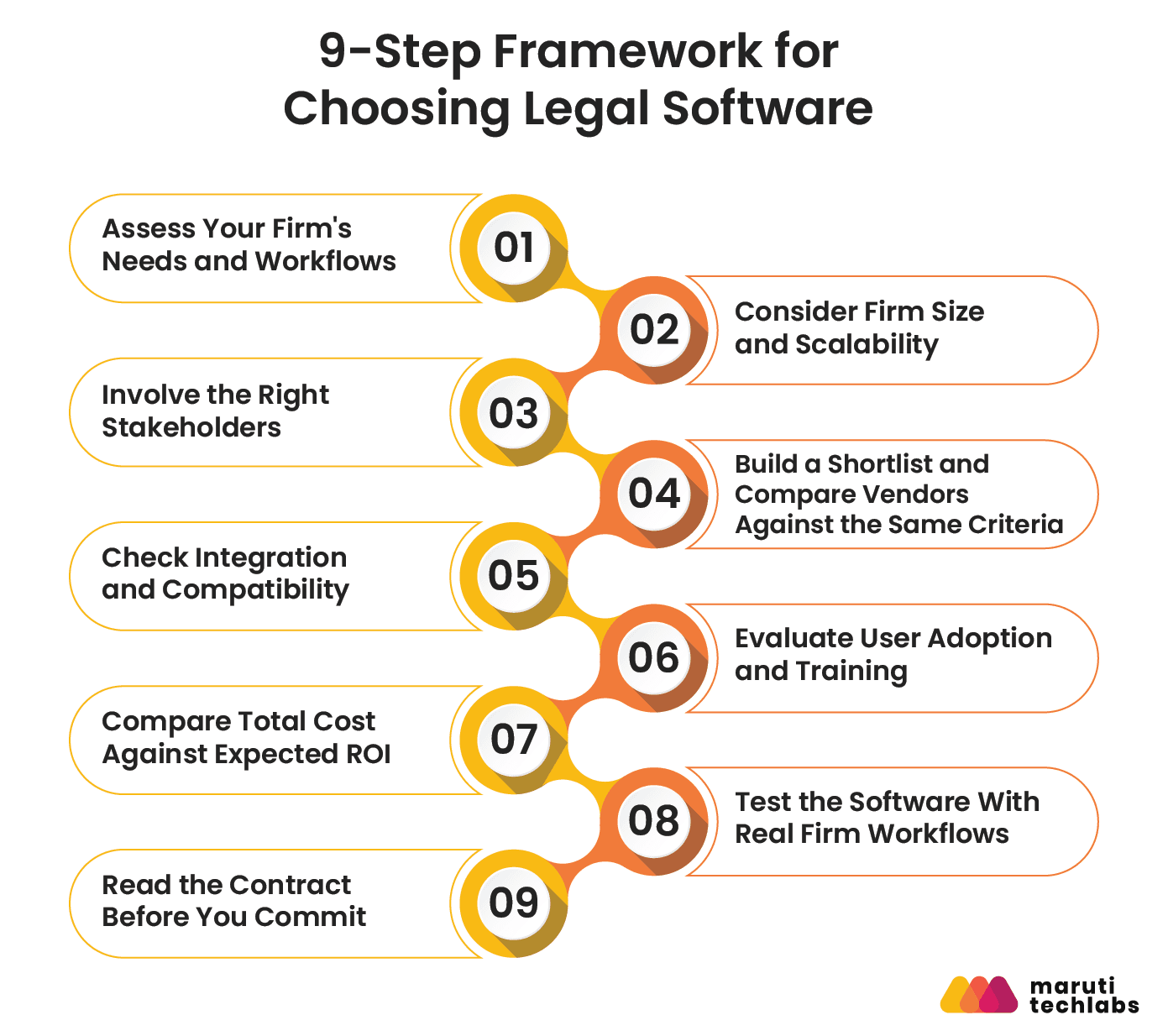
1. Assess Your Firm's Needs and Workflows
Start with the problems you want the software to solve, not with the software itself.
Map the workflows that consume the most administrative time or create the most operational risk. For example:
- How are new matters opened and assigned?
- Where are case documents stored and how are they retrieved?
- How are deadlines, court dates, and tasks tracked?
- How are time entries, invoices, trust accounting, and payments managed?
- How do attorneys communicate with clients?
- Which processes still depend on spreadsheets, email chains, or manual data entry?
- Where do errors or duplicate work occur most often?
Separate must-have requirements from features that would simply be useful. A litigation firm may prioritize matter management, deadlines, document organization, and eDiscovery integrations, while a transactional practice may place greater weight on document automation, collaboration, and billing workflows.
The goal is to create a requirements list that can later be used to score every platform consistently.
2. Consider Firm Size and Scalability
Firm size affects more than the number of user licenses. It changes the level of customization, administration, security, integration, and reporting you may need.
A practical starting point is:
| Firm profile | Priorities when evaluating software |
| Solo attorney | Ease of use, affordability, matter management, billing, calendaring |
| Small firm (2–10 attorneys) | Client portal, billing, collaboration, integrations, simple administration |
| Mid-size firm (10–50 attorneys) | Custom workflows, reporting, multi-practice support, permissions, integrations |
| Large or complex firm (50+ attorneys) | Enterprise security, SSO, APIs, advanced reporting, governance, scalability |
Do not assume that buying enterprise software is automatically safer for a growing firm. The better question is whether the platform can support your next stage of growth without forcing a costly migration.
3. Involve the Right Stakeholders
Legal software affects more people than the person making the purchase decision.
Create an evaluation group that represents the workflows the system will actually support. Depending on the firm, this could include:
- Managing partners
- Practicing attorneys
- Paralegals and legal assistants
- Finance or billing teams
- IT or security teams
- Legal operations
- Firm administrators
Each stakeholder should evaluate the platform from a different perspective. Attorneys may care about speed and usability, finance may focus on billing and accounting, while IT may prioritize authentication, data protection, integrations, and administrative controls.
This also exposes conflicting requirements early, before they become implementation problems.
4. Build a Shortlist and Compare Vendors Against the Same Criteria
Once your requirements are documented, narrow the market to a manageable shortlist.
Do not compare vendors based on marketing claims alone. Create a weighted evaluation matrix covering areas such as:
| Evaluation area | Example questions |
| Core workflows | Does it support our matter and case workflows? |
| Usability | Can attorneys complete common tasks without extensive training? |
| Billing | Does it support our billing models, payments, and accounting requirements? |
| Documents | Can users securely store, search, generate, and collaborate on documents? |
| Integrations | Does it connect with our existing systems? |
| Security | Does the vendor provide appropriate security controls and documentation? |
| Scalability | Can the platform support additional users, offices, matters, and workflows? |
| Support | What implementation and ongoing support is included? |
| Cost | What is the total cost, including add-ons and implementation? |
The objective is not to find the platform with the most features. It is to find the platform that performs best against the requirements that actually matter to your firm.
5. Check Integration and Compatibility
A practice management platform rarely operates in isolation.
Before signing a contract, confirm how the software connects with the systems your firm already depends on, including:
- Accounting and financial systems
- Microsoft 365 or Google Workspace
- Document storage platforms
- Email and calendars
- Legal research tools
- Court e-filing systems
- Payment processors
- eSignature platforms
- CRM or intake systems
- Identity and authentication providers
Ask vendors for an integration map, not simply a list of integrations.
An integration listed on a vendor's website may be a native connection, a third-party connector, an API-based integration, or a limited data export. Those differences can materially affect implementation effort and ongoing maintenance.
For larger firms, also evaluate API availability, webhooks, SSO, role-based access controls, and the ability to connect the platform to internal applications.
6. Evaluate User Adoption and Training
A technically capable platform can still fail if attorneys and staff avoid using it.
Ask vendors:
- What does implementation involve?
- Who configures workflows and permissions?
- Is data migration included?
- What training is provided?
- Is training role-specific?
- Is ongoing support available?
- How quickly can new employees become productive?
- Can administrators make changes without vendor intervention?
Pay particular attention to the workflows users perform every day. If creating a matter, finding a document, recording time, or sending an invoice requires too many steps, adoption will suffer.
The ABA's 2024 Technology and Training report reinforces the importance of usability and training. Around 89% of respondents reported feeling comfortable using their firm's available technology, but the report also highlights training as an important part of effective technology use.
7. Compare Total Cost Against Expected ROI
Do not evaluate legal software based only on its subscription price.
Calculate the total cost of ownership, including:
- User licenses
- Premium features or add-ons
- Implementation
- Data migration
- Integrations
- Training
- Support
- Additional storage
- Payment processing
- Future user growth
Then compare that cost with measurable operational gains.
A simple starting formula is:
Monthly ROI = Value of time saved + value of additional capacity or revenue − monthly software cost
For example, if a firm saves 20 hours per month and those hours are valued at $250 each:
20 × $250 = $5,000 in monthly time value
If the software costs $300 per month, the direct monthly value before other benefits is:
$5,000 − $300 = $4,700
This is only a simplified model. A stronger business case can also include reduced administrative work, fewer billing errors, faster collections, reduced software duplication, and increased matter capacity.
The key is to measure the outcomes that matter to your firm rather than treating "more features" as ROI.
8. Test the Software With Real Firm Workflows
Do not make the final decision from a generic product demo.
Use a trial or proof-of-concept to reproduce several real workflows from your firm. For example:
- Create a new matter.
- Assign users and permissions.
- Upload and organize case documents.
- Search for information.
- Create a task and deadline.
- Record time and expenses.
- Generate an invoice.
- Send a client communication.
- Complete the workflow from a mobile device if mobile access matters.
Use realistic, non-sensitive sample data wherever possible.
Also test the failure points. What happens when a user makes a mistake? Can an administrator restore data? Can permissions be changed easily? Can information be exported? How much manual work is required to correct an error?
A successful demo proves that the software can perform. A successful evaluation proves that your firm can operate with it.
9. Read the Contract Before You Commit
The final evaluation should cover the contract, not just the product.
Pay particular attention to:
1. Renewal and cancellation terms
Check automatic renewal provisions, notice periods, price increases, and termination conditions.
2. Data ownership and portability
Confirm that your firm can retrieve its matter data and documents in a usable format if it leaves the platform. Understand what happens to backups and retained data after termination.
3. Liability and security provisions
Review limitations of liability, breach notification obligations, security commitments, indemnification, and responsibilities when a security incident occurs.
Also clarify who owns data created within the platform, how long the vendor retains it, where it is stored, and whether subcontractors or third-party service providers can access it.
For a law firm, these are not merely procurement details. They affect confidentiality, business continuity, and the firm's ability to meet its own ethical obligations to clients.
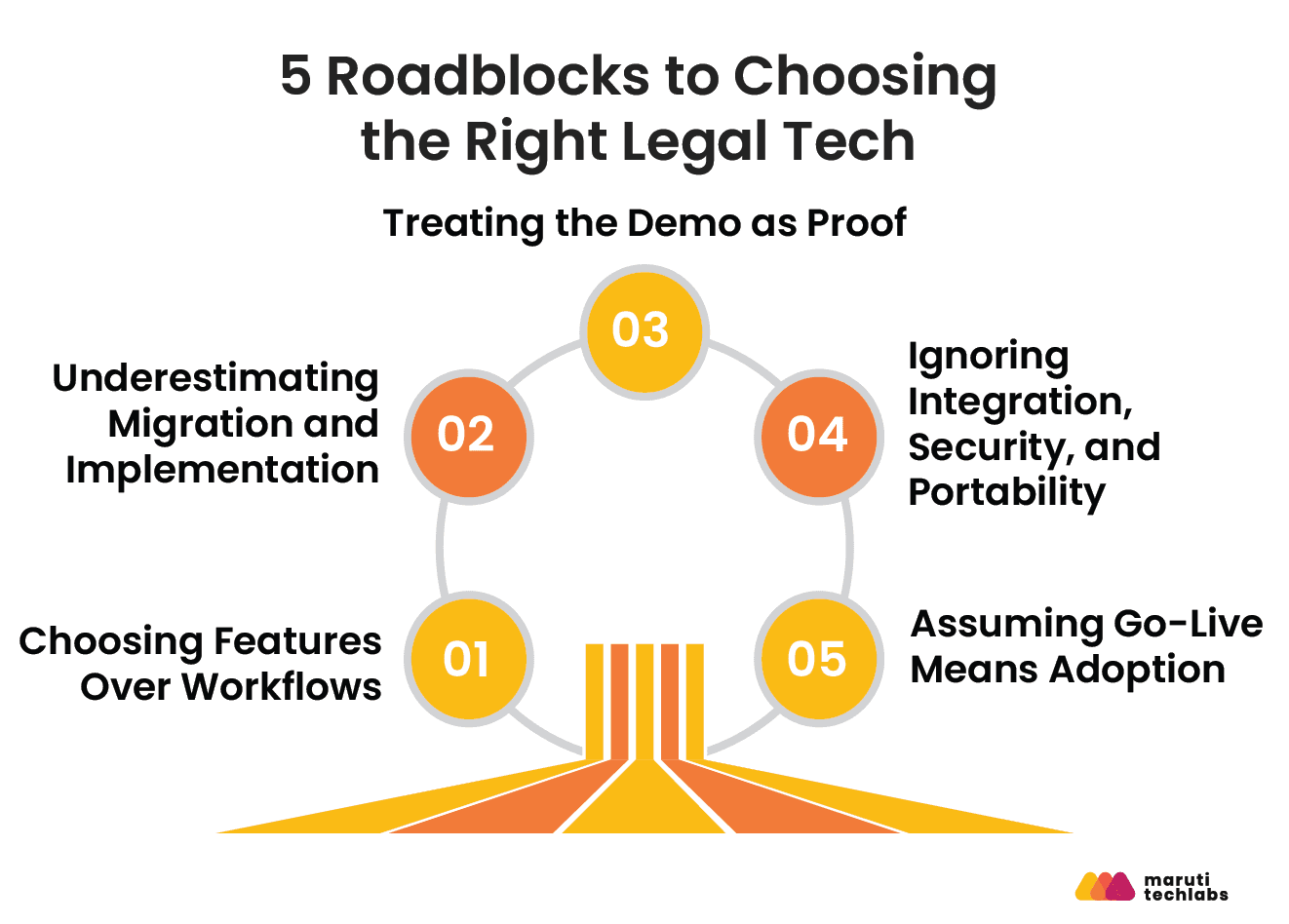
5 Common Mistakes Law Firms Make When Choosing Legal Tech
Choosing legal technology based on features alone can create more operational problems than it solves. The bigger risk is treating software as a product purchase rather than a change to how legal work gets done.
1. Choosing Features Over Workflows
A long feature list does not guarantee operational fit. Map your firm's 5–10 critical workflows and ask vendors to demonstrate them using realistic scenarios. Test whether the platform actually reduces manual steps across matters, billing, documents, and deadlines.
2. Underestimating Migration and Implementation
Migration involves more than importing contacts. Matters may include documents, emails, billing records, permissions, templates, and custom fields. Clarify what can be migrated, who owns the process, how data is validated, and what implementation support is included.
3. Treating the Demo as Proof
A polished demo shows ideal conditions, not necessarily your workflows. Test representative use cases or run a proof of concept with realistic sample data. Evaluate usability, configuration, error handling, and performance.
4. Ignoring Integration, Security, and Portability
Assess integrations with email, accounting, document management, eSignature, identity, and client-facing systems. Also evaluate encryption, access controls, incident response, subprocessors, and independent security assessments. Confirm how easily your data can be exported if you change platforms.
5. Assuming Go-Live Means Adoption
Deployment is only the beginning. Assign ownership, provide role-specific training, monitor usage, gather feedback, and refine workflows. A system delivers value only when teams consistently use it.
The Practical Test: Questions to Ask Before Choosing Legal Tech
Before selecting a legal technology platform, ask five questions:
| Question | What it reveals |
| Does it solve our highest-priority workflow problems? | Product fit |
| Can we migrate our existing data without unacceptable loss or complexity? | Implementation risk |
| Can our team use it without excessive training or workarounds? | Adoption risk |
| Does it integrate securely with our existing technology stack? | Technical & security risk |
| Can we export our data and exit without major disruption? | Vendor lock-in risk |
If a platform performs well across those five areas, its feature list matters far less. If it fails on one, an impressive demo or a lower subscription price may not offset the operational risk.
Choose for the Practice You’re Building
The right legal practice management software is not the one with the longest feature list. It is the one that fits your workflows, reduces implementation friction, and can scale with the practice.
Before choosing, focus on three questions:
- Does it fit how your firm actually works? Map core workflows before comparing features.
- What will implementation really involve? Assess migration, integrations, training, security, adoption, and data portability.
- Will it support where the firm is going? Look beyond current needs to APIs, scalability, permissions, reporting, and future automation.
The goal is not simply to select software. It is to choose a technology foundation your firm can build on.
For firms that need more than an off-the-shelf product, the evaluation should also consider the custom vs. off-the-shelf approach based on their workflows, integrations, and long-term requirements.
A legal technology partner can help assess existing workflows, integrate systems, modernize legacy applications, build custom legal software, and introduce AI or automation where it solves a clearly defined business problem.
That is where Maruti Techlabs can support law firms as a broader legal-tech consulting and engineering partner, from technology strategy and software product engineering to custom AI solutions, integrations, workflow automation, and modernization.
Frequently Asked Questions
1) What is legal practice management software?
Legal practice management software is an all-in-one platform that helps law firms manage cases, clients, documents, billing, calendaring, and compliance from a single system. Leading platforms include Clio, MyCase, and Filevine.
2) How much does legal practice management software cost?
Legal practice management software typically costs $49 to $150 per user per month, billed annually. Solo attorney plans start around $39 per month, while full enterprise plans with AI features can exceed $200 per user per month. Most vendors offer a free trial ranging from 7 to 30 days.
3) What is the difference between practice management and case management software?
Case management software focuses specifically on organizing and tracking active matters, including deadlines, tasks, and documents. Practice management software is broader, adding billing, accounting, client intake, reporting, and in some cases e-filing and CRM capabilities.
4) What are the most important features to look for in legal software?
The non-negotiable features are secure document storage, time and billing tracking, calendaring with conflict checks, client communication tools, trust accounting, and mobile access. Advanced features like AI-assisted drafting and predictive analytics matter more for firms handling high case volume.
5) How long does it take to implement legal practice management software?
Implementation typically takes 4 to 12 weeks depending on firm size and data migration complexity. Solo firms can be live in 1 to 2 weeks, while mid-size firms with historical data migration typically need 6 to 10 weeks. Vendors usually provide a dedicated implementation specialist for the first 30 to 60 days.
6) Is cloud-based legal software safe?
Yes, when the vendor meets industry security standards. Look for SOC 2 Type II certification, end-to-end encryption, and compliance with state bar association guidance on cloud storage and client confidentiality. Most major legal practice management vendors, including the platforms compared above, meet these standards.
7) Can small law firms afford legal practice management software?
Yes. Most major platforms offer plans starting at $39 to $49 per user per month. For a two-attorney firm, that comes out to $78 to $98 per month, an amount typically offset within the first one to two hours of billed time saved per month through automation. Many platforms also offer a free tier or extended trial for solo practitioners.
How Maruti Techlabs Cut Legal Research Time by 60% for a National Law Firm?
The client is a national law firm with 475 attorneys and government relations professionals spread across 17 offices, serving more than 40% of the Fortune 500. Their research workflow was fragmented across disconnected tools and sources, forcing teams to piece together answers manually for every complex query.
This fragmentation created compounding problems, with attorneys spending extensive time manually searching and validating results, existing AI tools lacking the depth needed for nuanced legal research, missing citations undermining trust in AI-generated outputs, and research volume growing faster than the firm's capacity to maintain consistent quality.
Maruti Techlabs built a customized, agentic AI-powered deep research engine capable of handling complex, multi-step legal queries autonomously, gathering information from integrated real-time sources and synthesizing structured insights with minimal human intervention.
The platform was designed to understand legal context across cases, jurisdictions, and regulations, with a validation and traceability layer ensuring every insight is source-verifiable. It runs on a centralized platform built to scale across offices and teams rather than staying siloed within one location.
The impact:
- 60% reduction in legal research time
- 3x improvement in insight accuracy
- 40% increase in team productivity
- Reduced manual verification effort across research teams
- The firm continues to expand adoption of the platform across additional offices
Our AI engineering team builds custom legal AI solutions, from research automation to document intelligence, designed around your firm's existing workflows.


