Why Progressive Web App is the future of web development?
Introduction
What is a PWA?
A Progressive Web App (PWA) is a web application built with standard web technologies that delivers app-like experiences, including offline access, installability, push notifications, and improved performance across devices.
PWAs are increasingly relevant as businesses prioritize engagement, performance, and cost efficiency. Modern users expect fast-loading, mobile-first experiences; slow websites directly impact bounce rates and conversions.
PWAs leverage caching and background processing to deliver near-instant interactions, even on unreliable networks. From a business standpoint, they eliminate the need to maintain separate iOS and Android codebases, reducing development and maintenance costs.
With growing mobile traffic and stricter app store policies, organizations seek distribution independence and faster release cycles. PWAs bridge web reach with native-like usability, enabling higher retention, improved user engagement, and scalable deployment without platform lock-in.
This blog offers insights into the working of progressive web apps, its benefits, when to choose, and steps to build a PWA.
How do Progressive Web Apps Work?
PWAs combine browser capabilities with native app principles using service workers, web manifests, and modern APIs to deliver reliable, fast, and installable experiences directly from the web.
1. Service Workers
Service workers are background JavaScript processes that intercept network requests and manage caching. They enable offline functionality, background sync, and push notifications. Operating independently from the main thread, they significantly improve performance, reliability, and resilience during unstable network conditions.
2. App Manifest
The web app manifest is a JSON file defining metadata such as app name, icons, theme colors, and display mode. It allows users to install the PWA on their device home screen, delivering a native-like appearance and launch experience.
3. Caching / Offline
PWAs use intelligent caching strategies such as cache-first, network-first, and stale-while-revalidate to ensure fast loading and offline functionality. Assets and API responses are stored locally, enabling consistent experiences even with limited or no connectivity.
4. Push Notifications
Push notifications allow PWAs to re-engage users through real-time alerts, updates, or reminders. Delivered via service workers, they function even when the browser is closed, increasing retention, engagement, and timely communication.
5. HTTPS Requirements
PWAs require HTTPS to ensure secure data transmission and user trust. Service workers only operate in secure contexts, preventing malicious interception. HTTPS guarantees encrypted communication, protecting user credentials and sensitive application data.
Key Features & Benefits of Progressive Web Apps
PWAs combine the accessibility of the web with native app capabilities, offering performance optimization, device integration, and broader distribution without a dependency on app stores.
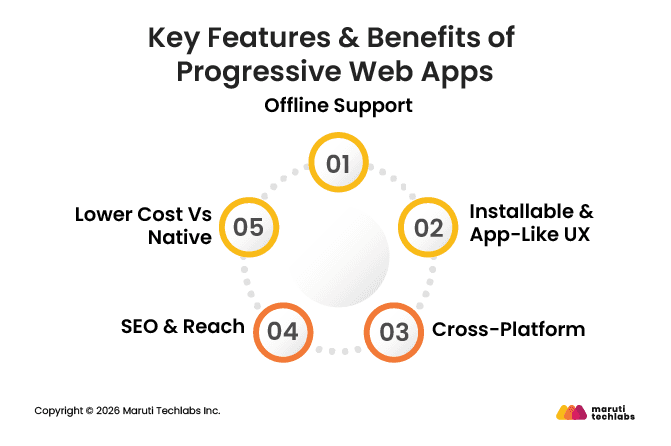
1. Offline Support
Offline functionality ensures uninterrupted user experiences. Cached resources and background sync allow users to browse content, complete actions, and resume workflows even during poor connectivity, improving reliability and customer satisfaction.
2. Installable & App-Like UX
PWAs can be installed directly from the browser without an app store. Full-screen mode, home-screen icons, and smooth transitions replicate native application behavior, enhancing usability and engagement.
3. Cross-Platform
A single PWA codebase runs across Android, iOS, desktop, and tablets. This cross-platform capability simplifies development, ensures consistency, and reduces time-to-market while maintaining broad device compatibility.
4. SEO & Reach
Unlike native apps, PWAs are indexable by search engines. This enhances discoverability, organic traffic, and content reach. Users can access functionality instantly without installation barriers.
5. Lower Cost vs Native
PWAs reduce development costs by avoiding separate native applications. Maintenance, updates, and feature releases occur centrally on the web, eliminating app store review cycles and reducing long-term operational expenses.
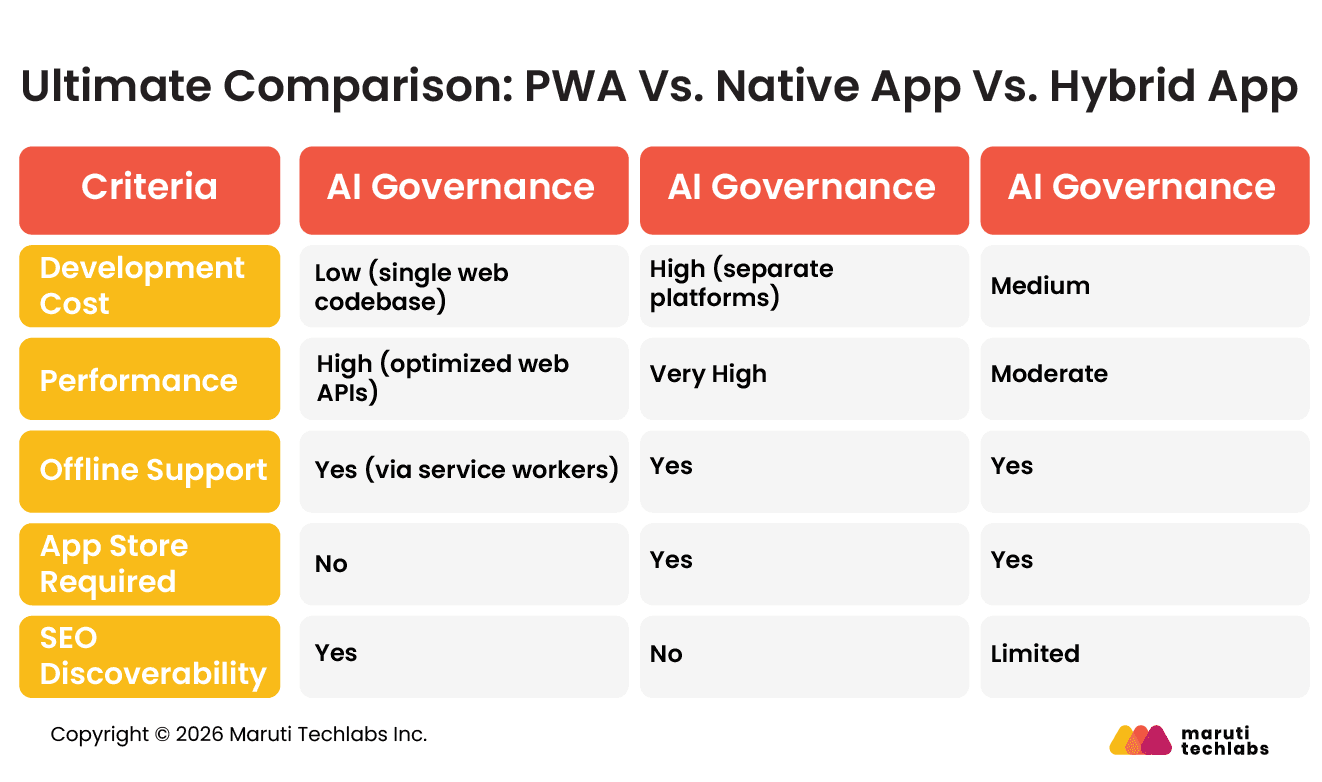
PWA Vs. Native App Vs. Hybrid App
Here’s how all three app types fare against each other.
Real-World Use Cases & Success Stories
Several global brands adopted PWAs to improve performance, reduce bounce rates, and enhance engagement across emerging and bandwidth-constrained markets.
1. Twitter – Twitter Lite
Twitter Lite PWA reduced data usage and improved performance in low-bandwidth regions. It reduced average load times by 30% and significantly improved engagement.
2. Pinterest
Pinterest rebuilt its mobile experience as a PWA, increasing core engagement by 60% and ad revenue by 44%. Performance optimization dramatically improved user retention.
3. Starbucks
Starbucks launched a PWA enabling offline browsing and ordering. The web app became significantly smaller than its native equivalent while maintaining core functionality.
When to Choose a PWA?
PWAs are ideal for businesses seeking broad reach, lower development costs, and fast deployment without compromising performance or user experience.
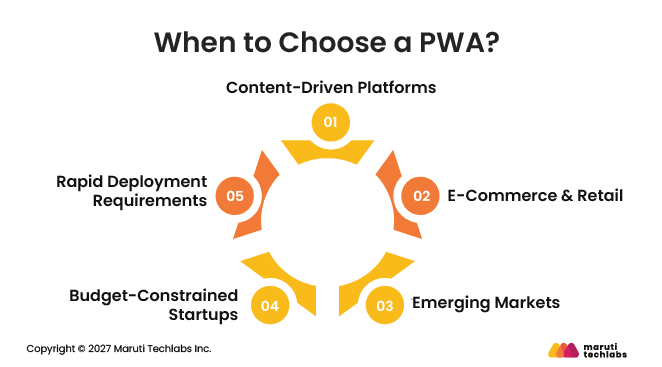
1. Content-Driven Platforms
Media, blogs, and publishing platforms benefit from SEO discoverability, fast load times, and offline reading, making PWAs ideal for engagement-focused ecosystems.
2. E-Commerce & Retail
Retailers targeting mobile-first audiences can leverage faster load times, push notifications, and seamless checkout experiences without requiring app installation barriers.
3. Emerging Markets
PWAs excel in regions with low bandwidth and device constraints, delivering lightweight experiences and reduced data consumption.
4. Budget-Constrained Startups
Startups can validate product-market fit using a single codebase before investing in full native development.
5. Rapid Deployment Requirements
Organizations needing faster iteration cycles and immediate updates benefit from web-based deployments without app store review delays.
How to Build a Progressive Web App in 7 Steps
Building a Progressive Web App requires enhancing a secure, responsive web application with installability, offline capabilities, performance optimization, and background processing to deliver reliable, app-like cross-platform experiences.
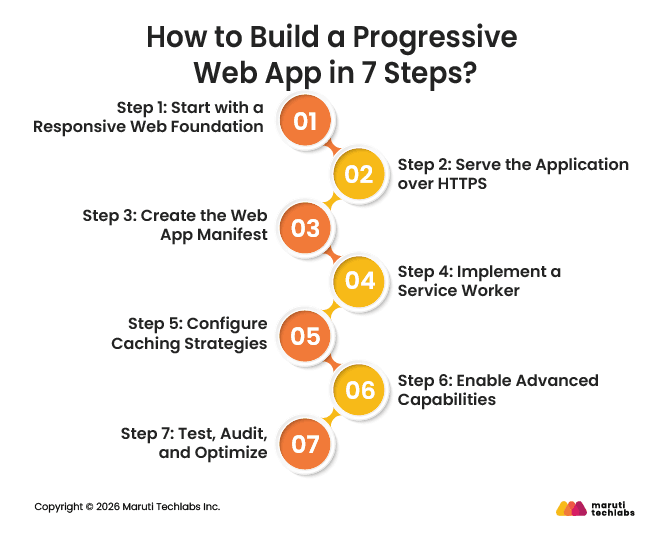
Step 1: Start with a Responsive Web Foundation
Develop a mobile-first, responsive web application using modern HTML, CSS, and JavaScript frameworks. Ensure layouts adapt seamlessly across screen sizes, devices, and orientations before implementing advanced PWA capabilities.
Step 2: Serve the Application over HTTPS
Deploy the application using HTTPS to enable secure communication and service worker functionality. Configure SSL certificates properly, enforce secure redirects, and validate secure context compliance across environments.
Step 3: Create the Web App Manifest
Define a manifest.json file specifying app name, short name, icons, theme colors, display mode, and start URL. This enables home-screen installation and native-like launch behavior.
Step 4: Implement a Service Worker
Register a service worker to intercept network requests, cache assets, and manage background processes. Structure lifecycle events—install, activate, fetch—to ensure controlled updates and stable runtime behavior.
Step 5: Configure Caching Strategies
Implement caching patterns such as cache-first for static assets and network-first for dynamic data. Use versioned caches to prevent stale content and ensure predictable offline behavior.
Step 6: Enable Advanced Capabilities
Integrate push notifications, background sync, and device APIs where supported. Apply progressive enhancement to maintain baseline functionality while activating advanced features on compatible browsers.
Step 7: Test, Audit, and Optimize
Use Lighthouse audits, performance profiling, and offline simulations to validate compliance. Monitor Core Web Vitals, resolve accessibility issues, and continuously optimize load times and runtime efficiency.
Limitations of a PWA & How to Mitigate Them
While PWAs offer flexibility and cost advantages, they have technical and ecosystem constraints that organizations must evaluate strategically.
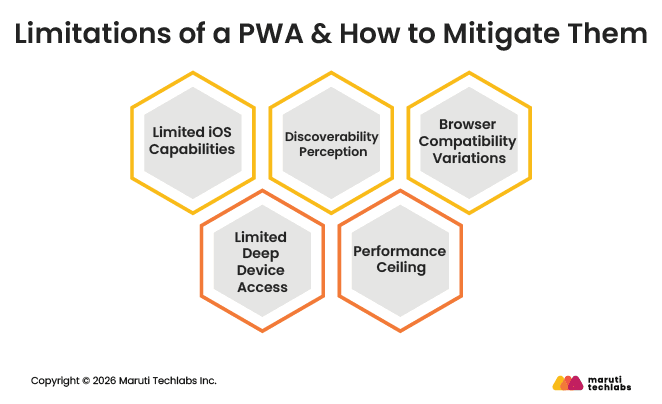
1. Limited iOS Capabilities
Certain advanced APIs and background processes remain restricted on iOS.
Mitigation: Design feature parity carefully, prioritize core functionality, and test thoroughly across Safari. For hardware-intensive features, consider hybrid or native augmentation.
2. Limited Deep Device Access
PWAs cannot access all device-level APIs that native apps can.
Mitigation: Evaluate Web API coverage early. Use progressive enhancement and selectively integrate native modules if critical hardware access is required.
3. Discoverability Perception
Users often associate apps with app stores rather than browsers.
Mitigation: Promote install prompts, leverage SEO, and use marketing campaigns highlighting home-screen install benefits.
4. Performance Ceiling
Highly graphics-intensive applications may perform better natively.
Mitigation: Optimize rendering, leverage WebAssembly where applicable, and evaluate whether performance-critical modules require native implementation.
5. Browser Compatibility Variations
Different browsers implement PWA features inconsistently.
Mitigation: Conduct cross-browser testing, use polyfills where feasible, and adopt progressive enhancement principles.
Top 5 Best Practices for Developing Progressive Web Apps
Adopting architectural discipline and performance optimization principles ensures PWAs deliver consistent, scalable, and secure user experiences.
1. Performance-First Architecture
Implement lazy loading, code splitting, and image optimization. Use caching strategies aligned with user journeys. Monitor Core Web Vitals to maintain responsiveness and minimize time-to-interactive metrics.
2. Secure by Design
Enforce HTTPS, implement Content Security Policy headers, and protect APIs with authentication tokens. Regularly audit dependencies and service worker scripts to prevent vulnerabilities.
3. Progressive Enhancement
Design baseline functionality for all browsers, then layer advanced features conditionally. This ensures accessibility and reliability regardless of device or browser capability.
4. Smart Caching Strategy
Align caching methods with content type. Use cache-first for static assets and network-first for dynamic data. Avoid stale data risks through version control and background updates.
5. Continuous Monitoring & Optimization
Use analytics and performance monitoring tools to track engagement, load times, and failures. Continuously iterate based on real user metrics and evolving browser capabilities.
Why Progressive web apps when last year google promoted Responsive web designs?
Responsive web design combines three concepts namely flexible widths, flexible images and media queries. It is a web development technique which effectively optimizes the browsing experience of the user by crafting website which fits into the user’s device. Whereas PWA is a step ahead and represents umbrella of technologies, design concepts and web APIs that work together to provide an app-like experience on mobile web.
Progressive enhancements take the mobile-first philosophy forward with improved user retention. According to Appboy’s Mobile Customer Retention Report retaining app users is not easy with more than 75% of users failing to return the day after first use.
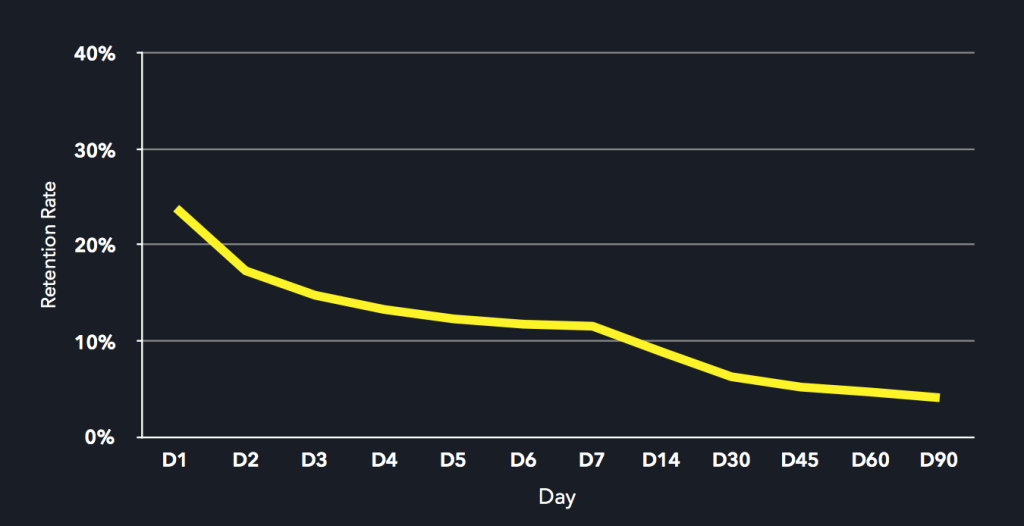
Mobile App retention rate over period of 90 days (Ref: Appboy’s Mobile Customer Retention Report)
A user must first find the app in an app store, download it, install it and then, finally, open it. PWA makes this process easier by eliminating the unnecessary downloading and installing stages. When a user finds your progressive web app, they will be able to immediately start using it. Thus a progressive web application takes advantage of a mobile app’s characteristics, resulting in improved user retention and performance, without the complications involved in maintaining a mobile application.
One of the best tech stacks that have earned its reputation among developers to build PWAs is Python. However, designing a lightweight web app using Python can be challenging if one isn't familiar with programming languages and its frameworks. You can always hire Django developers (a Python web-development framework) who would take care of your entire Python web application development process, i.e., from inception to deployment.

Progressive Web Apps (PWAs) offer a compelling solution for building web applications that deliver a native-like experience on mobile devices. Hiring offshore mobile app developers from a company like ours is essential for creating feature-rich, performant, and user-friendly PWA. Our developers are proficient in responsive design, offline functionality, push notifications, and cross-browser compatibility, which contribute to the success of your PWA.
How Progressive Web Apps improve browsing experience?
Fast and streamlined site
Progressive Web Apps are based on a new technology called service workers. Service workers are event-driven scripts that have access to domain-wide events. These programmable proxies sit between the user’s tab and the wider Internet. They intercept and rewrite or fabricate network requests to allow very granular caching and offline support. Oops, confused!! Simply, it provides instant and reliable loading irrespective of network connection. Flipkart Lite is a Progressive web app designed for the customers using 2G network. It leverages new, open web APIs to offer a mobile web experience with faster loading and less data usage, and has multiple ways to re-engage users. It also decreased load times by adding service workers and streamlined the site for better navigation.
Building a fast and streamlined PWA can be challenging if you don't have the necessary knowledge and experience. Therefore, it's best to connect with a software product development company that would handle all your development needs.
ASP.NET as a development framework is a viable option to create a fast and streamlined site. .Net can be leveraged to develop modern PWAs with RWAs that provide an intuitive user experience, offline capabilities, and support against various devices and screen sizes.
It's a favorable tech stack offering solutions to numerous use cases such as e-commerce, content delivery, and more. If you need to become more familiar with this framework, you can contact a Dot Net development company that will handle everything related to PWA development.
Better User experience
In addition to building streamlined websites, service workers help in improving user experience. Users visiting via browsers enjoy an app-like user experience. When they come back, it loads nearly instantly, even on slow networks. Frequent users will be prompted to install the app and upgrade to a full version. AliExpress, a popular e-commerce website in America, Russia, and Brazil, built a cross-browser Progressive Web App to combine the best of their app with the broad reach of the web. AliExpress observes a 104% increase in conversion rates, and users now visit twice as many pages per session, and time spent per session increased an average of 74% across all browsers.
A great user experience depends on your app's user interface. Choosing the right tech stack is the first step to designing an intuitive user interface, followed by the coding of your app.
However, this development process can seem overwhelming if you don't have an experienced development team. To avoid such pitfalls, we suggest you hire dedicated React.js developers who will guide you throughout your development cycle.
Angular.js is another web development framework from which to choose when designing web applications. Angular offers many perks like:
1) Ready-to-use templates
2) Reusable components
3) Seamless integration with other libraries and frameworks
You can create top-notch websites by hiring an Angular developer. It would expedite your web development process while offering you time to concentrate on other aspects of business development.

Increased customer engagement
You must have observed while accessing websites with PWA features prompts the user to ‘Allow’ sending of notifications. It’s a subtle yet powerful message, particularly for social networking websites. As a user, tapping ‘allow’ here will allow the website to notify you of messages or updates— even when you’re not looking at the page. Chrome has also incorporated ‘Add to Home Screen’ function.
Just two taps are required from the user to add the site to their homescreen, making it easier for them to come back. If you add a PWA to your homescreen, the app gets cached and you’ll have a direct link from your homescreen to the app. By defining a web app manifest, the developer can set the browser to open in full screen mode without an address bar, a splash screen, a color theme for the status bar and the icon itself.
Offline Access
Thanks to service workers, offline access of previously visited website is possible. As described earlier service workers are the backbone of PWA as they empower push notification, content caching, background updates, offline functionality. Offline access is made possible by service workers because these are essentially Javascripts that work independent of your app and responds to connectivity changes, network requests, push notification, etc. Businesses have lapped up this new technology, using it in creative ways. Guardian, the UK based newspaper recently built an offline crossword puzzle when there is a loss of network connectivity. This leads to customer engagement as a puzzle is a better alternative to showing stale news.
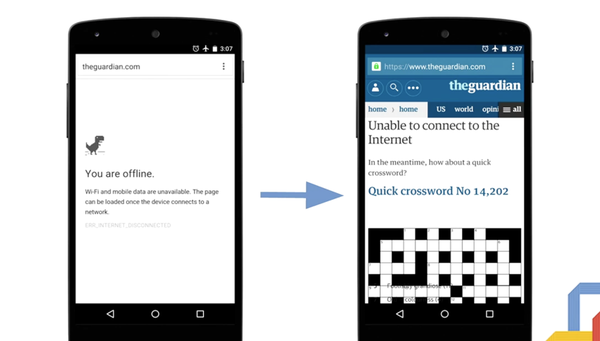
Guardian Progressive web app (Image credit: Sam Thorogood http://buff.ly/2cp5OCI)
Progressive web apps being a new technology, cross-browser support is still limited, especially in Safari and Edge. Still progressive web apps elevate the web browsing experience beyond native apps and responsive web design. For businesses PWA is useful in creating a better user experience and customer engagement. Similar to Guardian, there are other creative ways for engagement by proactively caching content in a different way. You can store user’s recent chat or providing enough information for visitor to view business’ latest updates.
Before going with a progressive web app, make sure to run a quick feasibility test. You can reach out to an IT outsource consulting firm to check if the progressive web app is the right fit for your application.
Looking for a reliable and experienced web application development company? Maruti Techlabs has a proven track record of delivering high-quality web applications that meet the needs of our clients. From top-notch custom product development services to testing and deployment, our expert team can handle all aspects of your project, giving you a seamless and stress-free experience.
Our SaaS app development services can help you create a Progressive Web App (PWA) that revolutionizes how users interact with your website.
FAQs
1. What are the trends in web apps?
Web applications increasingly leverage PWAs, server-side rendering, edge computing, and WebAssembly. AI integration, real-time collaboration, API-first architectures, and micro-frontends are shaping modern development practices focused on scalability, speed, and personalization.
2. What is the future of web app technology?
The future emphasizes deeper device integration, improved Web API standardization, stronger offline capabilities, and seamless cross-platform interoperability. Browser engines continue closing the gap with native performance, enabling enterprise-grade web applications.
3. Impact of AI on web applications?
AI enhances personalization, predictive analytics, automated workflows, and conversational interfaces. Embedded AI services enable smarter search, recommendations, fraud detection, and adaptive UX, improving engagement and operational efficiency.
4. What is the future of web apps?
Web apps will increasingly function as primary digital touchpoints, blending native performance with universal accessibility. As browser capabilities mature, PWAs and AI-powered experiences will dominate scalable, cross-platform application strategies.