Legacy Application Modernization: Strategies, Approaches & Step-by-Step Process
Key Takeaways
- Legacy modernization is a financial decision, not just a technical one; delay compounds cost, risk, and lost innovation.
- The 7 Rs framework is the core decision layer; success depends on picking the right approach per system.
- Technical debt already eats 40-70% of IT budgets; modernization frees both cost and engineering bandwidth.
- AI accelerates execution, not decisions, cutting migration and testing effort while architecture calls stay human.
- Modernization succeeds through phased execution, not big-bang cutovers.
McQueen Autocorp, a fast-scaling used car sales platform, relied on manual scheduling to run critical workflows. Jobs required constant human intervention for monitoring and restarting. Delays went unnoticed, failures often surfaced late, and the operations team was stuck in reactive firefighting instead of driving system improvements.
Maruti Techlabs stepped in to modernize this layer, replacing manual scheduling with orchestrated workflows using Apache Airflow. The result was system availability jumping from 90% to 99.95%, closing a gap that had been costing the business every single day.
This is what legacy application modernization looks like in practice. It rarely starts as one dramatic failure.
It builds slowly with:
- The outage that keeps repeating
- The feature that takes three sprints instead of three days,
- The patch that cannot ship because nothing downstream is documented.
The scale of this problem is well documented. Gartner estimates that roughly 40% of infrastructure systems across enterprises already carry significant technical debt. McKinsey research shows that technical debt and modernization costs can account for 40 to 50 percent of a company's total technology investment, leaving little room for anything other than keeping the lights on.
For CTOs and IT directors, the real question is not whether to modernize. It is whether to do it now, on your own terms, or later, once an outage or a missed revenue window forces the decision.

What is Legacy Application Modernization?
A legacy application is software that still runs critical business operations and is built on outdated technology, architecture, or infrastructure that can no longer keep pace with current business and security requirements. It still does what it was originally built to do, but it resists change: adding a feature, integrating a new tool, or scaling for growth all become disproportionately difficult and expensive.
Legacy application modernization is the process of updating these systems, their code, architecture, infrastructure, or all three, so they can meet current performance, security, and integration demands without discarding the business logic that already works.
It is important to separate this from cloud migration. Cloud migration moves a workload to cloud infrastructure. Modernization changes how the application itself is built, so it can actually take advantage of that infrastructure. A legacy application lifted onto the cloud without re-architecting it is still a legacy application, just running on someone else's servers.
This plays out differently across industries:
- M&T Bank runs core transaction processing, mobile banking, and loan payments on IBM z15 mainframes across its data centers.
- The Department of Health and Human Services ran payroll on a COBOL system until April 2026, when it finally moved to a cloud-based platform after an eight-month cross-agency effort.
- German foundry group Fritz Winter had to weigh migrating its legacy SAP ECC environment to S/4HANA against consolidating operations first, a decision shaping production across multiple manufacturing sites.
The technology differs, but the pattern is the same: systems that once matched business needs precisely now sit between the business and what it needs to do next.
Modernization is not one fixed action. It is a spectrum, ranging from a targeted refactor of a single module to a full rebuild of a cloud-native architecture.
Where a given system falls on that spectrum depends on its business criticality, technical condition, and the cost of change, a decision framework covered in detail under the 7 Rs of legacy application modernization below.
7 Signs Your Legacy System Is Holding Your Business Back
Legacy systems rarely fail all at once. Instead, they slow innovation, increase operational risk, and make routine changes harder to deliver. If releasing new features is slow, outages are common, security patches are hard to apply, or integrating modern tools takes extra effort, it's a sign your application needs modernization.
1. Every new feature request turns into a multi-sprint ordeal
A change that should take days takes weeks because the codebase has no clean separation between logic layers.
Business Impact: Product and engineering lose the ability to respond to market opportunities at the speed competitors can.
2. Security patches lag or cannot be applied at all
Vendor support has ended, or the patch would break undocumented dependencies elsewhere in the system.
Business Impact: Every unpatched month is measurable exposure, and the average cost of a data breach reached $4.44 million globally in 2025, with IT failure responsible for 23% of breaches studied.
3. The system cannot integrate with modern APIs or tools
Connecting the legacy core to a new CRM, analytics platform, or AI tool requires custom middleware built just for that one connection.
Business Impact: Every new tool the business wants to adopt now comes with a hidden integration tax.
4. Downtime and outages are becoming routine, not exceptional
Jobs fail silently, batch processes need manual restarts, and the operations team spends more time firefighting than building.
Business Impact: This is the exact pattern we saw with McQueen Autocorp before modernizing its workflow orchestration, where fixing it took availability from 90% to 99.95%.
5. Only one or two people actually understand how the system works
The original developers have retired or moved on, or the documentation was never written.
Business Impact: This is key-person risk with no mitigation plan, and it is measurably getting worse. COBOL developers, for instance, are aging out of the workforce faster than they are being replaced, and few new engineers are trained on legacy languages at all.
6. Compliance and audit requirements are becoming harder to meet
New regulatory demands, like real-time reporting or granular access logs, do not map cleanly onto how the system was designed to work.
Business Impact: Compliance gaps translate directly into audit findings, fines, or blocked product launches.
7. Customers or employees are actively complaining about the experience
Slow load times, clunky workflows, or repeated errors are showing up in support tickets, reviews, or internal feedback.
Business Impact: This is often the last sign to appear and the most expensive, since by the time it is visible externally, it has usually been costing retention and productivity internally for a while.
What Is the Real Cost of Delaying Legacy Modernization?
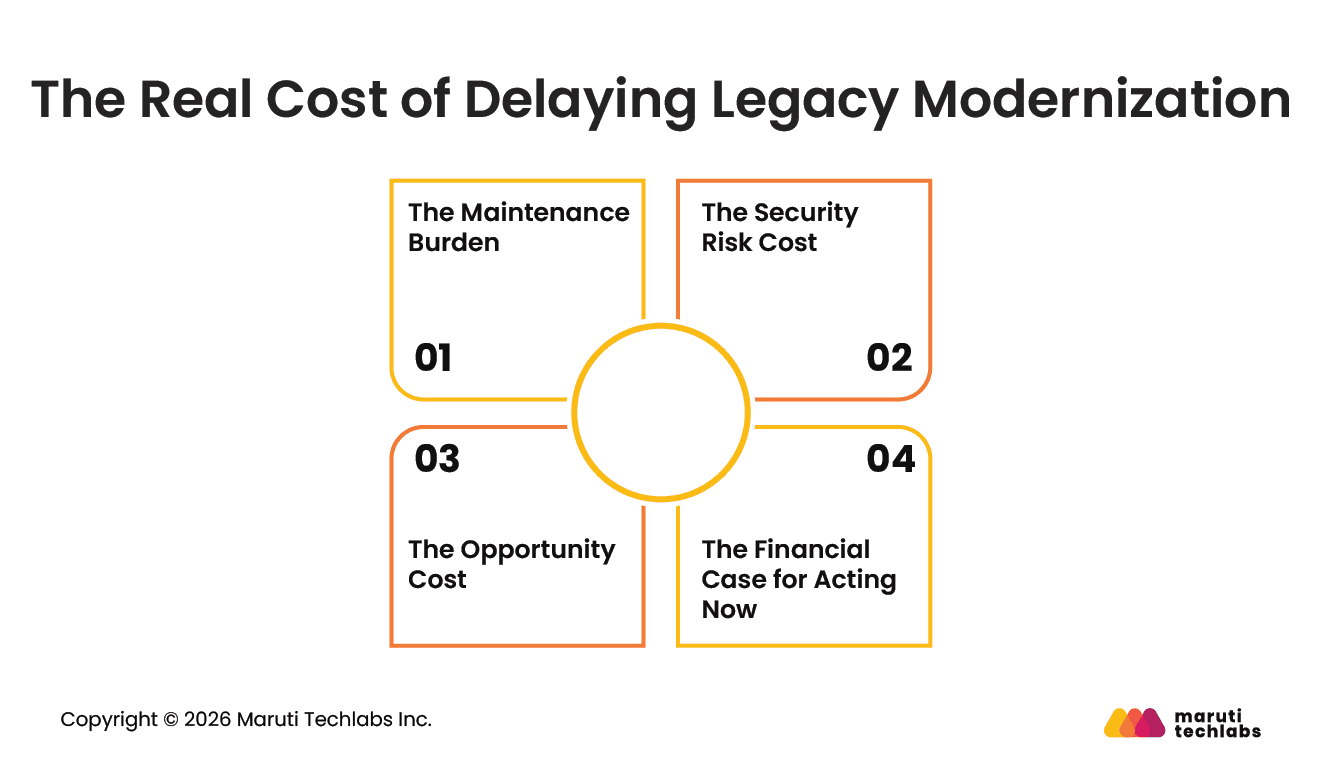
The cost of delaying legacy modernization extends far beyond maintenance. Aging systems drive up operational costs, increase security exposure, limit innovation, and divert engineering resources away from strategic initiatives, making every year of delay more expensive than the last.
The Maintenance Burden
Most IT organizations are structurally biased toward maintenance. Core systems, integrations, and support obligations absorb engineering capacity, leaving limited room for net-new development.
More recent industry analysis in 2025 shows the same pattern holding, with many organizations still absorbing 70 percent or more of their IT budget just for “keeping the lights on”. Every year that number stays high is a year of budget that cannot go toward the work that actually grows the business.
The Security Risk Cost
Delayed modernization is also a security posture problem. We have already seen the global average cost of a data breach and how it is impacting organizations. 5
Legacy systems, by definition, carry outdated patch cycles and undocumented dependencies, which is precisely the profile that makes a breach both more likely and more expensive to contain once it happens.
The Opportunity Cost
The clearest cost of delay is not what gets spent; it is what does not get built. Every sprint spent patching, firefighting, or working around a legacy constraint is a sprint not spent on a feature customers are asking for or a capability competitors have already shipped.
This is the least visible cost on the list and often the most expensive, because it never shows up as a number on a budget report.
The Financial Case for Acting Now
The financial case holds up under scrutiny. A Forrester Total Economic Impact study found that organizations modernizing legacy infrastructure to the cloud saw legacy solution costs drop by 60%, with 40% of the IT staff time previously spent on maintenance freed up for higher value work.
The longer a business waits, the more recoverable time and budget it leaves on the table, while the maintenance burden and security exposure above continue to accrue in the meantime.
What are The 7 Rs of Legacy Application Modernization?
The 7 Rs of legacy application modernization are Retire, Retain, Rehost, Replatform, Refactor, Re-architect, and Rebuild. Each represents a different way to handle an aging system, ranging from decommissioning it entirely to rewriting it from scratch, with a different balance of effort, cost, speed, and long-term payoff.
Picking the wrong one for a given system is the single most common reason modernization budgets overrun or stall entirely. The table below breaks down all seven so you can compare them and match each application in your portfolio to the right path.
The 7 Rs decision matrix
| Approach | Effort | Cost | Time to Value | Best For |
| Rehost | Low | Low | Fast (weeks to a few months) | Systems that work fine but run on infrastructure that is expensive or risky to keep managing in-house |
| Replatform | Low to Medium | Low to Medium | Fast | Systems needing minor infrastructure upgrades without a full architecture change |
| Refactor | Medium | Medium | Medium (months) | Systems with sound business logic but degraded code quality or performance bottlenecks |
| Rebuild | High | High | Slow (many months to over a year) | Systems fundamentally constrained by their original architecture, unable to scale further under any amount of patching |
| Replace | Medium to High | Medium to High | Medium to Slow | Systems where a proven commercial or SaaS alternative already does the job better than a custom build would |
| Retain | None | None | Immediate | Systems that still meet business needs and carry no urgent risk, deliberately deferred rather than ignored |
| Retire | Low | Low | Immediate | Systems whose function has been absorbed elsewhere or is no longer needed at all |
Rehost: The Fastest Path To Cloud Infrastructure
Rehosting, often called lift-and-shift, moves an application to new infrastructure without changing its code.
Fit Criteria: Prefer rehosting when the system's logic still works, and the constraint is purely the infrastructure it runs on, whether that means cost, performance, or scalability limits at the hardware level.
Maruti Techlabs demonstrated this with McQueen Autocorp by migrating Kubernetes workloads from x86_64 to Graviton-enabled nodes and updating CI/CD pipelines to support multiple architectures, without touching the applications themselves.
The result was a 15% reduction in daily EC2 costs with zero downtime during the migration. The tradeoff with rehosting is that it does not fix anything inside the application. Technical debt and integration limitations move to the new infrastructure along with everything else.
Replatform: Upgrading Without A Full Rewrite
Replatforming moves a system to a new platform while keeping its core features intact, using minimal code changes.
Fit Criteria: Go for replatforming when the application needs measurable performance or cost improvements but a full architectural overhaul is not justified by the system's remaining lifespan or business value. It sits between rehosting and refactoring, delivering better performance and lower infrastructure costs without a full code overhaul.
Refactor: Improving What Already Works
Refactoring modifies the internal structure of an application, typically the backend, without changing its front end or core functionality.
Fit Criteria: Choose refactoring when the business logic is sound and worth preserving, but the code has accumulated enough debt that changes are slow or risky. This is usually the least disruptive path to meaningful improvement, since users and downstream systems see no functional change while the code underneath becomes easier to maintain.
Rebuild: Starting Over On Cloud Native Architecture
Rebuilding replaces the legacy application entirely with one built on a modern, cloud-native architecture using microservices, APIs, and containerization from the ground up.
Fit Criteria: Select rebuilding when the architecture itself is the constraint, not just the code or infrastructure, and incremental fixes have already been tried without resolving the core scalability problem.
German foundry group Fritz Winter faced exactly this decision when weighing a full migration from its legacy SAP ECC environment to S/4HANA, choosing between rebuilding the platform and processes alongside it and consolidating operations first.
This is the highest-effort, highest-cost path, but the only one that fully removes the ceiling that a legacy architecture places on future growth.
Replace: Switching To A Proven Alternative
Replacing retires the current system in favor of an existing commercial or SaaS product rather than building or rebuilding in-house.
Fit Criteria: Choose replacing when a mature product already solves the problem better than a custom system would, and the cost of maintaining proprietary code no longer makes sense compared to licensing something built for exactly this purpose.
The main risk is data migration, ensuring existing data moves cleanly into the new system without disrupting the business processes that depend on it.
Retain: Deferring With A Deliberate Plan
Retaining means deliberately leaving a system unchanged rather than modernizing it at this time.
Fit criteria: Implement retention when a system still meets business needs and poses no pressing security or compliance risk, and when other systems in the portfolio have a stronger claim on budget and engineering time. This is not neglect. It requires an explicit long-term ownership plan and a scheduled reassessment, rather than simply being left alone by default.
Retire: Shutting Down What Is No Longer Needed
Retiring shuts a system down entirely and migrates its users to an already operational alternative.
Fit Criteria: Choose retiring when the system's function has already been absorbed elsewhere in the business, whether through consolidation, an acquisition, or an overlapping tool, and keeping it running only adds maintenance cost without adding value. This is often the most overlooked option, but it can eliminate maintenance costs and risk with the least effort of any approach on this list.
How to Modernize Legacy Applications: A Step-by-Step Process
Modernizing a legacy application happens in six phases: portfolio assessment, prioritizing and assigning the 7 Rs, building the business case, proof of concept, phased migration, and ongoing monitoring to prevent re-legacy.
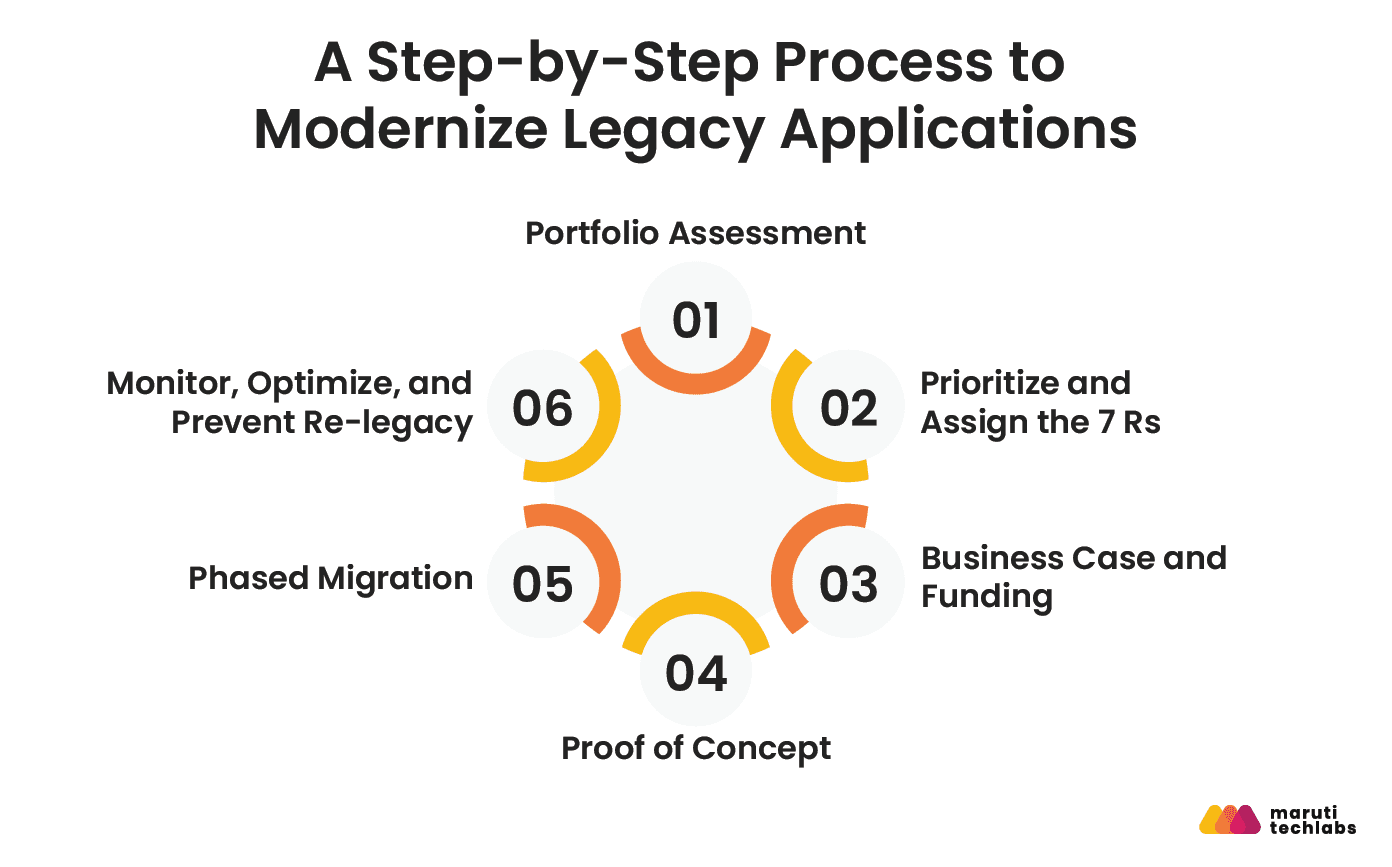
Choosing the right R for a given system, covered above, only answers part of the question. Execution is where most modernization programs actually succeed or fail. The six phases below sequence that execution from first assessment through the point where a system stops needing rescue and starts needing maintenance discipline instead.
Phase 1: Portfolio Assessment
Before anything is modernized, every application in scope needs to be inventoried and scored against the same criteria: business criticality, technical condition, integration dependencies, and compliance exposure.
Platforms like CAST Highlight scan large numbers of applications quickly and produce standardized scores for technical debt, risk, and cloud readiness, while LeanIX is a common choice for organizations that want portfolio assessment tied directly into a broader enterprise architecture practice.
This phase exists to prevent the most common early mistake: modernizing the loudest system in the room instead of the one that is actually costing the business the most.
Phase 2: Prioritize and Assign the 7 Rs
Once the portfolio is scored, each system gets matched to one of the seven approaches covered above: rehost, replatform, refactor, rebuild, replace, retain, or retire, based on where it falls on the effort, cost, and business criticality axes.
Systems are then sequenced; not all seven Rs occur at once, since the highest-priority, highest-risk systems need dedicated attention rather than competing for engineering time with lower-stakes ones.
Phase 3: Business Case and Funding
Every modernization initiative needs a financial case built the way a CFO evaluates any other investment:
- The cost of inaction versus the cost of action
- The expected payback period, and
- The risk exposure if nothing changes
This is where the cost-of-delay figures already covered above are tied directly to the specific systems selected in Phase 2, turning a general industry argument into a business case for this organization's actual portfolio.
Phase 4: Proof of Concept
Before committing full budget and timeline to a chosen approach, a scoped proof of concept validates the technical plan against a single, contained slice of the system rather than the whole thing at once.
Cloud-native services like AWS Transform or Azure Migrate are commonly used here, since both offer free discovery and assessment tools that let a team test a migration path for one component before scaling the approach across the entire application.
Phase 5: Phased Migration
Migration happens in stages rather than a single cutover, with the legacy and modernized systems often running in parallel during transition. This is where the strangler fig pattern, gradually routing traffic away from the legacy system component by component, becomes the standard approach for anything business critical.
We applied this directly for one of our clients, working under a strict deadline set by the old platform's discontinuation. The team integrated the new platform's online ordering into the existing app to keep the customer experience uninterrupted, while simultaneously building a full native replica using the new platform's API. The result was no downtime or disruption to the user experience, and the revamped app's rating rose to 4.7 on the App Store.
Dependency mapping tools used in Phase 1 typically stay active through this phase as well, since new dependencies often surface only once components start moving.
Phase 6: Monitor, Optimize, and Prevent Re-legacy
Modernization does not end at go-live. The newly modernized system needs ongoing code quality monitoring tools like SonarQube, which are widely used here to continuously flag technical debt and maintainability issues before they compound, as well as a deliberate maintenance investment set aside from day one.
Continuing with the phase 5 example, we built exactly this kind of ongoing discipline into a client's release process through a custom automation testing framework, running 600-plus UI test cases and 1,600-plus microservice test cases daily rather than on the previous biweekly cycle, catching regressions early enough to save 64 hours of manual testing per sprint release.
Without this kind of continuous check in place, a system modernized today quietly becomes the next legacy system within five years; the same undocumented dependencies and deferred updates that caused the original problem simply start accumulating again on new infrastructure.
How Is AI Changing Legacy Modernization in 2026?
AI has changed the economics of legacy modernization faster than any other part of this process. McKinsey research shows Gen AI-driven modernization can accelerate migration timelines by 40 to 50 percent and cut technical debt-related costs by 40 percent, with one banking case cutting an estimated 700- to 800-hour code migration nearly in half using orchestrated AI agents.
Automated code analysis
AI tools now scan legacy codebases to map dependencies, flag technical debt hotspots, and surface architecture that would take a human team weeks to document manually. This is the foundation on which every other AI-assisted step depends, since an accurate understanding of what a system actually does must come before anything gets touched.
Language migration
AI-assisted translation, with COBOL-to-modern-language translation being the most visible example, has moved from experimental to standard practice at the largest financial institutions, where COBOL still processes the majority of core banking transactions.
This does not eliminate the need for engineers who understand the original business logic, but it removes a large share of the mechanical translation work that once consumed the bulk of a migration timeline.
AI-assisted test generation
Ahead of refactoring undocumented systems, AI can generate regression test suites directly from existing execution behavior, giving teams a safety net for legacy code that was never fully documented or tested in the first place.
This matters most in systems where the original developers are long gone, and nobody on the current team can confirm what the system is and isn't supposed to do.
How Does This Apply Inside An Enterprise AI Strategy?
None of this works in isolation from the rest of an organization's AI maturity.
Maruti Techlabs starts with an AI strategy and readiness assessment. This includes evaluating existing infrastructure and data maturity to identify where AI can genuinely accelerate modernization.
Based on this, the focus shifts to targeted AI integration. Capabilities are embedded in existing enterprise systems via APIs and automation, aligned with the current architecture.
This approach avoids layering generic AI solutions on top of legacy systems without accounting for underlying dependencies and constraints.
For organizations exploring more autonomous approaches, we also build custom agentic AI systems that can plan, execute, and adapt across multi-step workflows, an increasingly relevant capability for the discovery and dependency mapping work described above, since that work benefits from an agent that can act on findings rather than simply report them.
The Strategic Boundary of AI in Legacy Modernization
AI accelerates translation and analysis, not architecture design. The decision between rehosting, refactoring, or rebuilding, and every fit criterion covered in the 7 Rs section, still depends on human judgment about business criticality, risk tolerance, and where a system needs to be in five years, not just where it can technically go today.
How Are Legacy Systems Being Modernized Across Banking, Insurance, and Healthcare?
Across regulated industries, legacy systems are not just outdated; they actively constrain growth, compliance, and integration. What makes modernization complex is not the age of these systems, but how deeply they are integrated in core operations. In banking, insurance, and healthcare, legacy infrastructure still powers mission-critical workflows, often at the cost of agility and real-time responsiveness.
The following examples highlight how this plays out across industries, where legacy dependencies persist, what pressures are accelerating modernization, and how targeted interventions can deliver measurable outcomes without disrupting critical operations.
Banking and Finance
Legacy exposure here is structural; over 70 percent of global banks still run legacy core systems, and 43 percent rely on COBOL. M&T Bank still runs core transaction processing, mobile banking, and loan payments on IBM z15 mainframes.
Regulatory pressure adds to this: PSD2 mandates secure APIs for third-party account access, and Basel III's finalized reforms bring real-time reporting demands legacy cores were never built for.
Insurance
A West Monroe survey of 300 US insurance executives found 54 percent of insurers spend over half their IT budget maintaining existing systems, with policy admin, claims, and underwriting typically stuck in disconnected silos.
Maruti Techlabs saw this firsthand with NetSecure Life, a Florida-based digital insurance platform, where cleaning up legacy infrastructure waste delivered over $200,000 in annual savings without disrupting the platform.
Healthcare
HL7 v2, a messaging standard from 1989, still runs in over 95 percent of US healthcare organizations, built for batch data exchange rather than the real-time API access FHIR provides.
When Apple launched FHIR-based Health Records in 2018, Johns Hopkins Medicine, Cedars-Sinai, and Penn Medicine were among the first hospital systems ready to make patient records available this way, proof that FHIR adoption directly determines which systems can plug into modern patient-facing tools and which cannot. This is a common focus of enterprise application modernization services, which help healthcare organizations modernize legacy systems while preserving critical clinical workflows.
Legacy Modernization Challenges and How to Overcome Them
Legacy modernization projects often face challenges that extend beyond the technology itself. Undocumented systems, data migration risks, business continuity concerns, and skill gaps can slow progress or increase project risk.
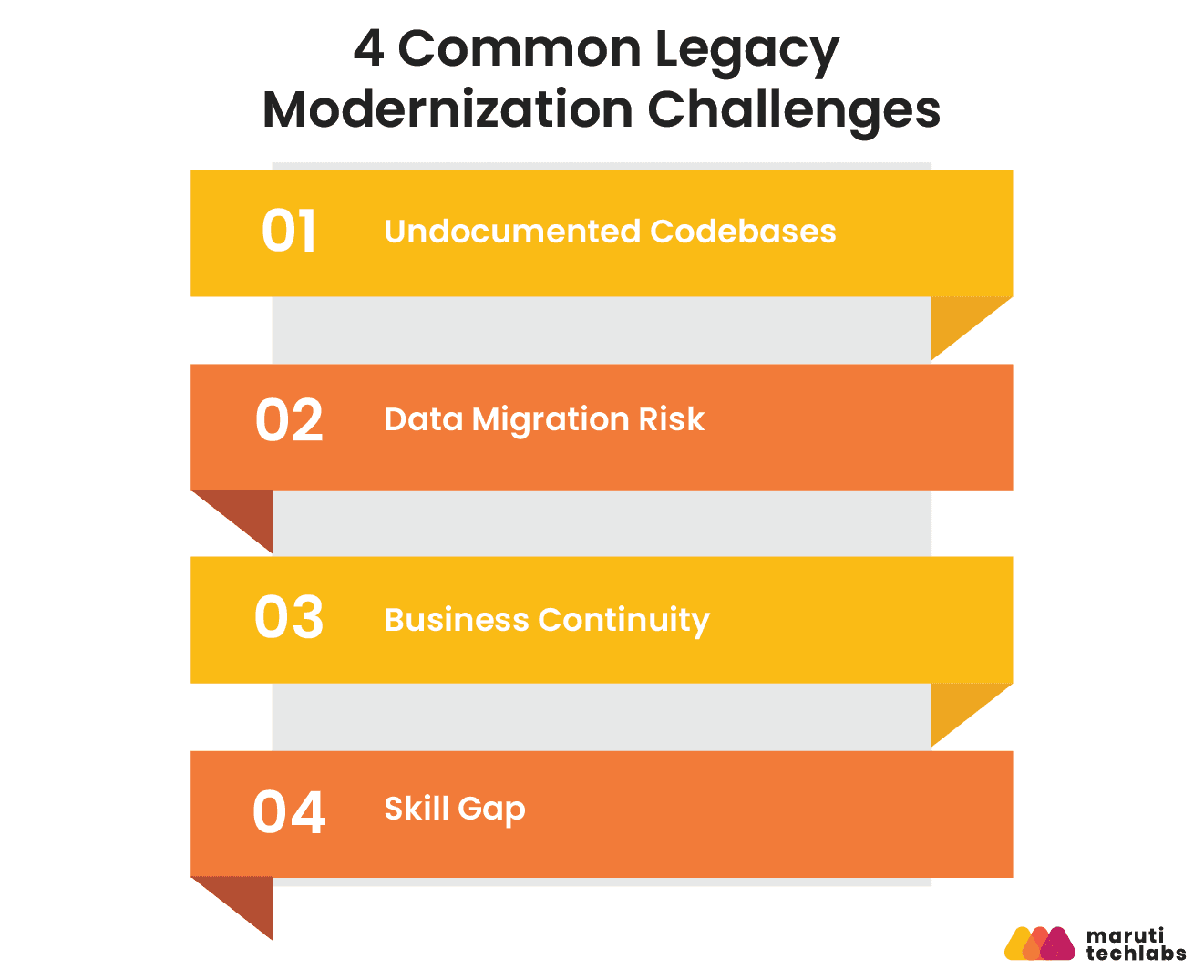
Undocumented Codebases
The original developers are gone, the documentation was never written, or it stopped being updated years ago. Nobody currently on the team can confirm what large parts of the system actually do, which makes any change feel like a guess rather than a decision.
Solution:
AI-assisted dependency mapping tools can scan a legacy codebase and reconstruct its architecture, data flows, and cross-module dependencies far faster than manual documentation ever could. This does not replace the judgment of someone who understands the business logic, but it gives that person a starting map instead of a blank page.
Data Migration Risk
Moving data from a legacy system to a modernized one risks corruption, loss, or subtle mismatches that do not surface until weeks after go-live, often in the exact records that matter most.
Solution:
Phased migration with dual-write and rollback checkpoints keeps both the old and new systems writing data in parallel during the transition, with clearly defined points where the team can roll back cleanly if something does not match.
This trades a longer migration timeline for the ability to catch and reverse a problem before it becomes a business-facing incident.
Business Continuity
The system being modernized is often the same system the business cannot afford to have down for even a weekend, which makes a single big-bang cutover a high-stakes bet that everything goes right at once.
Solution:
The strangler fig pattern avoids that bet entirely, gradually routing traffic away from the legacy system component by component while both versions run side by side. The business keeps operating normally throughout, and any issue surfaces in a small, contained piece of the system rather than across the whole thing at once.
Skill Gap
The people who understand the legacy system rarely understand modern cloud architecture, and the people hired for the modern side rarely have any context on why the legacy system works the way it does. Left unaddressed, this gap becomes the main source of delay.
Solution:
Paired modernization puts a legacy expert and a cloud architect on the same task from day one, rather than treating knowledge transfer as a separate handoff step. The legacy expert supplies context the documentation cannot, and the cloud architect keeps the target architecture from replicating the same problems that made the old system hard to maintain in the first place.
What are the Benefits of Legacy Application Modernization?
Modernizing legacy applications reduces costs, improves security, speeds up software delivery, and increases engineering productivity. By replacing outdated architectures with modern platforms and practices, organizations can innovate faster while spending less time maintaining legacy systems.
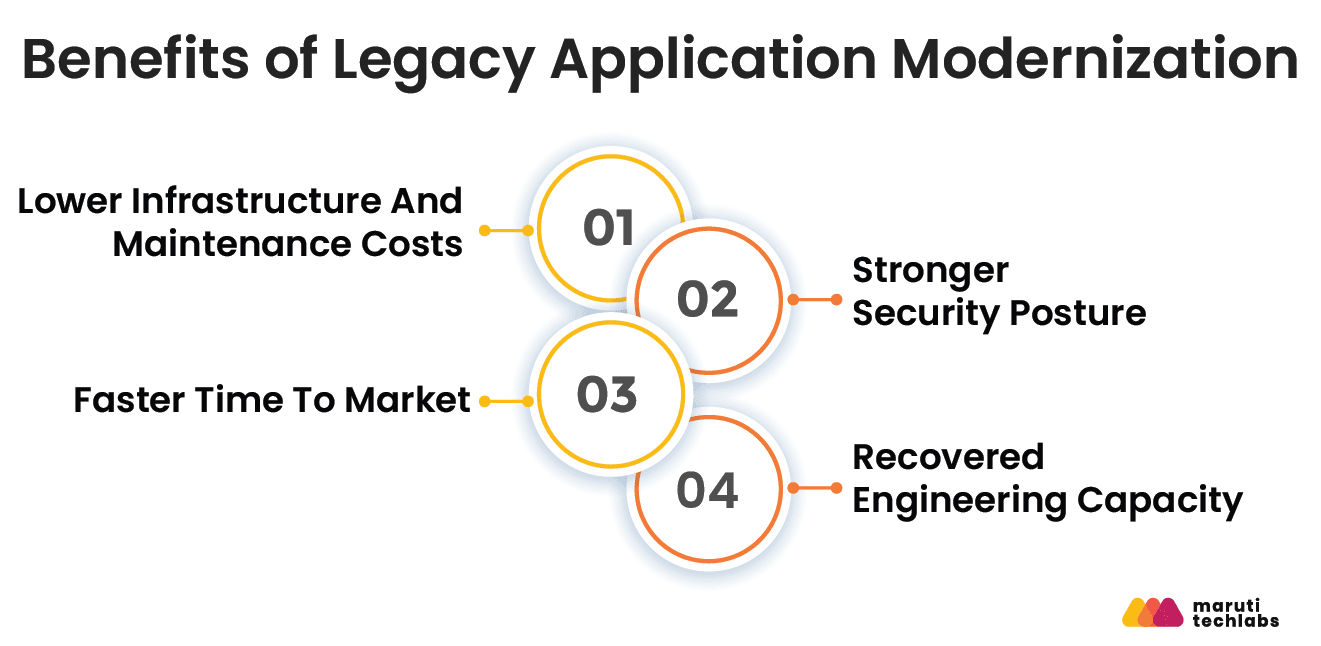
Lower Infrastructure And Maintenance Costs
Rehosting alone typically drops infrastructure costs by 20 to 40 percent immediately, without touching a single line of application code.
Deeper modernization compounds this further: McKinsey research on insurance carriers found a 40 percent reduction in IT cost once modernization is complete, and a separate Forrester study found organizations modernizing legacy infrastructure to the cloud cut legacy solution costs by 60 percent. The exact number varies by approach and industry, but the direction is consistent across all approaches and industries.
Stronger Security Posture
Legacy systems carry outdated patch cycles and undocumented dependencies, exactly the profile that makes a breach both more likely and more expensive. Modernized systems, built on current frameworks with active vendor support, close this exposure at the source rather than requiring compensating controls layered on top of an already fragile system.
Faster Time To Market
Modern CI/CD pipelines entirely change what a release cycle looks like. DORA's research shows elite-performing teams deploy 182 times more frequently than low-performing teams, with far lower change failure rates and dramatically faster recovery when something does go wrong.
On a legacy system, a release that should take days can take months, since every change carries the risk of breaking something undocumented elsewhere. On a modernized one, release frequency becomes a competitive advantage rather than a constant source of risk.
Recovered Engineering Capacity
Beyond direct cost savings, the Forrester study cited above found that modernization freed up 40 percent of IT staff time previously spent on maintenance for higher value work.
This is the least visible benefit on this list and often the most valuable one, since it is the difference between an engineering team that spends its time keeping the lights on and one that spends its time building what the business actually needs next.
Legacy Systems Will Not Fail Fast, But They Will Hold You Back
Across banking, insurance, and healthcare, the pattern is consistent. Legacy systems are not failing overnight, but they are steadily eroding speed, compliance readiness, and integration capability. The cost is not limited to maintenance spend. It shows up in delayed product launches, limited ecosystem participation, and rising operational risk.
What separates successful modernization efforts is not scale, but precision. Organizations that treat modernization as a portfolio decision, prioritizing high-impact systems and aligning execution with business outcomes, capture value without destabilizing operations.
The examples above reinforce a clear point: modernization does not require a full rebuild. It requires the right intervention at the right layer, executed in phases.
The longer systems remain untouched, the narrower the window for a controlled migration becomes. At that point, modernization shifts from a strategic choice to a forced response.
FAQs
1) What are some prominent examples of a legacy system?
Legacy systems typically include monolithic ERP platforms, mainframe-based banking systems, on-premises CRM deployments, and tightly coupled custom applications built on outdated stacks such as COBOL or early Java frameworks. These systems still run critical operations but lack scalability, integration flexibility, and support for modern architectures.
2) What are modern vs. legacy applications?
Legacy applications are tightly coupled, difficult to scale, and costly to maintain due to outdated architectures and limited integration capabilities. Modern applications are built using cloud-native, API-first, and modular architectures, enabling faster releases, better scalability, and clean integration across distributed systems.
3) What is the difference between legacy modernization and cloud migration?
Cloud migration focuses on moving existing applications to cloud infrastructure with minimal changes. Legacy modernization involves re-architecting, refactoring, or rebuilding applications to improve scalability, performance, and maintainability. Migration is a subset; modernization addresses deeper architectural and operational limitations.
4) How long does legacy application modernization take?
Timelines vary based on system complexity, dependencies, and modernization approach. Incremental refactoring programs may take 3–9 months for critical modules, while full-scale re-architecture can extend to 12–24 months. Phased execution with parallel runs reduces disruption and accelerates time-to-value.
5) What are the risks of legacy application modernization?
Key risks include business disruption during transition, data integrity issues, underestimated dependencies, and cost overruns. Poorly defined scope or lack of governance can delay outcomes. These risks are mitigated through phased rollout, strong observability, regression testing, and clear ownership across engineering and business teams.
6) How much does legacy modernization cost?
Costs depend on application size, architecture complexity, and modernization strategy. Lift-and-shift migrations are relatively low-cost, while re-architecting or rebuilding systems requires higher investment. Most mid-sized modernization programs range from $100K to $1M+, with ROI driven by reduced maintenance costs and improved delivery velocity.
How Maruti Techlabs Helped NetSecure Life Save Over $200K Annually on AWS Without Disrupting Operations?
We recently worked with NetSecure Life, a Florida-based digital insurance platform helping users compare and purchase Medicare plans online, on an AWS cloud cost optimization engagement.
Their AWS bill had climbed to nearly $52,000 per month, driven by underused EC2 and RDS instances, 3 TB of old backup data, and a high-tier support plan the team was barely using, with no clear ownership of which unused servers could even be safely removed.
We streamlined their AWS usage without touching platform performance. Our approach identified and removed unused EC2 instances, rightsized EC2 and RDS instances against actual usage, shifted steady workloads to reserved instances, cleaned up unnecessary backups with updated retention settings, downgraded the support plan to match actual usage, and set up ongoing cost monitoring using AWS Lambda and Cost APIs.
The impact
- Monthly savings of $15,000 to $18,000, totaling over $200,000 annually
- Cleaner infrastructure with significantly less resource waste
- Platform performance remained stable throughout the entire engagement
- More predictable cloud spend, improving budgeting accuracy going forward
- Reduced resource usage also contributed directly to the client's sustainability goals