

Zero Trust on AWS: Why Perimeter Security Is Dead and What CTOs Should Do Next
Key Takeaways
- Zero Trust is a business imperative. 84% of organizations faced identity-related breaches in 2025, costing an average of $4.44 million. Implicit trust is a liability.
- AWS has everything you need, natively. Verified Access, Verified Permissions, IAM Identity Center, VPC Lattice, GuardDuty, and CloudTrail cover every Zero Trust layer out of the box.
- Get identity right before anything else. IAM Identity Center, phishing-resistant MFA, and Trusted Identity Propagation are the foundation. Everything else builds on top.
- Zero Trust does your compliance heavy lifting. One architecture simultaneously satisfies HIPAA, PCI-DSS, GDPR, and NIST 800-207.
- Start with one app, not the entire infrastructure. Pick your highest-risk workload and expand from there.
In January 2025, a ransomware group called Codefinger didn't break through a firewall. They didn't exploit a zero-day vulnerability. They walked straight in using compromised AWS credentials and encrypted critical data stored across Amazon S3 buckets belonging to multiple enterprises.
By generating their own AES-256 encryption keys through AWS's own SSE-C mechanism, they ensured victims couldn't decrypt a single file without paying the ransom. A seven-day deletion countdown added to the pressure. The breach wasn't a failure of AWS infrastructure. It was a failure of trust, specifically the assumption that verified credentials meant a trusted user.
This is the defining security problem of 2026: perimeter-based thinking no longer works when your infrastructure is cloud-native, your workforce is distributed, and your attackers know how to move laterally through trusted identities.
According to IBM, the global average cost of a cloud breach in 2025 was $4.4 million, with rising regulatory penalties for data exposure continuing to drive that figure higher. The most dangerous entry points aren't unpatched software. They are overprivileged IAM roles, misconfigured access policies, and the quiet assumption that someone already inside your environment can be trusted.
Zero Trust Architecture directly challenges that assumption. At its core, Zero Trust operates on a single, non-negotiable principle: never trust, always verify. No user, device, or workload is trusted by default, regardless of whether it sits inside or outside your network perimeter. Every access request must be authenticated, authorized, and continuously validated before it reaches any resource.
This guide is written for CTOs, cloud security architects, DevSecOps leads, and SMBs who are either building a Zero Trust strategy on AWS for the first time or maturing an existing one to meet the demands of 2026. It includes complete implementation steps, multi-account environments, AI-driven workloads/AI agents, along with challenges and compliance mandates.
If your cloud security strategy still relies on the assumption that the perimeter is your last line of defense, this guide is where that assumption ends.
Zero Trust Security: A New Approach to Secure Digital Transformation for CTOs
According to the Zero Trust Architecture security paradigm, no user, device, workload, or network connection should be given implicit trust, regardless of whether it originates inside or outside the corporate network. Until an access request is specifically verified, permitted, and validated, it is considered potentially hostile. Every session and every request requires ongoing trust.
Zero Trust is an evolving set of cybersecurity paradigms that move defenses from static, network-based perimeters to focus on users, assets, and resources. |
The basic tenet of the security concept is that everything within the perimeter is safe if threats are kept outside it. When the network boundary was well-defined, applications ran on on-premises servers, and workers worked from a single office, that paradigm made sense. For the majority of businesses today, none of those requirements apply.
In 75% of breach cases in 2025, attackers did not break through the perimeter. They simply logged in using stolen credentials and walked through the front door. Perimeter-based security has comprised this, whereas Zero Trust provides a double shield to the organization.
For CTOs, this is a fundamental architectural shift that involves reconsidering how access decisions are made at every level of the organization rather than just buying a product or changing a particular configuration.
6 Strategic Reasons CTOs are Adopting Zero Trust Architectures
CTOs and Technical Leaders are moving from reactive to proactive and resilience-first security. To accomplish this goal, they are rapidly enforcing Zero Trust Architectures. Whether it be faster breach detection, reducing identity-related risks, or aligning with regulatory compliance, they’re operating under one rule - "never trust, always verify". Let’s look at these compelling 6 reasons why CTOs are moving towards ZTA.
1. Reduced Breach Costs
Because fewer systems and attackers are unable to roam freely once inside, organizations using Zero Trust spend much less time recovering from breaches than their peers using standard perimeter-based security.
According to Forrester Research, companies using Zero Trust reduce average breach costs by up to 40%
2. Faster Breach Detection and Containment.
When access is continuously verified and lateral movement is restricted through micro-segmentation, the blast radius of any single compromised credential is contained before it can cascade across accounts and workloads.
3. Reduced Identity-Related Risk
Over 71% of organizations experienced an identity-related incident in 2025. Zero Trust addresses this by requiring continuous verification of every identity, human or machine, and enforcing least-privilege access at every layer. A stolen password or a compromised IAM role no longer guarantees free movement across your environment.
4. Simplified Regulatory Compliance
Zero Trust aligns natively with HIPAA, PCI-DSS, GDPR, and NIST 800-207. Continuous logging, least-privilege enforcement, and session-level authorization generate the audit trails compliance frameworks demand, without manual effort.
5. Governance for AI and Automated Workloads
Non-human identities are now a significant security issue as AI agents and automated pipelines increase. Identity verification and least-privilege access to these identities are expanded by Zero Trust. As per CyberArk's 2025 State of Machine Identity Security Report, 50% of firms had security breaches employing compromised machine identities.
6. Reduced Infrastructure Overhead
Cost and surface area decrease when AWS Verified Access is used instead of VPN-based access. After switching to Zero Trust network access models, Cloudflare claims up to 80% fewer remote access support tickets.
What Are the 7 Core Principles of Zero Trust? (NIST 800-207)
NIST Special Publication 800-207 defines seven foundational tenets that every Zero Trust Architecture must adhere to. These tenets state: "A zero trust architecture is designed and deployed with adherence to the following zero trust basic tenets." Here is what each means in practice for enterprise security leaders:
Tenet 1: All Data Sources and Computing Services Are Considered Resources
Every asset, whether a database, microservice, S3 bucket, or developer workstation, requires the same level of access governance. No exceptions are made based on location or perceived importance.
Tenet 2: All Communication Is Secured Regardless of Network Location
Whether data travels through a partner environment, the public internet, or an internal network, it must be secured and authorized. There is no security benefit to network location.
Tenet 3: Access to Individual Resources Is Granted on a Per-Session Basis
Access is not a permanent state. Once a session ends, trust resets and the next request must re-authenticate from scratch, preventing persistent access from becoming a lateral movement opportunity.
Tenet 4: Access Is Determined by Dynamic Policy
The environmental context is considered when making access decisions. Compared to a corporate device that complies, a user on an unmanaged device at an odd location would have less access.
Tenet 5: All Assets Are Continuously Monitored for Integrity and Security Posture
No device or workload is assumed to be in a trusted state simply because it was verified at session start. Posture is re-evaluated continuously throughout every interaction.
Tenet 6: All Authentication and Authorization Are Dynamic and Strictly Enforced
Authorization is a checkbox that must be checked during login. It is a continuous, active judgment that is applied to each request at each access boundary.
Tenet 7: Data Collection and Analytics Are Used to Improve Security Posture
Zero Trust is dynamic. Over time, anomaly detection becomes more accurate as policy decisions are continuously improved by telemetry, behavioral signals, and access logs.
How Does Zero Trust Security Work on AWS?
A Zero Trust security model is based on the principle of "never trust, always verify."
On AWS, this principle is enforced at the infrastructure level through native services that evaluate every access request before it reaches any resource.
It uses identity and network capabilities together to break down traditional security silos and make integrated access decisions based on correlated data, focusing on granular, policy-based access controls based on factors such as identity and device posture, regardless of the user's location.
1. Every Request Is Verified Before Access Is Granted
AWS Verified Access evaluates each application request and allows access based on trust data from your chosen trust provider and the access policies you define. All application requests are denied by default until a policy is defined, and every access attempt is logged to support security incident response and auditing.
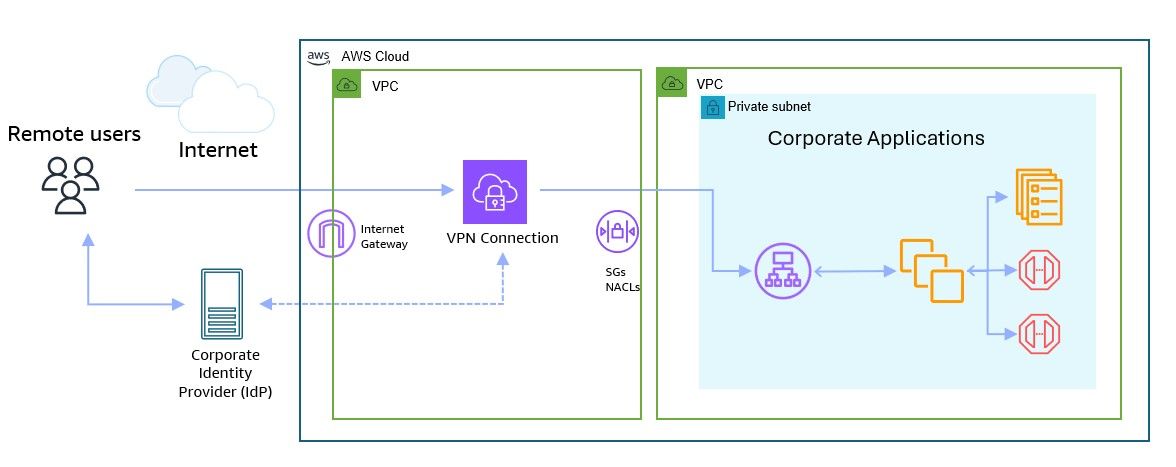
Figure: AWS Verified Access ensures every user request is authenticated, evaluated against policies, and authorized before reaching private applications
Source - AWS Blog
In this architecture, AWS Verified Access acts as a policy enforcement point. Every incoming request from remote users is validated against identity and security policies before being allowed to interact with applications hosted inside private subnets.
2. Access is Granted Per Session, Not Permanently
Authorization is only valid for the current session. The next time a user or device wants to connect, it goes through the same verification steps again, making this a per-session access pattern. A valid session from this morning does not carry forward. Trust resets with every new request.
3. IAM Identity Center and Trusted Identity Propagation
AWS IAM Identity Center centralizes workforce identity across AWS, connecting existing providers, including Microsoft Active Directory, Okta, Google Workspace, and Microsoft Entra ID. Understanding IAM and PAM for enterprise security helps organizations determine the right approach for securing workforce identities and privileged access.
Trusted Identity Propagation extends this across service boundaries by adding identity context to IAM roles, propagating that context to downstream AWS services, and enabling administrators to audit who accessed what data via CloudTrail. A user accessing Amazon Redshift or Athena is known by name and role at every layer, with no shared IAM permissions required.
4. Policies Are Dynamic, Not Static
Access is granted per application only when specific security requirements like user identity and device security posture are met and maintained throughout the session. If a device falls out of compliance mid-session, access is revoked immediately, not at the next login cycle.
Which AWS Services Support Zero Trust Architecture?
AWS offers a variety of services that you can use to implement a Zero Trust architecture, including AWS Verified Access, AWS Identity and Access Management, Amazon VPC Lattice, Amazon Verified Permissions, Amazon API Gateway, and Amazon GuardDuty, all of which help protect AWS resources from unauthorized access.
These services are best understood when grouped by their function within a Zero Trust model: identity, network, and monitoring.
Category | Service | Description | Role in Zero Trust |
| Identity | AWS IAM & IAM Identity Center | IAM controls access to AWS resources, while IAM Identity Center centralizes workforce authentication across accounts and integrates with identity providers. | Forms the foundation of Zero Trust by enforcing least-privilege access and centralized identity control. |
| Identity | AWS Verified Access | Applies Zero Trust access controls to applications by continuously validating user identity and device posture before granting access. Eliminates the need for VPN. | Ensures per-request verification and application-level access enforcement. |
| Identity | Amazon Verified Permissions | Fine-grained authorization service that externalizes and centralizes access policies using the Cedar policy language. | Enables least-privilege and real-time authorization decisions within applications. |
| Network | Amazon VPC Lattice | Connects, secures, and monitors service-to-service communication with centralized access controls and authentication. | Enforces service-level isolation and ensures only necessary communications are allowed. |
| Network | Amazon API Gateway | Manages API access with request signing and identity-based authorization. | Acts as an enforcement point, ensuring all API calls are authenticated and authorized. |
| Monitoring | Amazon GuardDuty | Uses AI/ML, threat intelligence, and anomaly detection to identify security threats in real time. | Provides continuous monitoring and detects suspicious behavior or compromised credentials. |
| Monitoring | AWS CloudTrail | Logs all API activity and access events across AWS environments. | Serves as the audit backbone for traceability, compliance, and incident response. |
How to Implement Zero Trust Security on AWS: Step-by-Step Guide
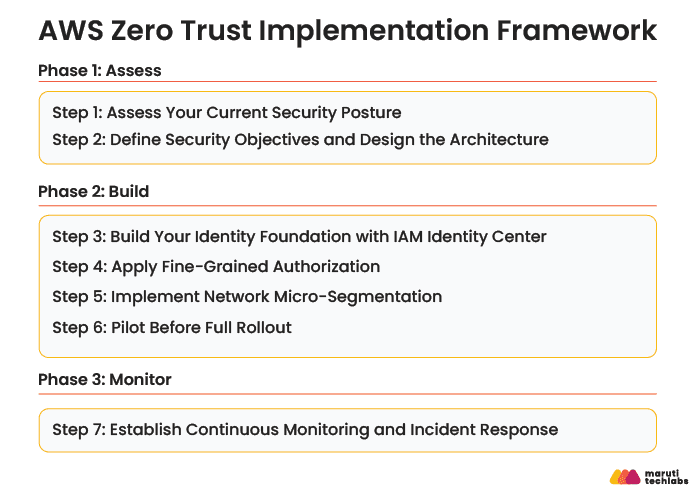
AWS recommends a phased adoption approach to Zero Trust to smooth the transition and minimize disruption to business operations. The seven steps below are organized across three phases: Assess, Build, and Monitor. Each phase builds on the last so teams can make meaningful progress without waiting for a perfect end-state before they begin.
Phase 1: Assess
Step 1: Assess Your Current Security Posture
Before you build anything, you need to know where implicit trust currently lives in your environment.
Conduct an assessment of your existing security infrastructure, policies, and controls. Identify potential vulnerabilities, gaps in security, and areas where Zero Trust principles can provide improvements.
Key things to audit:
- Which IAM roles are over-permissioned or shared across workloads
- Which services communicate without authentication
- Which access patterns have no audit trail in AWS CloudTrail
- Where MFA is missing or not enforced
Tools to use: AWS IAM Access Analyzer, AWS Config, AWS Security Hub
Even the recent industry developments reinforce this shift. For example, SailPoint has expanded its integration with Amazon Web Services to strengthen identity security across cloud environments. This reflects a broader move toward identity-first Zero Trust models, where every access request is continuously verified.
Expert Tip: Do not aim for a perfect assessment before moving forward. AWS Prescriptive Guidance specifically warns against analysis paralysis. Identify your highest-risk systems first and start there.
Step 2: Define Security Objectives and Design the Architecture
Once gaps are found, turn them into precise Zero Trust goals that are connected to your company's security plan.
Create a Zero Trust architecture using identity and access control tools, network segmentation, and ongoing monitoring systems to help you achieve your security objectives. The architecture should be flexible, scalable, and ready to support future expansion.
Your architecture design should cover:
- Which identity provider connects to IAM Identity Center
- Which applications move to AWS Verified Access first
- How network segmentation will be enforced across VPCs and accounts
- How compliance requirements map to specific AWS controls
Tools to use: AWS Well-Architected Tool, AWS CloudFormation for deployable architecture templates
Expert Tip: Represent the architecture in a deployable format such as an AWS CloudFormation template, rather than a static diagram. It gives implementation teams something actionable from day one.
Phase 2: Build
Step 3: Build Your Identity Foundation with IAM Identity Center
Identity is the control plane of Zero Trust. Everything else depends on getting this right first.
Identity and access management form the foundation of a Zero Trust architecture by providing robust user authentication and coarse-grained access control mechanisms, including single sign-on, multi-factor authentication, and identity governance and management solutions.
This includes,
- Centralizing identity through AWS IAM Identity Center
- Connecting your existing IdP (Okta, Microsoft Entra ID, Google Workspace)
- Enforcing phishing-resistant MFA for all workforce access
- Enabling Trusted Identity Propagation for cross-service identity context
Tools to use: AWS IAM Identity Center, AWS IAM, AWS Organizations
Expert Tip: Enable phishing-resistant MFA (FIDO2/passkeys) over SMS-based MFA. SMS MFA is vulnerable to SIM-swap attacks and does not meet the verification bar Zero Trust requires.
Step 4: Apply Fine-Grained Authorization
With identity in place, enforce per-request, policy-driven access at the application and workload layer.
Implement a Zero Trust architecture that enforces granular access controls, strong authentication mechanisms, and continuous monitoring, using cloud-native Zero Trust services such as AWS Verified Access and Amazon VPC Lattice.
What this involves:
- Replacing VPN-based access with AWS Verified Access for corporate applications
- Using Amazon Verified Permissions with Cedar policies for in-application authorization
- Enforcing least-privilege access per session, not per login
Tools to use: AWS Verified Access, Amazon Verified Permissions, AWS IAM Identity Center
Expert Tip: Start with your highest-sensitivity applications in AWS Verified Access first. Once policies are defined there, the same model extends naturally to other applications without rebuilding from scratch.
Step 5: Implement Network Micro-Segmentation
Even with strong identity controls, lateral movement remains a risk if workloads can communicate freely. Micro-segmentation closes that gap at the network layer.
When two components do not need to communicate, they should not be able to, even within the same network segment. You can accomplish this through service-to-service connectivity with embedded authentication and authorization using Amazon VPC Lattice, dynamic micro-perimeters built using Security Groups, and request signing through Amazon API Gateway.
What this involves:
- Defining service-level access policies in Amazon VPC Lattice
- Restricting east-west traffic using Security Groups
- Enforcing request signing for API-level service-to-service calls via API Gateway
Tools to use: Amazon VPC Lattice, Amazon VPC Security Groups, Amazon API Gateway
Expert Tip: Treat micro-segmentation as a workload-by-workload exercise, not a network-wide redesign. Start with your most sensitive data tiers and expand outward iteratively.
Step 6: Pilot Before Full Rollout
Do not attempt an organization-wide Zero Trust deployment in one go. A controlled pilot significantly reduces risk and builds confidence across teams.
Test the Zero Trust architecture in a small-scale, controlled environment. Monitor the pilot deployment closely, gather feedback, and make any necessary adjustments. Be prepared to be flexible early in the process, when Zero Trust moves from being a hypothetical exercise to one you are building real experience with.
What this involves:
- Selecting one AWS account or one application as the pilot scope
- Running Verified Access policies in monitor-only mode before enforcement
- Gathering feedback from end users and security teams before broader rollout
Tools to use: AWS Verified Access (monitor mode), AWS CloudTrail, AWS Security Hub
Expert Tip: Use a non-production account for the initial pilot so policy errors do not affect live workloads. Once verified, promote the same CloudFormation templates to production accounts.
Phase 3: Monitor
Step 7: Establish Continuous Monitoring and Incident Response
Zero Trust is not a one-time deployment. Continuous verification requires continuous visibility.
Establish a comprehensive monitoring and analytics program to assess the security posture continuously and detect any potential anomalies, using advanced security tools and technologies to monitor user behavior, network traffic, and system activities. Create a comprehensive incident response plan that aligns with Zero Trust principles, establishing clear escalation paths, defining roles and responsibilities, and implementing automated incident response mechanisms where possible.
What this involves:
- Enabling Amazon GuardDuty for real-time threat detection across accounts
- Using AWS CloudTrail to maintain a full, tamper-evident access audit trail
- Centralizing findings in AWS Security Hub for unified visibility
- Defining automated remediation playbooks in AWS Security Hub or AWS Systems Manager
Tools to use: Amazon GuardDuty, AWS CloudTrail, AWS Security Hub, Amazon CloudWatch
Expert Tip: Expect your Zero Trust architecture to change over time. Build update processes into your team's workflow from the start so policy changes can be deployed with minimal effort or disruption.
Zero Trust for Multi-Account AWS Environments
Most enterprise AWS environments span dozens or hundreds of accounts across business units, regions, and compliance boundaries. Traditional approaches require duplicating VPN infrastructure, managing separate bastion hosts in each account, and maintaining fragmented security policies across multiple applications, which increases infrastructure costs and expands the attack surface.
Zero Trust solves this by centralizing access policy management rather than replicating security controls per account. The right deployment model depends on your team structure and compliance requirements.
How Do You Implement Zero Trust Across Multiple AWS Accounts?
Implementing Zero Trust in a multi-account environment starts with shifting control from network boundaries to identity and policy-driven access.
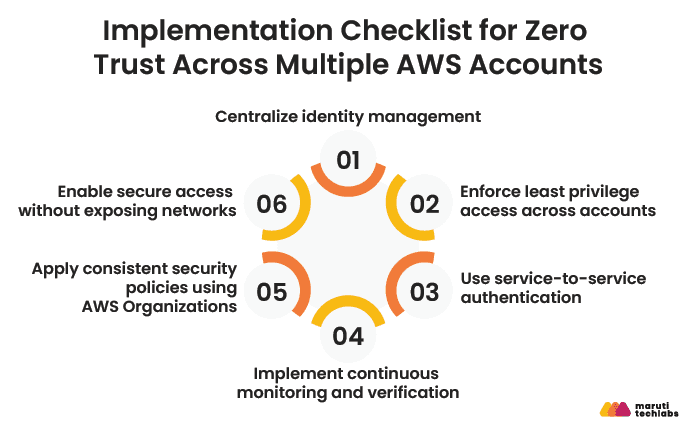
Here’s how leading teams approach it:
1. Centralize identity management
To manage users and permissions across all AWS accounts, utilize a unified identity layer like IAM Identity Center. This minimizes identity sprawl and guarantees consistent authentication.
2. Enforce least privilege access across accounts
For every account, specify IAM roles and policies. Make sure every role is scoped to particular actions, resources, and conditions and steer clear of broad permissions.
3. Use service-to-service authentication
For workloads communicating across accounts, implement strong authentication using mechanisms like IAM roles, signed requests, and API Gateway authorization layers.
4. Implement continuous monitoring and verification
Leverage services like CloudTrail and GuardDuty to monitor activity across all accounts. Every request should be logged, analyzed, and validated in real time.
5. Apply consistent security policies using AWS Organizations
Use Service Control Policies (SCPs) to enforce guardrails across accounts. This ensures that even if misconfigurations occur at the account level, critical security controls remain intact.
6. Enable secure access without exposing networks
Adopt tools like Verified Access to provide application-level access without relying on VPNs or network-based trust.
Centralized vs Hybrid vs Decentralized Models
Choosing the right operating model is key to scaling Zero Trust effectively across multiple AWS accounts. Each model offers a different balance of control, flexibility, and operational overhead.
Model | How It Works | Best For | Advantages | Trade-offs |
| Centralized | Security, identity, and policy management are controlled from a single master account | Organizations with strict compliance and governance needs | Strong control, consistent policy enforcement, easier auditing | Can become a bottleneck, slower team autonomy |
| Hybrid | Core security controls are centralized, while individual teams manage application-level policies | Growing organizations balancing control with flexibility | Balanced governance, scalable, supports team independence | Requires clear boundaries and coordination |
| Decentralized | Each account or team manages its own security policies and controls | Highly autonomous teams or fast-moving product organizations | High flexibility, faster deployments, team ownership | Risk of inconsistency, harder to enforce global security standards |
Zero Trust for AI Agents and Machine-to-Machine Workloads on AWS
As organizations adopt AI-driven systems and automated workflows, a new category of security challenges is emerging. These workloads do not involve human users, yet they access sensitive data, trigger actions, and communicate across services at scale.
This raises an important question: Does Zero Trust apply to AI agents and machine-to-machine interactions? The answer is yes. In fact, these environments demand even stricter enforcement.
Why Zero Trust matters for AI and automated workloads?
Unlike human users, AI agents and services operate continuously and at high speed. A compromised identity or misconfigured permission can lead to a large-scale impact within seconds.
Traditional security models often assume that internal services can be trusted. This assumption breaks down in modern distributed architectures. Zero Trust removes this implicit trust and ensures that every interaction is verified, regardless of whether it originates from a user, service, or AI agent.
How to Apply Zero Trust to AI agents on AWS?
Implementing Zero Trust for machine-driven workloads requires a strong focus on identity, authentication, and fine-grained authorization.
1. Assign strong identities to every workload
Every automated microservice and AI agent should have its own identity. To provide traceability and control, use IAM roles rather than shared credentials.
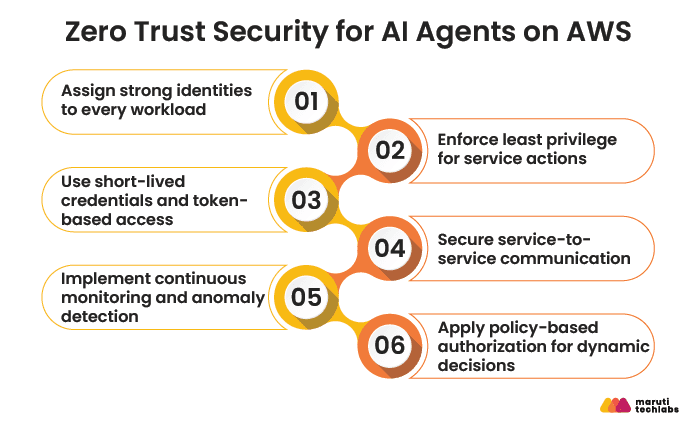
2. Enforce least privilege for service actions
Define tightly scoped permissions for each workload. Avoid broad policies and ensure that agents can only access the resources they absolutely need.
3. Use short-lived credentials and token-based access
Depend on credentials produced by identity federation or IAM roles so that there is less chance of long-term credential exposure.
4. Secure service-to-service communication
All communication between services should be authenticated and authorized. Use API Gateway, signed requests, or service mesh patterns to validate every request.
5. Implement continuous monitoring and anomaly detection
Utilize monitoring tools on AI bots' behavior patterns. Alerts and automated reactions should be triggered by a change from expected behavior.
6. Apply policy-based authorization for dynamic decisions
Key considerations for AI-driven environments
- Scale and speed: AI agents can generate a high volume of requests. Security controls must be efficient and scalable.
- Behavioral unpredictability: Machine learning systems can behave differently over time. Continuous verification becomes essential.
- Data sensitivity: AI systems often access critical datasets, making strict access control and auditing non-negotiable.
Zero Trust and Compliance: NIST, CISA, HIPAA, PCI-DSS, GDPR
AWS supports 143 security standards and compliance certifications globally, and Zero Trust's continuous verification, least-privilege access, and audit logging directly satisfy what HIPAA, PCI-DSS, GDPR, and NIST frameworks require.
| Framework | What It Requires | How Zero Trust on AWS Addresses It | Key AWS Services |
| NIST SP 800-207 | Defines the foundational tenets of Zero Trust: per-session access, dynamic policy, continuous monitoring, least privilege | AWS aligns its Zero Trust services directly to NIST 800-207, ensuring all communication is secured independent of network location by individually authenticating and authorizing every API call over TLS | IAM Identity Center, AWS Verified Access, Amazon VPC Lattice, CloudTrail |
| CISA Zero Trust Maturity Model (ZTMM v2) | Four maturity stages (Traditional, Initial, Advanced, Optimal) across five pillars: Identity, Devices, Networks, Applications, Data | While specifically intended for federal agencies, CISA recommends all organizations use the ZTMM to advance their zero trust maturity across all five pillars. AWS Verified Access, IAM Identity Center, and GuardDuty map directly to the Identity, Network, and Visibility pillars | AWS Verified Access, GuardDuty, Security Hub, IAM Identity Center |
| HIPAA | Access controls, audit controls, transmission security, and integrity controls for protected health information (PHI) | AWS aligns its HIPAA risk management program with FedRAMP and NIST 800-53, which are higher security standards that map to the HIPAA Security Rule. Customers may use any AWS service in a HIPAA-designated account but should only process, store, and transmit PHI in HIPAA-eligible services defined in the Business Associate Addendum. AWS Zero Trust enforces access controls and audit trails at the service level, satisfying HIPAA's technical safeguard requirements | IAM, AWS CloudTrail, Amazon Macie, AWS Config, Amazon GuardDuty |
| PCI-DSS | Restrict access to cardholder data, monitor all access to network resources, and implement strong access control measures | Zero Trust's least-privilege and micro-segmentation controls directly enforce PCI-DSS network isolation requirements. AWS Config Conformance Packs offer pre-built templates for PCI-DSS and allow custom rule creation, manageable at the single account or organization level. | AWS Config, Security Hub, VPC Security Groups, Amazon VPC Lattice, CloudTrail |
| GDPR | Data minimization, purpose limitation, access controls, and the ability to demonstrate compliance through audit records | AWS Artifact offers compliance documentation, while AWS CloudTrail generates tamper-evident audit logs to assist enterprises in meeting GDPR Article 30 record-keeping requirements. | AWS CloudTrail, Amazon Macie, AWS Artifact, IAM Identity Center |
Expert Tip: AWS Config Conformance Packs can be deployed and monitored across multiple accounts and regions through AWS Organizations, offering pre-built compliance templates for HIPAA, NIST, and PCI-DSS with custom rule creation capability. Use these as your compliance baseline before layering Zero Trust controls on top, so you are not auditing from scratch
Common Challenges in Zero Trust Implementation (and How to Solve Them)
While Zero Trust significantly strengthens cloud security, implementing it in an AWS environment comes with architectural, operational, and organizational challenges. These must be addressed strategically to ensure a successful transition.
Challenge | Business Impact | How to Overcome (AWS + Strategy) |
| Complex Identity Management | Misconfigured roles can lead to unauthorized access | Implement fine-grained IAM roles, enforce MFA, and adopt identity federation |
| Over-Permissioned Access | Increased attack surface and compliance risk | Apply least privilege policies and continuously audit permissions using AWS IAM Access Analyzer |
| Lack of Visibility Across Environments | Delayed threat detection and weak audit readiness | Use AWS CloudTrail, CloudWatch, and centralized logging strategies |
| Legacy Architecture Limitations | Difficult to enforce Zero Trust principles | Modernize applications and adopt microservices with secure access controls |
| Network Segmentation Complexity | Lateral movement risk within cloud environments | Use VPC segmentation, private subnets, and AWS PrivateLink |
| Misconfigurations in Cloud Resources | One of the leading causes of cloud breaches | Continuously monitor using AWS Config and enforce guardrails with Control Tower |
| Scalability of Security Policies | Inconsistent enforcement across accounts | Use AWS Organizations and Service Control Policies (SCPs) |
| Operational Overhead | Increased management complexity for teams | Automate security controls and compliance checks using Lambda and Infrastructure as Code |
| User Experience Friction | Resistance from internal teams due to stricter access controls | Implement adaptive authentication and balance security with usability |
| Continuous Monitoring & Maintenance | Requires dedicated resources and expertise | Deploy automated threat detection tools like GuardDuty and Security Hub |
Conclusion
Zero Trust on AWS is not a future initiative. With identity-based breaches rising and the average breach now costing $4.44 million, the cost of waiting is measurable. AWS gives you a native stack, from Verified Access and Verified Permissions to IAM Identity Center, VPC Lattice, GuardDuty, and CloudTrail, that makes Zero Trust implementable without rebuilding your infrastructure or replacing your existing identity provider.
Start with your highest-risk application, validate your access policies, and expand from there. Organizations that approach Zero Trust as a phased journey rather than a one-time deployment consistently see faster results, lower implementation costs, and stronger compliance posture across HIPAA, PCI-DSS, GDPR, and NIST 800-207. If you are ready to move from implicit trust to verified access across your AWS environment, the architecture, tools, and roadmap are already in place.
FAQs
1) What are the five pillars of AWS security?
The AWS Security Pillar of the Well-Architected Framework is built around five core areas: identity and access management, detection, infrastructure protection, data protection, and incident response. In a Zero Trust context, all five work together rather than in isolation:
- Identity and access management governs who can reach what and under what conditions
- Detection surfaces threats in real time through services like GuardDuty and Security Hub
- Infrastructure protection limits the blast radius of any compromise through micro-segmentation and network controls
- Data protection ensures sensitive information is encrypted and access-controlled at the resource level
- Incident response ensures your team can act fast when something does go wrong
2) How does Zero Trust architecture differ from traditional network security?
Traditional network security works on the assumption that everything inside the corporate network is safe. Once you are in, you are trusted. Zero Trust flips that entirely. It treats every access request as potentially hostile regardless of where it originates, whether that is inside the office network, a remote employee's home, or a cloud workload.
The core differences:
- Trust model: Traditional security trusts by network location. Zero Trust trusts by verified identity, device posture, and context on every request
- Access control: Traditional security grants broad access once inside the perimeter. Zero Trust grants access per session, per application, with least privilege enforced
- Breach containment: Traditional security has no answer for lateral movement once an attacker is inside. Zero Trust's micro-segmentation structurally limits how far a compromised credential can travel
- Visibility: Traditional security logs at the perimeter. Zero Trust logs every access request at every layer, giving security teams full audit trails for compliance and incident response
3) What is the difference between AWS Verified Access and Amazon Verified Permissions?
They solve different problems and work at different layers. A simple way to think about it:
- AWS Verified Access is the front door. It controls who can reach your corporate applications by evaluating user identity and device posture before a request ever reaches the application. It replaces VPN-based access entirely.
- Amazon Verified Permissions governs what happens once someone is inside. It determines what a user can do, which data they can see, which actions they can take, and which resources they can interact with, all enforced through Cedar policies evaluated in milliseconds.
In practice, most enterprise Zero Trust architectures on AWS use both together. Verified Access handles workforce access at the network boundary, and Verified Permissions enforces fine-grained authorization inside the application itself.
4) Is SMS-based MFA compliant with Zero Trust in 2026?
Technically, SMS-based MFA satisfies the basic requirement of a second factor, but it falls short of what Zero Trust demands in 2026. The key risks:
- SIM-swap attacks allow attackers to intercept SMS codes without touching the target device
- SMS OTP is now categorized as a restricted authenticator by NIST 800-63B, meaning it carries known weaknesses that organizations should actively work to move away from
- Real-time phishing kits can capture and replay SMS codes within seconds of delivery
The current best practice is phishing-resistant MFA using FIDO2 security keys or passkeys, both supported through AWS IAM Identity Center. If your organization still relies on SMS MFA, treat it as a transitional control rather than a permanent one and prioritize migrating high-privilege users first.
5) How long does it take to implement Zero Trust on AWS?
It depends on the size of your environment, the number of applications in scope, and how mature your existing identity infrastructure is. A realistic timeline for most enterprise teams:
- Weeks 1 to 4: Current state assessment, gap analysis, and Zero Trust architecture design
- Weeks 4 to 10: Identity foundation setup with IAM Identity Center, MFA enforcement, and Verified Access pilot on the first application
- Months 3 to 6: Expanding Verified Access and Verified Permissions coverage across additional applications and workloads
- Ongoing: Continuous monitoring refinement, policy updates, and expanding micro-segmentation coverage
The key is not to treat Zero Trust as a one-time project with a fixed end date. AWS Prescriptive Guidance is clear that Zero Trust is an iterative journey, and organizations that try to implement everything at once tend to stall. Starting with your highest-risk application and building from there is consistently the faster path.
6) What are the cost considerations for AWS Zero Trust implementation?
AWS Zero Trust is largely built on services that carry no additional licensing cost beyond standard AWS usage. Here is a quick breakdown:
- AWS IAM Identity Center: No additional charge
- AWS Verified Access: Priced on instance hours and number of requests processed
- Amazon Verified Permissions: Charged per authorization request evaluated per month
- Amazon GuardDuty and AWS CloudTrail: Usage-based pricing per volume of data analyzed and events logged
The bigger cost consideration for most organizations is not the AWS service charges but the internal engineering time required for policy design, identity provider integration, and phased rollout. Organizations that attempt a full-environment deployment without a phased approach tend to see higher implementation costs and longer timelines. Starting with a focused pilot scope keeps both costs and complexity manageable.
Why Choose Maruti Techlabs as Your Strategic Partner for Implementing Zero Trust on AWS?
As an AWS Partner, Maruti Techlabs designs and implements Zero Trust architectures for enterprises across healthcare, insurance, and legal tech. Our engagements go beyond advisory. We architect and build Zero Trust controls directly on AWS, covering:
- Identity Foundation: IAM Identity Center, AWS Verified Access, phishing-resistant MFA, and Trusted Identity Propagation
- Fine-Grained Authorization: Amazon Verified Permissions with Cedar policies for per-session, least-privilege access
- Network Micro-Segmentation: VPC Lattice, Security Groups, and API Gateway to eliminate lateral movement
- Multi-Account Governance: Centralized Verified Access across AWS Organizations with AWS Control Tower security baselines
- Compliance and Monitoring: GuardDuty, CloudTrail, and Security Hub configured to meet HIPAA, PCI-DSS, GDPR, and NIST 800-207 requirements
If you are building Zero Trust on AWS for the first time or maturing an existing implementation, connect with our cloud security team experts to get started.