AWS Explained: Your Go-To Guide for Superior Web Hosting
As the demand for scalable and reliable cloud solutions grows, businesses of all sizes are turning towards web hosting services. As organizations seek reliable, scalable cloud migration solutions for their digital presence, AWS's comprehensive platform has much to offer. Whether launching a startup or managing enterprise-level operations, companies are discovering that AWS's flexible hosting services align with their business objectives.
AWS is a dominant force in the cloud hosting market. According to W3Techs, AWS currently holds the largest market share in web hosting, powering 5.4% of all websites globally. This impressive share demonstrates AWS’s influence in the hosting industry, making it a preferred choice for businesses seeking reliability, scalability, and innovation in hosting solutions.
This blog explores the essentials of AWS hosting services, its hosting options, benefits, and challenges of using AWS, and how it compares as a hosting solution across different use cases.
What is AWS Hosting?
AWS hosting is a complete cloud computing solution that makes over 200 of Amazon's cloud products and services available. It has established itself as the world's largest cloud storage and computing platform through scalability, security, and versatility.
It applies in various industries and provides flexible, on-demand infrastructure without physical hardware or initial investments. Its greatest strength is that it caters to organizations' needs differently. AWS offers customized solutions for everything, be it small websites or complex enterprise applications.
A strong infrastructure can easily support large volumes of work, so it is ideal for startups, SMEs, and large companies. AWS adheres to various regulatory frameworks in the medical line of service, the payment card industry, and even FedRAMP, thus making it the trusted choice of healthcare, finance, and governmental entities with more stringent data protection needs. High compliance levels provide businesses with the ability to keep sensitive information within themselves while being in line with very strict regulations.
Having established a foundational understanding of AWS hosting services, it will be imperative to enumerate the numerous hosting solutions that AWS offers.
Types of AWS Hosting Services
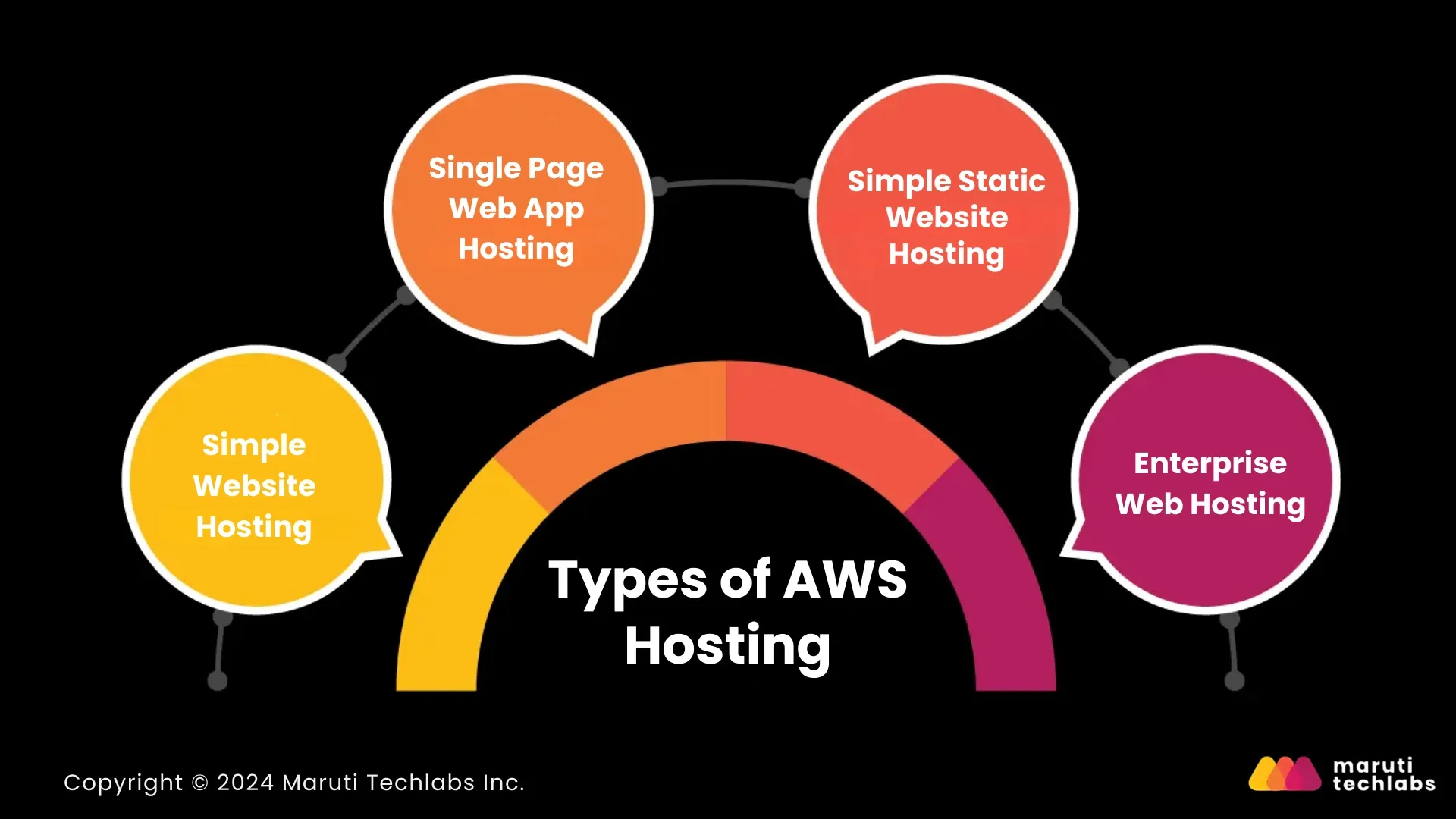
AWS offers multiple hosting solutions designed to cater to different websites and applications. Let’s explore some of the primary hosting types offered:
1. Simple Website Hosting
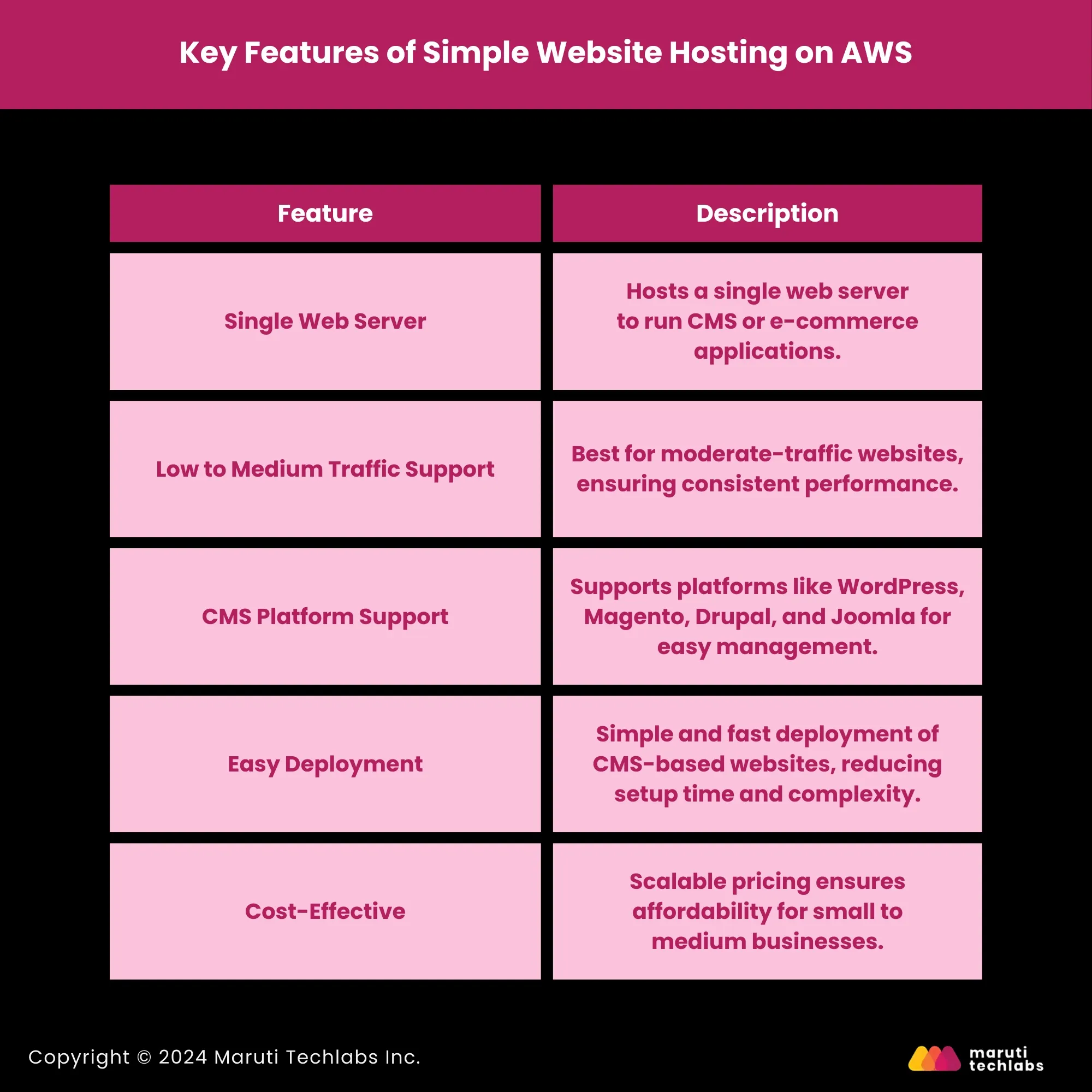
Simple Website Hosting on AWS is ideal for small to medium-sized websites, particularly those that rely on content management systems (CMS) such as WordPress, Magento, Joomla, or Drupal.
AWS hosting services provide a straightforward setup with a single web server, sufficient to handle low to medium-traffic volumes, making it a popular choice for blogs, small e-commerce stores, and corporate websites.
This hosting option is perfect for businesses or individuals looking for reliable infrastructure without complex configurations. With AWS hosting services, deploying CMS-based applications becomes seamless, as users can leverage a wide range of supported platforms and benefit from AWS's scalability and security features.
Key Features of Simple Website Hosting on AWS
Suitable Use Cases
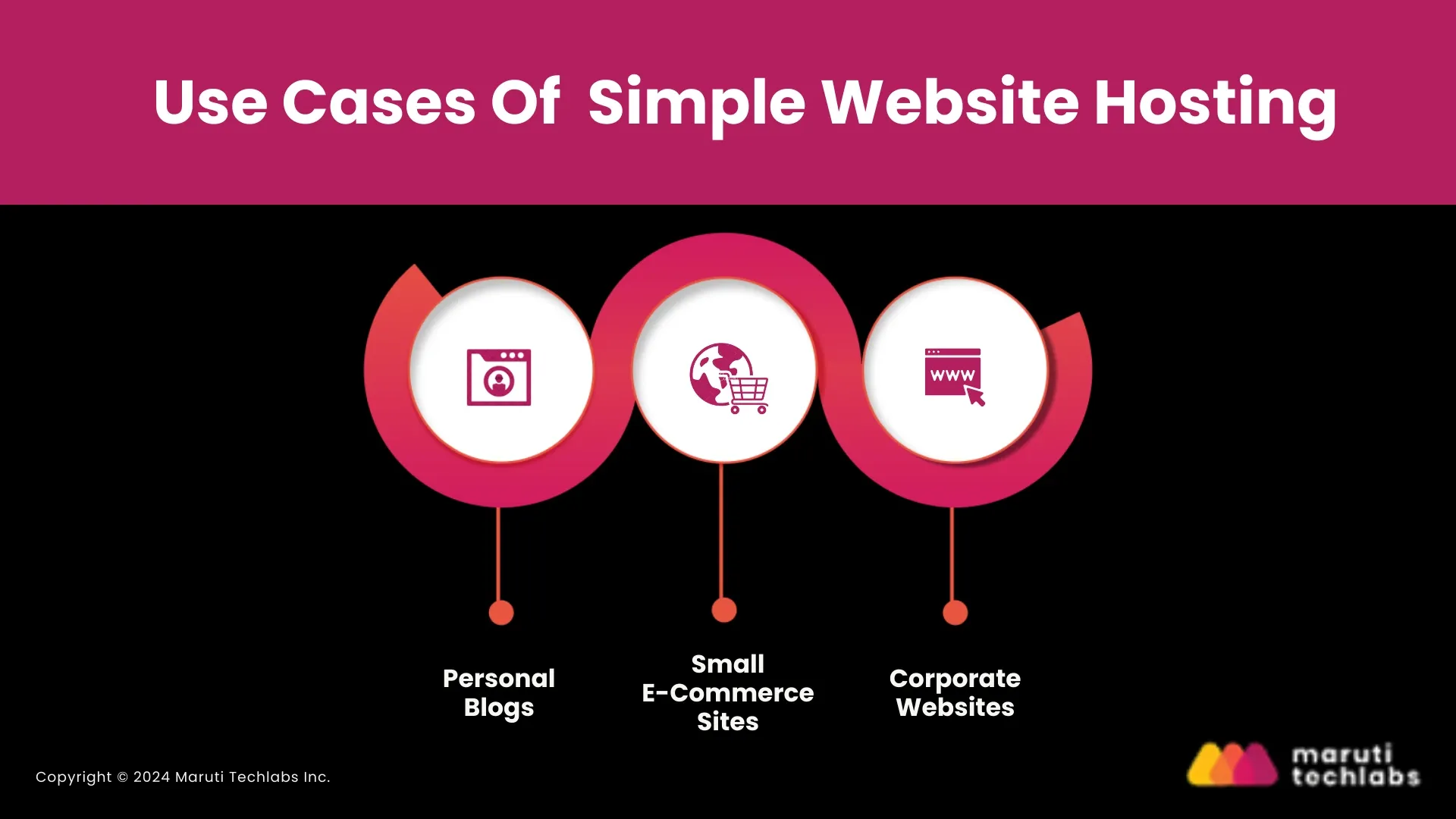
- Personal Blogs: Users can easily host personal or niche blogs, ensuring performance stability and low maintenance.
- Small E-Commerce Sites: For businesses just starting, AWS can provide the infrastructure to run small online stores without expensive hosting solutions.
- Corporate Websites: Small to medium businesses can use AWS to host their official websites, ensuring reliability and security without complex infrastructure.
2. Single Page Web App Hosting
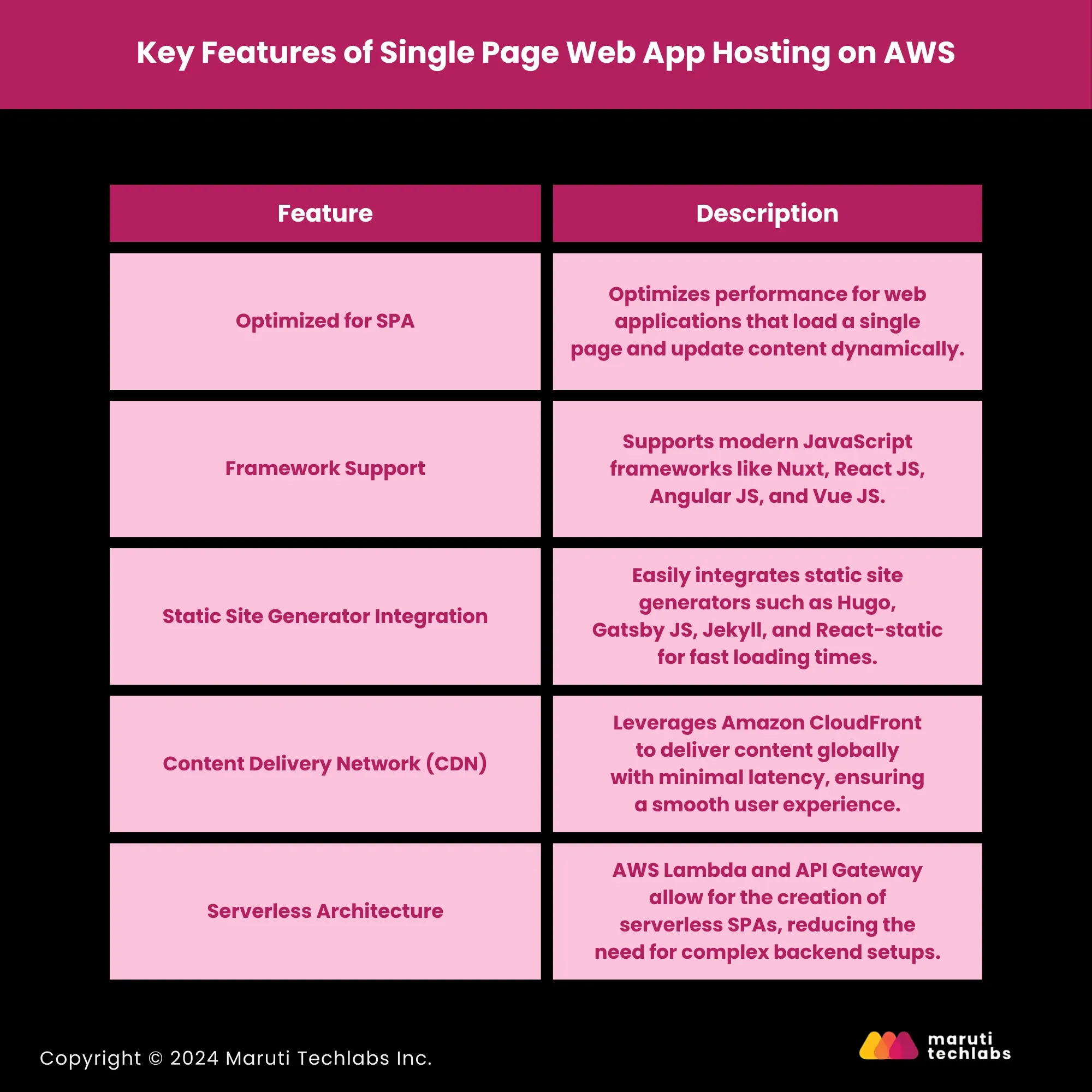
Single-page web application (SPA) hosting on AWS is designed for modern, dynamic websites that load all their content on a single page. This hosting solution optimizes performance for static web applications built with technologies like CSS, HTML, and JavaScript.
By leveraging AWS hosting services, businesses can host applications that offer seamless user experiences without reloading the entire page during navigation. SPAs are widely used for dynamic interaction applications like dashboards, analytics platforms, or digital-commerce portals.
AWS provides full support to popular SPA frameworks such as React JS, Vue JS, and AngularJS, as well as static site generators such as Hugo, Gatsby JS, Jekyll, and React Static.
Key Features of Single Page Web App Hosting on AWS:
Ideal Use Cases

- Real-Time Dashboards: These applications display real-time data updates without refreshing the entire page, such as stock market or analytics dashboards.
- E-Commerce Platforms: SPAs offer smooth and fast interactions for e-commerce sites, ensuring users can browse products and complete transactions without delays.
- Social Media Apps: SPAs are perfect for social platforms that require continuous user interactions without interrupting the flow of content updates.
With AWS’s single-page web app hosting, businesses can create fast, dynamic, and scalable applications that deliver high performance and an exceptional user experience. By combining the power of modern JavaScript frameworks and AWS’s global infrastructure, SPAs can be deployed rapidly and scale effortlessly.
3. Simple Static Website Hosting
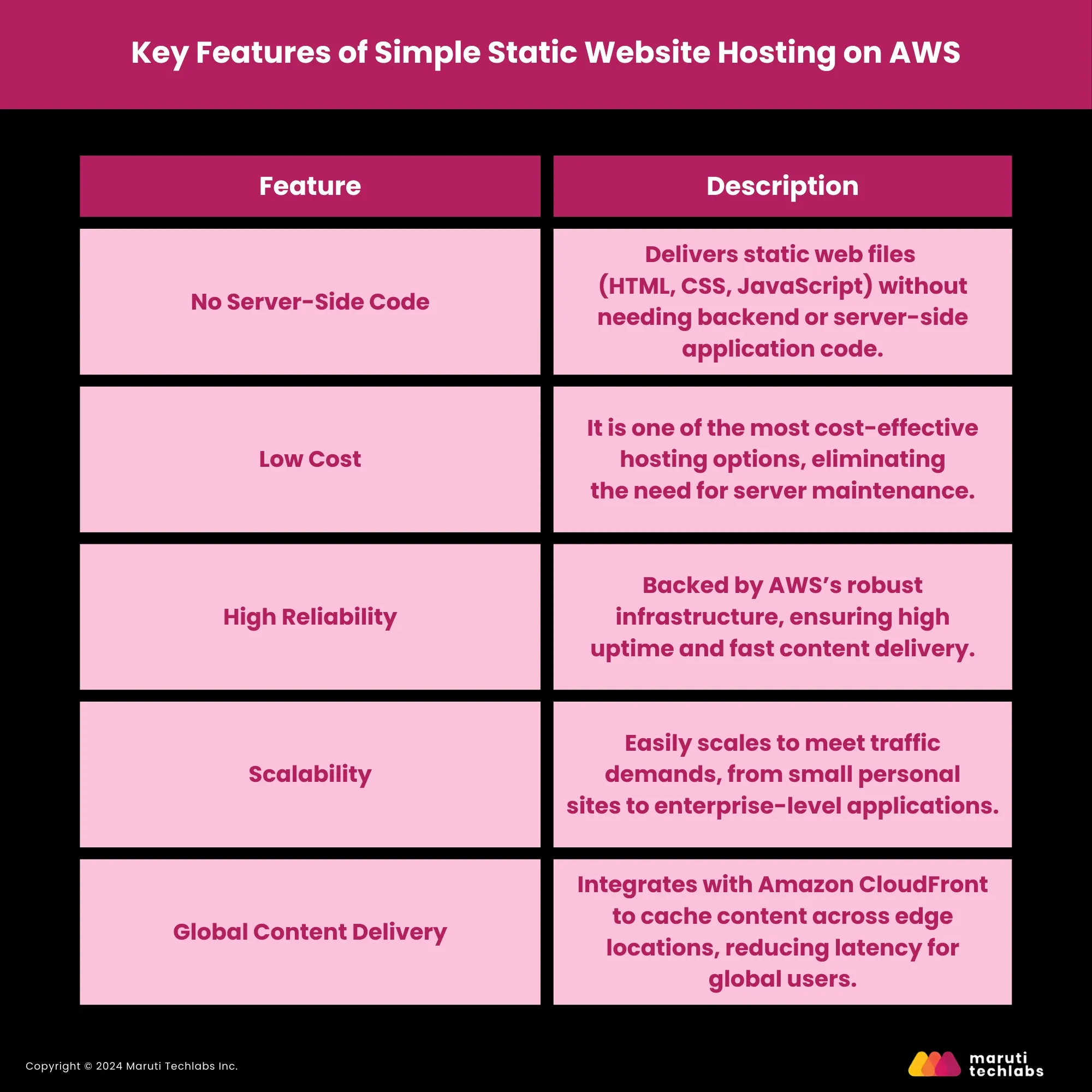
AWS’s Simple Static Website Hosting is an efficient, affordable, and highly scalable solution for websites without server-side processing. This hosting type is designed to serve static content such as HTML, CSS, JavaScript, images, and videos without a backend server or database.
It’s an ideal choice for websites like portfolios, landing pages, or documentation sites where fast load times and high reliability are essential, but server-side scripting is unnecessary.
AWS’s static website hosting uses Amazon S3 (Simple Storage Service) to store and deliver static web files, allowing businesses to deploy content quickly and easily. This approach ensures that even high-traffic websites can maintain performance without costly infrastructure.
Key Features of Simple Static Website Hosting on AWS:
Suitable Use Cases
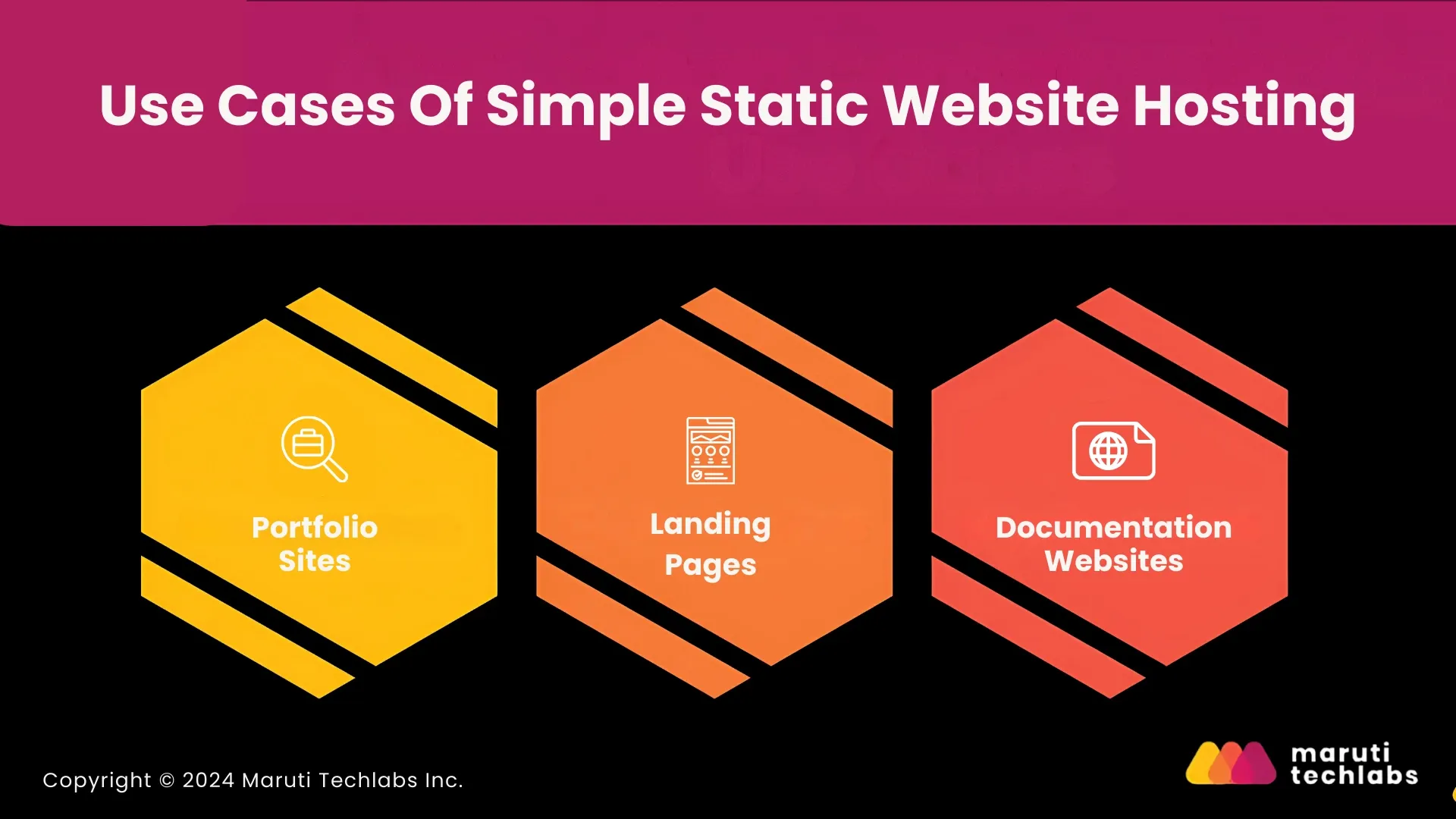
- Portfolio Sites: For designers, developers, or photographers showcasing their work, static hosting offers fast load times and a streamlined user experience.
- Landing Pages: Perfect for businesses needing highly reliable landing pages with quick load times to support marketing campaigns.
- Documentation Websites: Ideal for hosting user manuals, guides, or technical documentation that doesn’t require backend logic.
4. Enterprise Web Hosting
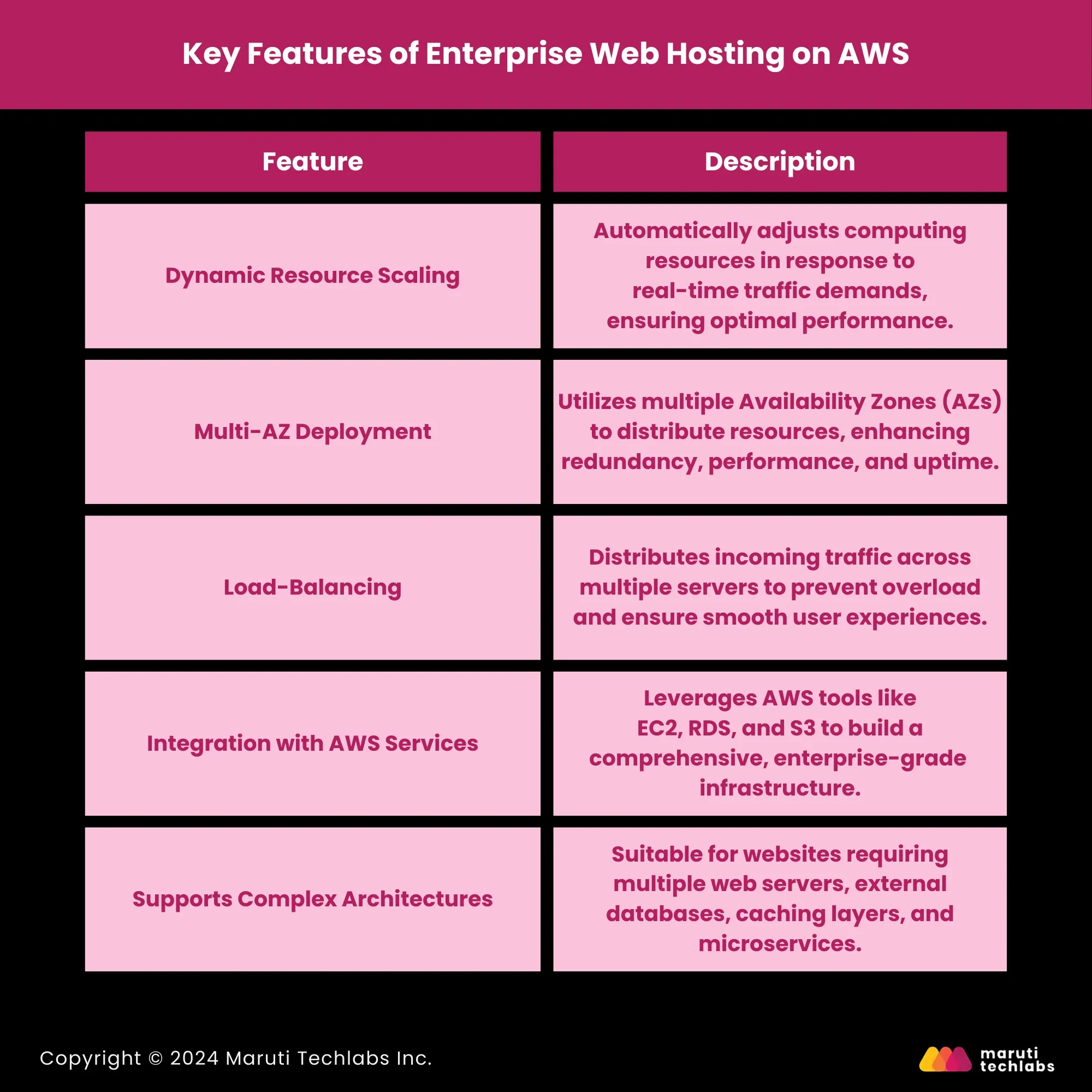
AWS’s Enterprise Web Hosting is tailored for large-scale businesses that demand high-performance infrastructure to manage substantial traffic volumes. It is particularly well-suited for complex platforms like large e-commerce stores, media outlets, and financial institutions. AWS provides a scalable and highly reliable environment, with over 99.99% uptime availability across its multiple availability zones.
This ensures that businesses experience minimal disruptions, making it an ideal solution for those where even a minute of downtime can result in significant losses. AWS’s flexible infrastructure allows companies to adjust resources in real-time, aligning with traffic demands while maintaining optimal performance.
AWS’s enterprise hosting leverages a combination of services such as Auto Scaling, Elastic Load Balancing, and Amazon RDS (Relational Database Service), allowing for seamless resource management and application scaling across multiple servers and databases.
Key Features of Enterprise Web Hosting on AWS
Ideal Use Cases
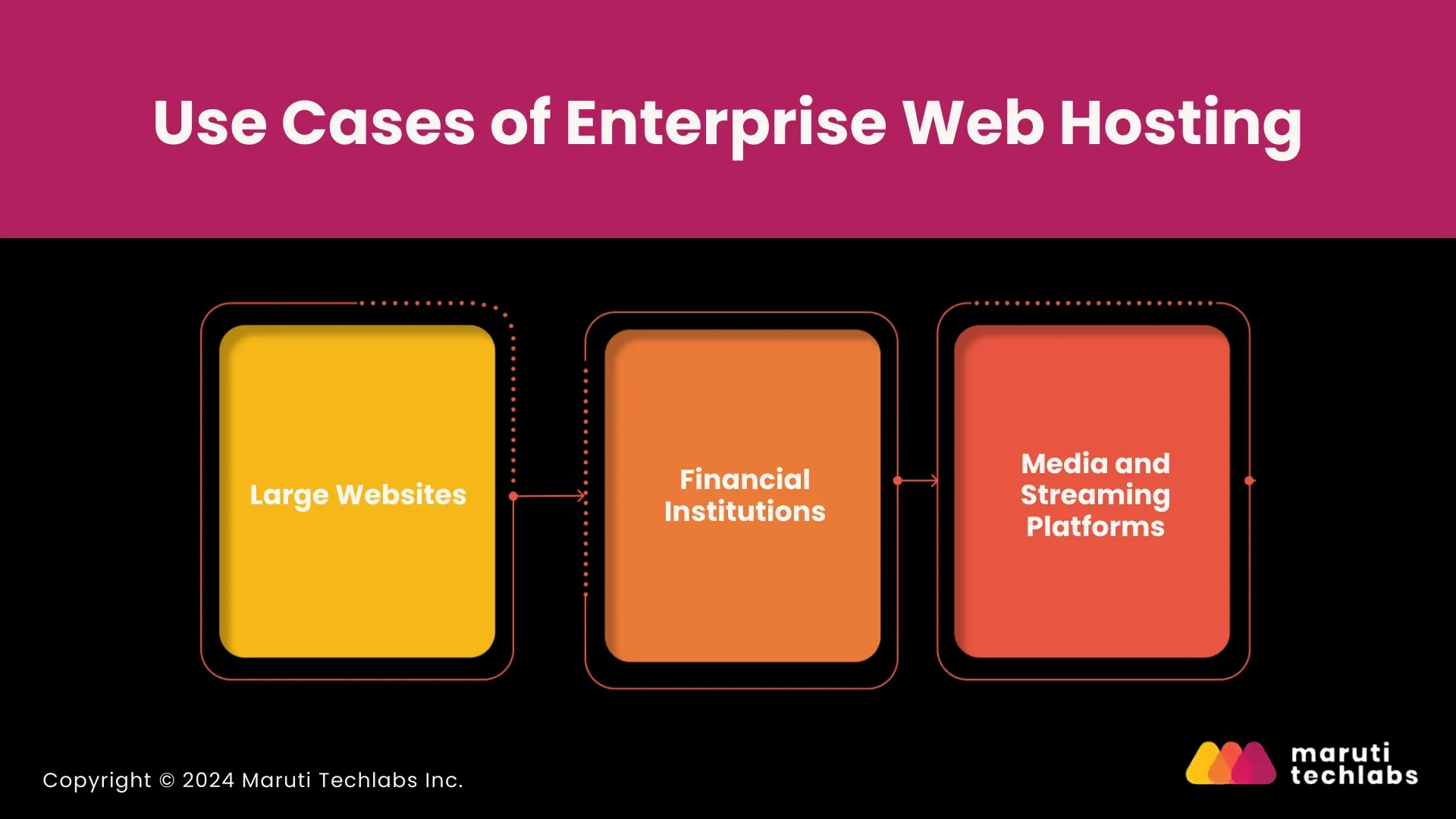
- Large Websites: Enterprise web hosting can dynamically scale and manage high traffic volumes during peak periods, such as holiday sales or promotions.
- Financial Institutions: For platforms requiring low latency and high uptime to process financial transactions, AWS provides the infrastructure to handle large volumes of sensitive data securely.
- Media and Streaming Platforms: High-traffic media sites and streaming services can leverage AWS’s infrastructure to provide seamless content delivery to users around the world without performance degradation.
AWS Hosting vs. Traditional Hosting
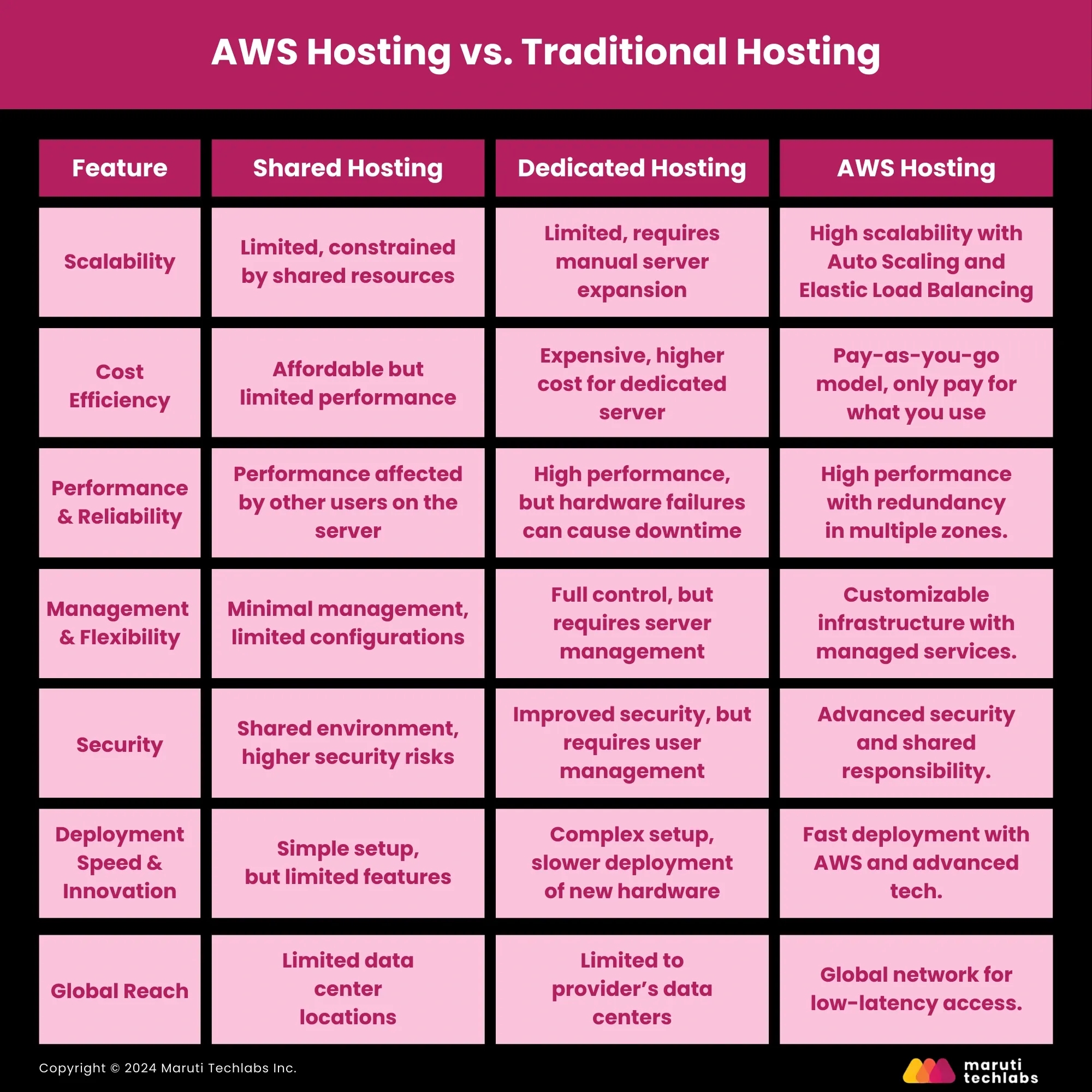
When considering hosting options, AWS provides a unique cloud-based approach compared to traditional hosting methods like shared or dedicated hosting. Both have advantages, but AWS offers greater flexibility, scalability, and innovation for modern web applications and business needs.
Below is a comparison between AWS hosting and traditional hosting, mainly shared and dedicated hosting solutions.
Advantages of AWS Hosting
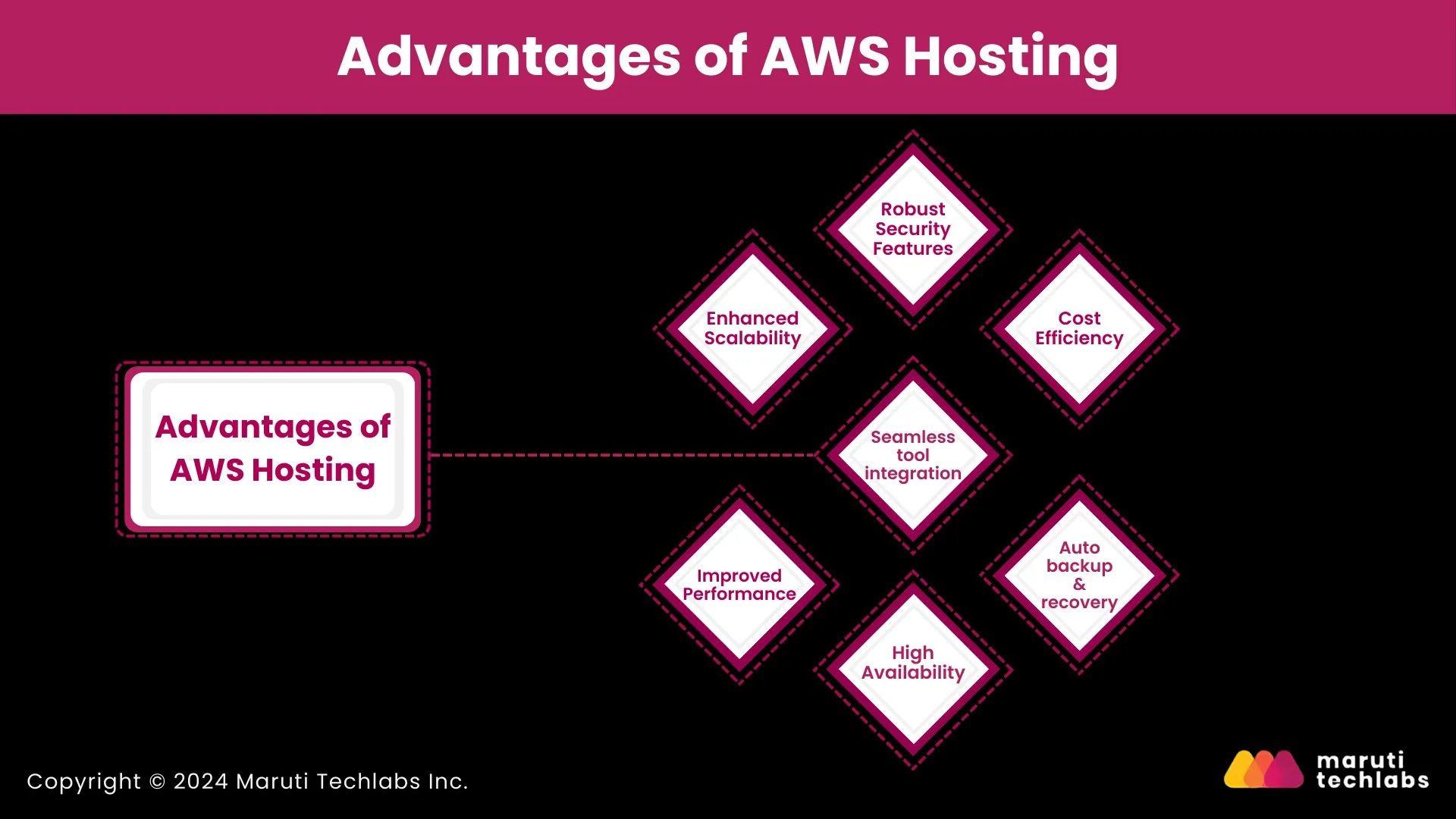
AWS hosting services provide numerous advantages, making it an ideal choice for businesses of all sizes. Below is a detailed overview of the key benefits.
1. Enhanced Scalability
One of the most compelling reasons to opt for AWS hosting services is its ability to scale resources on demand. AWS’s Auto Scaling feature automatically adjusts the number of Amazon EC2 instances based on incoming traffic patterns.
This ensures that websites and applications remain responsive during traffic surges, such as seasonal promotions or flash sales, without manual intervention. This scalability is crucial for businesses like e-commerce stores, where user traffic can fluctuate significantly.
2. Improved Performance
AWS offers a worldwide network of data centers, enabling businesses to host their websites closer to their target audience. This geographical diversity reduces latency and enhances website performance, leading to faster page load times and improved user experience.
In addition, services like Amazon CloudFront, a content delivery network (CDN), cache static content closer to users, significantly boosting website speed. Faster websites enhance user satisfaction and drive higher sales and conversion rates.
3. Robust Security Features
Security is one of AWS’s USPs. With features such as network isolation through Amazon VPC (Virtual Private Cloud), DDoS protection via AWS Shield, and a comprehensive set of compliance certifications (HIPAA, PCI-DSS, and FedRAMP, to name a few), AWS hosting services provide multi-layered security.
Businesses handling sensitive customer data, particularly in industries like healthcare or finance, can rely on AWS to meet stringent regulatory requirements. AWS Management and Access Identity allow you to restrict who can access backend systems, further bolstering sensitive data security.
4. High Availability
Downtime can result in lost revenue and customer dissatisfaction. AWS’s infrastructure is built for high availability, ensuring that websites and applications remain accessible even during traffic spikes or hardware failures.
Services like AWS Elastic Load Balancing help distribute traffic across multiple servers, ensuring that no single server is overwhelmed. This fault-tolerant setup ensures consistent uptime, even during peak usage periods.
5. Cost Efficiency
Amazon Web Services uses a pay-as-you-go model, avoiding large upfront hardware costs—ideal for small and medium enterprises. Additionally, AWS hosting services offer a free tier for businesses to test out services before committing to paid options.
For example, an e-commerce business can store product images using Amazon S3, paying only for the space consumed. This flexibility makes AWS an attractive option for growing businesses that need to scale resources but want to avoid heavy financial commitments.
6. Automated Backups and Recovery
Data loss can significantly impact businesses. AWS provides easy-to-use backup options that ensure data is regularly backed up and stored securely. Automated backups help companies to recover quickly from system failures or cyberattacks, minimizing downtime and data loss.
With AWS’s recovery options, businesses can restore their applications to a previous state with minimal effort, safeguarding important customer and business data.
7. Seamless Integration with Other Tools
AWS’s extensive API ecosystem makes it easy to integrate third-party tools and services and provides easy integration of third-party tools and services through its massive API ecosystem.
Users can enhance their websites hosted on AWS by bringing sophisticated analytic tools, machine learning algorithms, or even IoT devices into the equation. This way, businesses customize their cloud infrastructure toward the needs of their innovation goals, hence promoting growth and innovation.
Despite the notable advantages presented, it is crucial to consider the potential drawbacks associated with AWS hosting services, as these may influence prospective users' decision-making process.
Drawbacks of AWS Hosting
While AWS hosting services offer numerous advantages, they are not without some limitations. It’s essential to consider the following potential challenges:
1. Complexity for New Users
AWS’s extensive ecosystem, with over 200 cloud-based products, can be daunting for users new to cloud hosting. Setting up and managing an AWS environment often requires advanced technical skills, including knowledge of networking, server configuration, security policies, and cost management.
The learning curve can be steep for businesses without a dedicated IT team or cloud experts, and even minor configuration errors could lead to performance or security issues.
2. Complicated Billing Structure
One of the most common complaints about AWS is its complex billing model. Although the pay-as-you-go pricing model offers flexibility, it can become confusing due to the wide range of services and options that incur charges.
AWS bills for various elements, including computing power, data transfer, storage, load balancing, and additional services like CloudFront or AWS Lambda. As a result, users can find themselves paying for services they didn’t realize they were using.
3. Cost Unpredictability
While essential for businesses expecting fluctuating traffic, the auto-scaling feature can lead to unexpected costs. In periods of high traffic, AWS automatically scales resources, which can significantly increase your monthly bill if not properly managed.
Predicting costs can be challenging without a deep understanding of how AWS bills for its services, and reviewing the monthly billing report, which includes hundreds of line items, can be overwhelming.
4. Not Suitable for Everyone
While AWS hosting services offer a robust suite of hosting services, it may not be the best choice for every business. Smaller companies or startups that don’t require advanced scalability and features may find AWS’s offerings excessive and too costly for their needs.
AWS's robust infrastructure can feel overkill for simple websites, personal blogs, or small-scale online stores when more affordable, straightforward hosting options are available.
Conclusion
AWS hosting services provide a robust, scalable, and secure solution for businesses with various hosting needs. Its tailored hosting solutions are a perfect fit for your simple static websites to the most complex enterprise applications.
However, the right choice depends on your technical requirements and budget. Additionally, organizations with limited IT resources may find the complexity and potential costs of AWS challenging and might benefit from exploring alternative hosting providers.
Having an expert by your side is critical when considering your options. At Maruti Techlabs, we help businesses navigate the challenges of cloud hosting and cloud migration.
As a trusted AWS partner, we ensure you can fully harness AWS's potential, optimizing performance and scalability to meet your business needs. Contact us today to learn how we can support your cloud journey and set your business up for success in the ever-evolving digital world.
FAQs
1. Can I migrate my existing website to AWS hosting?
Yes, AWS provides tools like AWS Migration Hub and AWS Database Migration Service to assist with transferring websites and databases, enabling a smooth migration process with minimal downtime.
2. What support options are available for AWS hosting users?
AWS offers various support plans, ranging from the Basic plan for general guidance to more comprehensive options like Business and Enterprise Support, which include 24/7 access to cloud support engineers and proactive monitoring.
3. Can I launch multiple Amazon cloud servers?
Yes, AWS allows you to launch multiple EC2 instances (cloud servers) to support different applications or distribute workloads across various servers, making it easy to scale your infrastructure.
4. Do I have to pay separately for Amazon Cloud Services?
Yes, AWS follows a pay-as-you-go pricing model, where you pay separately for each service you use, such as computing power, storage, and data transfer, based on usage.
5. How secure is my website on managed Amazon hosting services?
AWS provides robust security features like DDoS protection with AWS Shield, data encryption, and secure networking through Virtual Private Clouds (VPCs), ensuring a high level of security for hosted websites.