Cloud-Native Architecture: Build Apps That Scale and Recover

- Cloud-native architecture builds apps from microservices and containers that scale, recover, and ship updates automatically.
- It is a design approach, not a hosting choice. A monolith on cloud VMs is not cloud-native.
- 82% of container users run Kubernetes in production, per the Cloud Native Computing Foundation CNCF's 2025 survey.
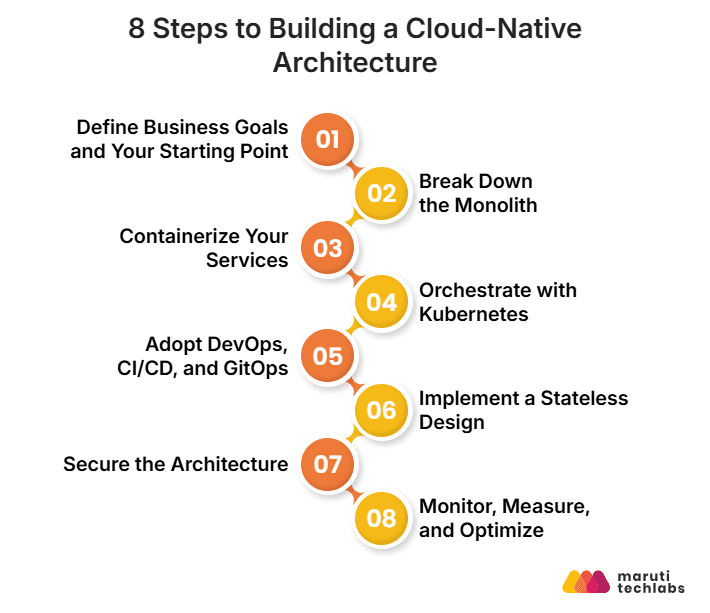
- Build in eight steps: set goals, split the monolith, containerize, orchestrate, automate delivery, go stateless, secure, and observe.
- Design security, cost control, and observability from day one, not after launch.
- Netflix, Capital One, and Spotify took three to seven years to migrate, driven by business need.
Introduction
A launch, a sale, or a live event can multiply traffic in minutes, and an app deployed as one unit can only scale as a whole. Cloud-native architecture fixes this by letting each part of an application scale and recover on its own.
The approach is now mainstream: 82% of container users ran Kubernetes in production in 2025, and 98% of organizations used cloud-native techniques. The CNCF names containers, service meshes, microservices, immutable infrastructure, and declarative APIs as its defining examples. Three terms are often confused:
| Term | What it means | Typical example |
| Cloud-based | Any application hosted in the cloud, including a traditional monolith on cloud VMs. | A lift-and-shift migration |
| Cloud-enabled | A traditional app that uses some cloud services, such as managed databases, without redesigning its core. | A monolith plus a managed database |
| Cloud-native | Built or rebuilt around microservices, containers, API-first design, and CI/CD. | Independent services on Kubernetes |
A practical cloud-native architecture starts with a clear application design, independent services, and a deployment process built for scale. Cloud application development services can help businesses design and build applications that meet these requirements.
This guide, drawn from our cloud application development projects, covers the building blocks, an eight-step build process, key patterns, AWS tools, security, best practices, and real migrations.
Get an architecture review covering service boundaries, platform choice, security, and cost.
What Is Cloud-Native Application Architecture?
Cloud-native application architecture is a way of building software as small, independently deployable microservices that run in containers on automated, elastic cloud platforms. Each service can be built, scaled, and updated without redeploying the rest of the system.
What Are the Core Building Blocks of Cloud-Native Architecture?
Cloud-native architecture rests on five building blocks taken from the CNCF definition:
- Containers: package each service with its dependencies so it runs the same way everywhere.
- Service meshes: manage service-to-service communication, encryption, and observability at the network layer (Istio and Linkerd are the best-known examples).
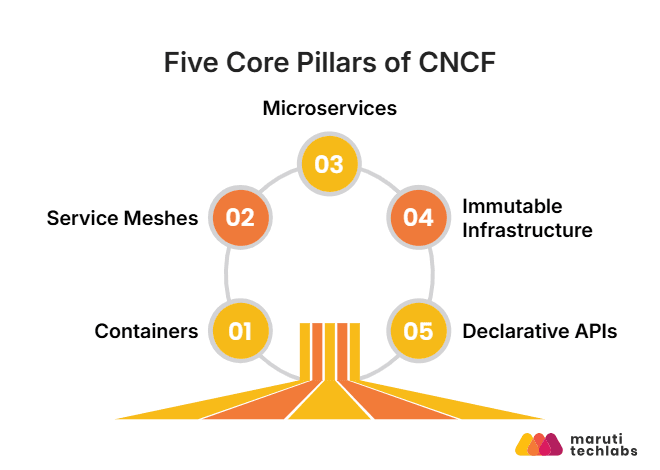
- Microservices: split the application into independent, single-purpose services.
- Immutable infrastructure: treat servers and containers as disposable and replace them instead of patching them in place.
- Declarative APIs: define the desired state and let the platform work out the steps to reach it.
How Do Cloud-Native Applications Work?
A request enters through an API gateway, reaches the right microservice, and is served by containers that an orchestrator scales and heals automatically. Five things happen along the way:
1. A request arrives: The API gateway authenticates it and routes it to the right microservice.
2. A service handles it: A stateless service running in a container does the work. It reads state from external databases and caches and calls other services through APIs (REST or gRPC).
3. The platform keeps it healthy: A service mesh encrypts and retries calls between services. Kubernetes adds pods when load rises and replaces any that fail.
4. Telemetry flows out: Metrics, logs, and traces from every service are collected so teams can see what happened and why.
5. Changes ship continuously: A CI/CD pipeline tests and deploys a changed service on its own, without touching the others.
Why Do Cloud-Native Applications Matter?
They let businesses handle unpredictable demand, release faster, control cost, and contain failures:
- Unpredictable demand: Services scale independently and automatically, so a launch or sale does not force you to over-provision everything all year.
- Faster releases: With CI/CD, a change to one service ships on its own, often within hours instead of waiting for a large scheduled release.
- Cost control: You pay for resources as they are used and scale down after the peak.
- Resilience: One service can restart without taking down the rest, and the orchestrator replaces failed containers automatically.
Netflix described this shift when it moved from a monolith to hundreds of microservices and continuous delivery.
What Challenges Do Traditional Monolithic Systems Create?
Monoliths create three problems: they scale only as a whole, they slow down releases, and they lock you into older technology.
1. Scaling limitations: If checkout is the bottleneck during a sale, you still have to scale search, accounts, and everything else with it, which wastes resources and raises costs.
2. Slow development cycles: Any change means redeploying the entire application, which brings downtime risk and delays releases.
3. Vendor and technology lock-in: Tightly integrated legacy systems make it hard to adopt better technology. Cloud-native is not immune: heavy use of proprietary managed services creates its own lock-in. Standardizing on open interfaces (Kubernetes, OpenTelemetry, Terraform) keeps your options open.
When Is Cloud-Native Not the Right Choice?
It is not the right choice for small teams with stable, low-traffic products, because microservices trade code complexity for operational complexity. Distributed tracing, data consistency across services, network latency, and on-call load all grow with every service you add.
A well-structured modular monolith on a managed platform often serves these teams better. Move to microservices when independent scaling or independent team release cycles are a real constraint, not because the pattern is fashionable.
How Do You Build a Cloud-Native Architecture? (8 Steps)
You can build a cloud-native architecture by defining goals, breaking down the monolith, containerizing, orchestrating, automating delivery, going stateless, securing, and observing. The steps work for new builds and migrations, and each step notes where the two differ.
Step 1: Define Business Goals and Your Starting Point
Set measurable goals, such as p95 latency at peak load or deployments per week, and decide whether you are building new (greenfield) or migrating (brownfield).
For a brownfield system, use the strangler fig pattern, a term coined by Martin Fowler: route traffic gradually from the monolith to new services instead of attempting a big-bang rewrite.
Step 2: Break Down the Monolith
Split the monolith along business boundaries using Domain-Driven Design, so each microservice maps to a bounded context. Start with high-impact functions such as authentication or payments.
Avoid "nanoservices," such as one service per database table, which add operational cost without architectural benefit. A useful test is whether a small team can own the service end to end.
Step 3: Containerize Your Services
Package each service in a container image with Docker and store it in a private registry such as Amazon ECR, Azure Container Registry, Google Artifact Registry, or Harbor. containerd, the runtime underneath Docker, is widely used directly in Kubernetes.
Add image vulnerability scanning with Trivy or Snyk to your CI pipeline so problems are caught before images reach production.
Step 4: Orchestrate with Kubernetes
Run your containers on a managed Kubernetes service such as Amazon EKS, Azure AKS, Google GKE, or Red Hat OpenShift, which cuts the operational load of running the control plane.
Set resource requests and limits on every workload, use the Horizontal Pod Autoscaler to scale with demand, and package applications with Helm. For the AWS-specific service map, see the AWS section below.
Step 5: Adopt DevOps, CI/CD, and GitOps
Automate testing and deployment so every change moves to production through the same pipeline. A common toolchain is GitHub Actions or GitLab CI for pipelines (Jenkins is still widely used), Argo CD or Flux for GitOps-based deployment, and Helm for packaging.
GitOps treats Git as the single source of truth for infrastructure and deployment state. Add contract testing with Pact to catch interface mismatches between services before integration.
Step 6: Implement a Stateless Design
Keep services stateless by moving session and application state to external stores, so any instance can handle any request and failed instances can be replaced freely. Use a distributed cache such as Redis, a database such as DynamoDB or Amazon RDS, or a message platform such as Kafka.
Use Kubernetes ConfigMaps and Secrets for configuration, and reserve Persistent Volume Claims for workloads that genuinely need local state.
Step 7: Secure the Architecture
Secure the system with zero trust, encrypted traffic, and policy-enforced Kubernetes controls. Verify every request, inside and outside the cluster. Secure APIs with OAuth 2.0 or OpenID Connect, and encrypt data in transit with TLS and at rest with a managed key service such as AWS KMS.
In Kubernetes, add Pod Security Admission, network policies for pod-to-pod traffic, and image scanning in CI. Policy engines such as Open Policy Agent (OPA) Gatekeeper or Kyverno enforce rules as code.
Step 8: Monitor, Measure, and Optimize
Collect metrics, logs, and traces from every service, and alert on service level objectives (SLOs) that reflect what users actually experience. Monitoring tells you something is wrong. Observability tells you why.
A common open-source stack is Prometheus for metrics, Grafana for dashboards, Loki for logs, and Tempo or Jaeger for traces, with OpenTelemetry for instrumentation. Managed options include Amazon CloudWatch, Azure Monitor, and Google Cloud Observability.
The tools table below lists a common open-source and managed observability stack, and Best Practice 5 covers instrumentation.
Which Tools Do You Need at Each Step?
Most teams combine Docker and Kubernetes with a CI/CD tool, infrastructure as code, and an observability stack, as the table shows.
Step | Common Tools |
| 1-2. Goals and decomposition | Domain-Driven Design workshops, strangler fig migration, OpenAPI specifications |
| 3. Containers | Docker, containerd, Amazon ECR, Azure Container Registry, Google Artifact Registry, Harbor, Trivy, Snyk |
| 4. Orchestration | Kubernetes, Amazon EKS, Azure AKS, Google GKE, Red Hat OpenShift, Helm |
| 5. CI/CD and GitOps | GitHub Actions, GitLab CI, Jenkins, Argo CD, Flux, Tekton, Pact |
| 6. Stateless design and data | Redis, DynamoDB, Amazon RDS and Aurora, Kafka, Kubernetes ConfigMaps and Secrets |
| 7. Security | OAuth 2.0 / OpenID Connect, TLS, AWS KMS, OPA Gatekeeper, Kyverno, HashiCorp Vault |
| 8. Observability | OpenTelemetry, Prometheus, Grafana, Loki, Tempo, Jaeger, CloudWatch, Azure Monitor |
What Are the Key Cloud-Native Architecture Patterns?
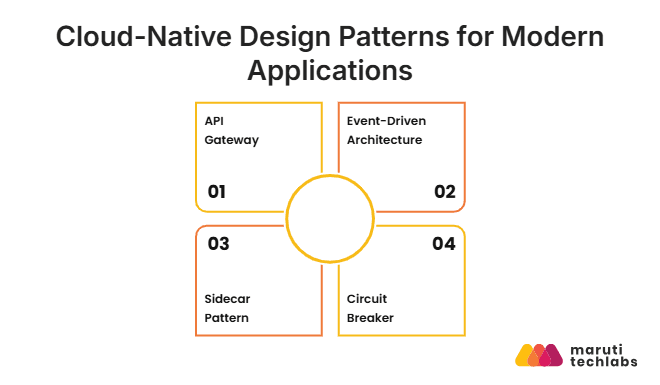
The four patterns used in most production systems are the API gateway, event-driven messaging, the sidecar, and the circuit breaker. Together, they solve the problems microservices create: how clients find services, how services talk without blocking each other, how cross-cutting concerns stay out of application code, and how one failure is kept from becoming many.
1. API Gateway
An API gateway is the single entry point that routes client requests to the right microservice. It also handles authentication, rate limiting, and request transformation, so clients do not need to know where every service lives. Common choices are AWS API Gateway, Kong, and gateways built on Envoy. Keep the gateway stateless and horizontally scalable so it never becomes the bottleneck for a high-traffic system.
2. Event-Driven Architecture
In an event-driven system, services publish events to a message broker instead of calling each other synchronously. Brokers include Apache Kafka, Amazon SQS and SNS, and Google Pub/Sub. The producer does not need the consumer to be available when it publishes.
This allows asynchronous processing of high-volume workloads, isolates faults (a failed consumer does not block the producer), and creates a natural audit trail because the event stream records what happened and when.
3. Sidecar Pattern
The sidecar pattern runs a helper container next to each service container in the same Kubernetes Pod. The sidecar handles logging, monitoring, security, and network communication without changing the main application.
Service meshes such as Istio use this pattern by injecting an Envoy proxy as a sidecar, which delivers mutual TLS, traffic management, and observability with no application code changes. Newer sidecarless modes, such as Istio ambient mode (general availability in Istio 1.24), remove the per-pod proxy.
4. Circuit Breaker
A circuit breaker stops cascading failures by cutting off calls to a slow or down service and immediately returning a fallback response. It has three states: closed (normal operation), open (requests fail fast), and half-open (a few test requests check whether the service has recovered).
Resilience4j (Java) and Polly (.NET) implement the pattern, and service meshes can apply it without code changes. Netflix's Hystrix popularized the idea, but Netflix now lists it as in maintenance mode.
How Do You Build Cloud-Native Applications on AWS?
Compose them from managed AWS services: EKS or Fargate for compute, API Gateway for entry, SQS, SNS, and EventBridge for messaging, DynamoDB or Aurora for data, and CloudWatch with OpenTelemetry for observability. This means building from managed blocks instead of running open-source software yourself on EC2 instances.
Which AWS Services Handle Compute and Containers?
Run containers on Amazon EKS for Kubernetes, Amazon ECS for AWS-native orchestration, or AWS Fargate for serverless compute.
- Amazon EKS: managed Kubernetes with an AWS-managed control plane, for teams that want full Kubernetes control.
- AWS Fargate: you define the container and its resources, and AWS runs the infrastructure. It works with both EKS and Amazon ECS.
- Amazon ECS: AWS's own orchestrator, simpler than Kubernetes for teams that do not need Kubernetes portability.
EKS with Fargate is a common combination when you want Kubernetes without managing worker nodes.
Which AWS Services Handle Networking and APIs?
Use Amazon API Gateway for client traffic and AWS Cloud Map for service discovery. AWS App Mesh is no longer an option.
- Amazon API Gateway: manages API traffic into your microservices, including authentication (IAM, Cognito), throttling, caching, and routing.
- AWS Cloud Map: registers services and returns healthy instances.
- Service mesh: AWS ended App Mesh support on September 30, 2026, and its documentation points ECS users to Amazon ECS Service Connect. For EKS, AWS recommends Amazon VPC Lattice, or you can run Istio or Linkerd yourself.
Which AWS Services Handle Data and Messaging?
Use SQS, SNS, and EventBridge for messaging, and DynamoDB or Aurora Serverless v2 for data.
- Amazon SQS: managed queues for asynchronous communication between services.
- Amazon SNS: managed publish/subscribe messaging for event-driven designs.
- Amazon EventBridge: a serverless event bus that connects AWS services and SaaS applications.
- Amazon DynamoDB: a managed NoSQL database that suits stateless services needing low-latency access at scale.
- Amazon Aurora Serverless v2: relational workloads with database capacity that scales automatically.
Which AWS Services Handle Observability and Audit?
Use CloudWatch for metrics and logs, CloudTrail for audit logging, and OpenTelemetry for tracing.
- Amazon CloudWatch: metrics, logs, and alarms for AWS services and your own applications.
- AWS X-Ray: distributed tracing across services. The X-Ray SDKs and daemon entered maintenance mode on February 25, 2026, and will reach end of support on February 25, 2027. AWS recommends instrumenting with OpenTelemetry (the AWS Distro for OpenTelemetry) and sending traces to X-Ray.
- AWS CloudTrail: audit logging for AWS API calls, essential for security and compliance.
- Amazon Managed Service for Prometheus and Amazon Managed Grafana: the open-source observability stack without the operational work.
Which AWS Services Handle CI/CD and Images?
Use CodePipeline and CodeBuild, or GitHub Actions with Argo CD, and store images in Amazon ECR.
- AWS CodePipeline and CodeBuild: AWS-native CI/CD for teams committed to the AWS ecosystem.
- GitHub Actions with Argo CD on EKS: a common hybrid. GitHub Actions builds and tests, and Argo CD deploys through GitOps.
- Amazon ECR: a private container registry with native EKS integration and image scanning.
What Are the Azure and GCP Equivalents?
Azure and Google Cloud offer a matching service for every AWS layer, as the table shows. The architectural patterns are the same on every major cloud. Only the managed service names change.
Layer | AWS | Azure | Google Cloud |
| Managed Kubernetes | Amazon EKS | Azure AKS | Google GKE |
| Serverless containers | AWS Fargate | Azure Container Apps | Cloud Run |
| API management | Amazon API Gateway | Azure API Management | Apigee |
| Messaging and events | SQS, SNS, EventBridge | Service Bus, Event Grid | Pub/Sub |
| Container registry | Amazon ECR | Azure Container Registry | Artifact Registry |
| Observability | CloudWatch | Azure Monitor | Google Cloud Observability |
How Do You Secure Cloud-Native Applications and Keep Them Resilient?
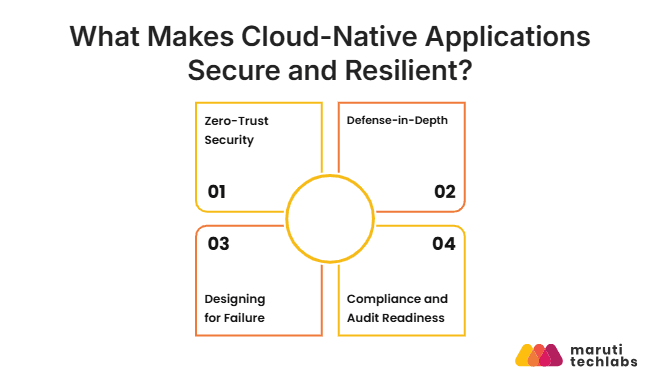
Secure them with zero-trust access, layered defenses, and compliance controls, and keep them resilient by designing for failure and testing it. Cloud-native systems have more moving parts and more network traffic than monoliths, so these have to be designed in, not added later.
1. Zero-Trust Security
Zero trust means verifying every user, device, and service at every access point and granting only the minimum permissions needed. In Kubernetes, it is implemented through:
- RBAC: define what each service account and user can do in the cluster.
- Network policies: restrict which pods can communicate with which other pods.
- Pod Security Admission: block privilege escalation and require non-root containers for sensitive workloads.
- Secrets management: use Kubernetes Secrets with encryption at rest, or preferably an external manager such as AWS Secrets Manager or HashiCorp Vault, instead of plain environment variables or ConfigMaps.
2. Defense-in-Depth
Defense-in-depth layers several controls so that if one fails, others still protect the system. Layers include network firewalls, encryption of data in transit (TLS) and at rest, and strict controls at the application level. TLS protects data between two points, such as client to gateway. End-to-end encryption keeps data readable only by the sender and the final recipient, even across intermediate services.
Supply chain security is now a core layer. Sign container images (Cosign and Sigstore) and verify signatures before deployment. Generate a Software Bill of Materials (SBOM) so you know which libraries and versions are in every image. Pull from private registries with scanning enabled instead of pulling public images straight into production.
3. Designing for Failure
Design for failure by assuming any component can fail, then adding load balancing, failover, and tested recovery plans. Load balancers spread traffic across instances and zones, and failover moves traffic to healthy capacity when a primary service goes down. Back this up with disaster recovery plans, defined recovery time and recovery point objectives, and the chaos testing described in the best practices below.
4. Compliance and Audit Readiness
Make compliance auditable by logging every Kubernetes API call, scanning configurations as code, and storing logs in durable storage. Containers are ephemeral, so logs kept inside them disappear, and immutable infrastructure means traditional change management does not apply.
Enable Kubernetes audit logging, scan configurations against policy with OPA Gatekeeper or Kyverno, and ship logs immediately to storage such as Amazon S3 or Google Cloud Storage.
What Are the Best Practices for Cloud-Native Development?
Best practices for cloud-native development include choosing the right tools, designing and testing for resilience, automating everything, optimizing costs, and building in observability.
1. Choose Tools That Fit Your Ecosystem
Choose tools that integrate well with the cloud-native ecosystem, because that matters more than language choice.
The toolchain has settled into clear categories:
- Containers: Docker, containerd
- Orchestration: Kubernetes
- Service mesh: Istio, Linkerd, Cilium
- CI/CD: GitHub Actions, Argo CD
- Observability: OpenTelemetry, Prometheus, Grafana
- Infrastructure as code: Terraform, Pulumi
Node.js and Spring Boot, for example, are both used to build microservices, so choose based on your team's skills and performance needs.
2. Design for Resilience and Test It
Add redundancy, set timeouts, include retries with backoff and use circuit breakers. Then prove they work with chaos engineering, which purposely adds failures to find weak spots before real outages happen.
Netflix released Chaos Monkey in 2012 for this, and tools such as Chaos Toolkit, Gremlin, and AWS Fault Injection Service make it routine. Start in staging with a narrow experiment, such as terminating one pod, and expand from there.
3. Automate Everything, Including Infrastructure
Provision infrastructure as code with Terraform, Pulumi, or AWS CloudFormation, and deploy through GitOps so environments are consistent and repeatable. With GitOps, all infrastructure and deployment configuration lives in Git, and production changes happen only through Git commits, never through manual kubectl commands or console edits. Argo CD and Flux are the leading GitOps tools for Kubernetes.
4. Optimize Costs From the Start
Optimize cloud costs with right-sizing, autoscaling, spot capacity, and tagging. Elastic infrastructure saves money only with governance:
- Right-size workloads. The Kubernetes Vertical Pod Autoscaler adjusts CPU and memory requests based on actual usage. Over-provisioned pods waste money at scale.
- Autoscale on demand. The Horizontal Pod Autoscaler scales pods with CPU, memory, or custom metrics, and KEDA can scale event-driven workloads down to zero when idle.
- Use spot capacity for fault-tolerant work. AWS says Spot Instances are available at up to a 90% discount compared with On-Demand pricing. Design workloads to handle interruption.
- Tag everything and apply FinOps. Label every resource with team, environment, and service, so costs have an owner. Kubecost, AWS Cost Explorer, and Infracost make the spend visible.
5. Build Observability In From Day One
Instrument every service for metrics, logs, and traces from the first release, not after the first outage. Use OpenTelemetry, the CNCF's vendor-neutral standard, to cover all three signal types.
Without distributed tracing, finding the cause of latency in a system of dozens of services is nearly impossible, because a single user request can cross many services, and the trace is the only way to see which hop was slow.
Which Companies Have Successfully Moved to Cloud-Native Architecture?
Netflix, Capital One, and Spotify have all done it, each over three to seven years and each driven by a concrete business need. All three are documented by the companies themselves.
Netflix: Rebuilding After a Failure
Netflix moved from a monolith to hundreds of microservices on AWS between 2008 and 2016, after a major database corruption in August 2008 left it unable to ship DVDs for three days. It completed the migration in early January 2016, after seven years. Netflix notes that the easiest route would have been to move its systems to AWS unchanged, but it chose the cloud-native approach instead and rebuilt virtually all of its technology. It reports a steady increase in availability, nearing its goal of four nines.
Key lesson: The migration was caused by a tangible failure, not by architectural theory. Cloud-native adoption sticks when it is driven by real business pain.
Capital One: A Regulated Bank All In on the Cloud
Capital One chose AWS in 2014 and announced in November 2020 that it had exited all eight of its on-premises data centers, becoming the first US bank to report going all in on the public cloud. Its own account dates the closure of its last data center to 2021, so published dates for the finish vary slightly by source. It now runs about 2,000 applications on AWS, about 80% of them built from the ground up for the cloud.
Key lesson: AWS describes the effort as going beyond infrastructure, including a new approach to talent management, technology development, and operations. For banks and other regulated organizations, people and process changes are as big as the technical ones.
Spotify: Migrating Through Time-Boxed Sprints
Spotify planned its move from four on-premises data centers to Google Cloud in 2015 and announced it in February 2016. The migration covered about 1,200 online services and 20,000 daily data jobs, owned by more than 100 teams.
A small central team ran the program with Google. Progress was tracked in a real-time visualization, and every engineering team spent one focused two-week sprint migrating its own systems. Teams could lift and shift user-facing services so streaming was never disrupted, and rewrite where time allowed. Traffic was fully routed to Google Cloud by May 2017, the first data center closed in December 2017, and the other three were retired in 2018.
Key lesson: a big migration works when it is broken into a repeatable, time-boxed program with shared visibility into progress. Lift and shift for the riskiest, user-facing workloads is a legitimate first step before deeper redesign.
Conclusion
Cloud-native architecture significantly changes how applications are designed, built, and run. Microservices, containers, Kubernetes, and automated pipelines give organizations the flexibility to scale and ship on demand, while zero-trust security, layered defenses, and failure-tolerant design keep that speed from costing reliability.
Adoption is driven by commercial objectives like dependability, delivery speed, and scale rather than architectural theory, as Netflix, Capital One, and Spotify show. The fundamental patterns: microservices, containers, GitOps, observability, and zero trust, remain the same whether you operate on AWS, Azure, or Google Cloud.
What happens next is being shaped by two trends. A growing solution to that complexity is platform engineering, which creates internal developer platforms that hide Kubernetes complexity while maintaining governance. Additionally, Kubernetes is receiving increased workloads due to AI: according to the CNCF 2025 report, 66% of companies using generative AI models utilize Kubernetes for inference.
How Did Maruti Techlabs Migrate a US-Based Car Marketplace From a Monolith to Kubernetes?
We re-architected a US used-car marketplace's single-node monolith into a container-orchestrated platform on Docker and Kubernetes, using the Strangler Pattern so the live platform stayed up throughout the migration. The project follows the same steps described above: blueprint, containerize, strangle the monolith, orchestrate, and observe.
What Problem Did the Client Have?
More than 200 services ran on a single node, so one failure or maintenance window stopped the entire product suite. A technical audit surfaced four risks:
- No failover: with no isolation between services, a node failure halted everything.
- Revenue exposure: advertising drove most site traffic, so even a few minutes of downtime meant direct revenue loss.
- No partial scaling: the platform either provisioned resources for the whole application or left it under-resourced at peak demand.
- Security blast radius: a tightly coupled codebase meant one successful exploit could cascade across the entire application.
How Did We Migrate It Without Downtime?
We migrated in five phases, moving service by service rather than in one risky cutover:
- Design the blueprint: mapped the target Kubernetes architecture for all 200+ services and proved it with a working pilot.
- Package the components: wrapped each service in Docker containers, each with its own repo and release pipeline.
- Retire the legacy code: use the Strangler Pattern to gradually replace monolithic functionality, evaluating each step against predetermined benchmarks.
- Roll out across environments: verified services were sequentially deployed across development, staging, and production.
- Instrument and observe: PagerDuty, Nagios, and New Relic were added for quick incident response and real-time visibility.
What Results Did the Migration Deliver?
The platform now scales, deploys, and fails in a contained way instead of all at once:
- Independent scaling: Each service scales on its own, with no need to over-provision the whole stack.
- Smarter traffic distribution: Requests route across pods instead of one congested node, cutting latency at peak load.
- Uninterrupted releases: Rolling updates swap instances gradually, so new features ship without taking the platform offline.
- Contained failures: A crash in one service no longer cascades into unrelated parts of the application.
- Faster delivery: Dedicated pipelines per service shorten the path, from code to production letting developers push updates to users faster.
Our microservices consulting team plans and runs step-by-step migrations, from defining service boundaries to production rollout.
Frequently Asked Questions
1. Can you build cloud-native applications without Kubernetes?
Indeed, Kubernetes is the most popular orchestrator; nonetheless, cloud-native refers to methods rather than a single product. Teams can also employ serverless functions, install services on Google Cloud Run, or run containers on Amazon ECS or AWS Fargate.
Choose Kubernetes when you need to move workloads between cloud providers or when you want complete control over how containers are scheduled. Choose a managed container service when you prefer to spend time handling the day-to-day operations.
2. How do you manage data across microservices?
Each service should have its own datastore, and its data should only be accessible via events or APIs. A shared database quickly recreates monolith-style coupling, a pitfall our microservices best practices guide calls out.
Because transactions do not span services, use eventual consistency with the saga pattern (a sequence of local transactions with compensating actions) and the outbox pattern (write the data and the event in one local transaction, then publish the event).
3. What skills does a team need to run cloud-native systems?
Fundamentals of containers and Kubernetes, infrastructure as code, CI/CD, observability and on-call practice, cloud security (identification, secrets, supply chain), and Domain-Driven Design for service boundaries are all necessary for a team.
Most organizations upskill existing DevOps staff, assign dedicated ownership of the platform, or bring in outside help.
4. How much does a cloud-native migration cost?
It depends mainly on how many services you have, how tightly coupled they are, how much data must move, and how long you run the old and new systems in parallel. Add platform setup, team training, and ongoing cloud and operations spend. For a first estimate, use our cloud migration cost calculator.
5. How is cloud-native different from serverless?
Cloud-native is how you build and run applications. Serverless is one method to put that idea into practice. In a serverless model, such as AWS Lambda, the provider runs the servers, scales to zero, and bills per execution. Trade-offs include cold starts, execution limits, and provider-specific features, so many systems mix containers and functions.