What Is the Zero Trust Framework for Enterprise Cloud Security?
Learn how Zero Trust improves enterprise cloud security with practical steps and best practices.
Cybersecurity
What Is the Zero Trust Framework for Enterprise Cloud Security?
Learn how Zero Trust improves enterprise cloud security with practical steps and best practices.
Table of contents
Table of contents
Key Takeaways
Introduction
What Is Zero Trust Cloud Security?
How the Zero Trust Security Framework Works
Understanding Zero Trust Implementation and the 5 Steps to Get Started
Common Challenges in Zero Trust Implementation
Best Practices for Implementing Zero Trust in Cloud Security Architecture
Advantages of Zero Trust for Enterprise Cloud Security
Conclusion
Why Maruti Techlabs
FAQs
Key Takeaways
Zero Trust cloud security follows a simple rule: never trust any user or device without verifying access.
It protects cloud systems by continuously checking identities, devices, and permissions before granting access.
Successful implementation starts with small use cases instead of transforming the entire environment at once.
Strong visibility, limited access, and network segmentation help reduce security risks in cloud environments.
Zero Trust helps organizations strengthen enterprise cloud security while adapting to modern cloud and remote work environments.
Introduction
As more companies shift their workloads to the cloud, protecting data becomes more challenging. Traditional networks once relied on a “trust but verify” approach. But cloud environments work differently, and security teams can no longer assume that users or devices inside the network are safe.
This is where the Zero Trust approach comes in. Instead of automatically trusting anyone, it requires every user, device, and application to be verified before accessing systems or data. The concept was first introduced by John Kindervag and has gained wide attention as cloud environments become more complex.
Industry research also shows how quickly organizations are moving in this direction. According to Gartner, by 2028, 50% of organizations are expected to implement a Zero Trust posture for data governance. This highlights the growing importance of stronger security strategies in cloud environments.
Traditional security models often struggle to protect modern cloud systems. As organizations expand across cloud platforms, remote work environments, and connected devices, security risks also increase.
In this blog, we explain what Zero Trust implementation is, how the Zero Trust security framework works, the steps to implement it, common challenges organizations face, best practices for cloud security architecture, and the advantages it offers for enterprise cloud security.
What Is Zero Trust Cloud Security?
Zero Trust cloud security is a security framework that assumes no user, device, or system should be trusted by default in a cloud environment. It works on the idea that threats can come from both inside and outside the network, so every access request must be verified before it is allowed.
In this approach, users and devices must continuously prove their identity before accessing cloud applications, systems, or data. Access is granted based on the principle of least privilege, meaning users receive only the permissions required to perform their tasks.
Unlike traditional security models that focus mainly on protecting the network perimeter, Zero Trust cloud security focuses on protecting individual cloud resources. Every request is verified, whether it comes from inside the organization or from external users.
It is also important to understand that Zero Trust is not a single product. It is a security approach built on principles that help organizations control access, monitor activity, and protect cloud infrastructure in modern enterprise environments.
How the Zero Trust Security Framework Works
Zero Trust works by continuously checking every request made to systems, applications, or data. Instead of trusting users or devices once they enter the network, the framework verifies identity, device status, and permissions every time access is requested. This applies to employees, devices, and even applications communicating with each other.
Implementing Zero Trust across an organization usually involves several systems and processes. It is not something that can be achieved with a single tool. Security teams often rely on guidance from organizations such as the National Institute of Standards and Technology and the Cybersecurity and Infrastructure Security Agency when building a Zero Trust strategy.
Most Zero Trust frameworks are built around three principles and five focus areas that guide how access is controlled and monitored.
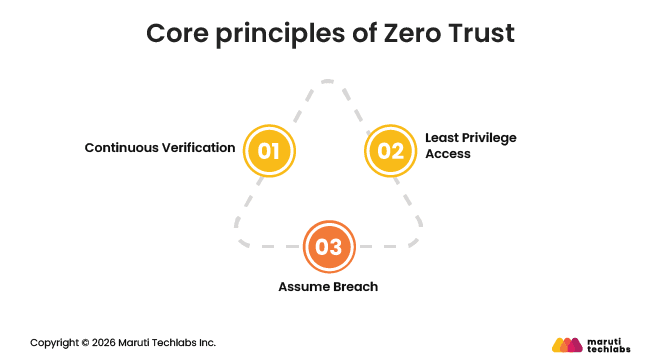
Core principles of Zero Trust
The Zero Trust model is built on three core principles: Continuous Verification, Least Privilege Access, and Assume Breach. These principles form the foundation for securing access, minimizing risk, and guiding implementation across the organization.
Continuous Verification: Every user, device, and application must be authenticated before accessing resources. Access is not granted permanently, and systems continue to verify activity throughout the session.
Least Privilege Access: Users and devices are given only the level of access required to complete a specific task. Once the task is finished, those permissions are removed to reduce unnecessary exposure.
Assume Breach: Organizations operate with the mindset that an attacker may already be inside the environment. Because of this, systems are monitored closely, and network access is limited to prevent threats from spreading.
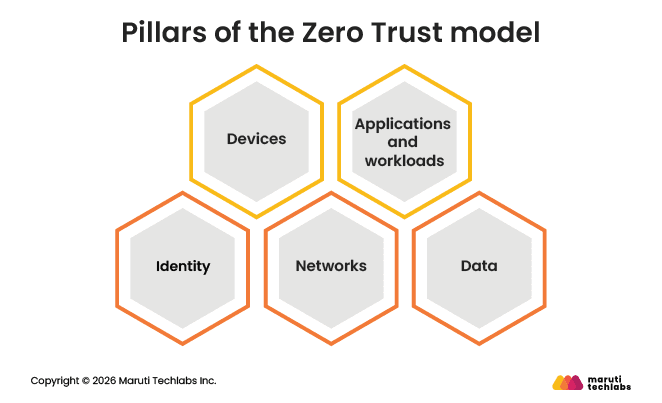
Pillars of the Zero Trust model
The Zero Trust model is built on five core pillars—Identity, Devices, Networks, Applications/Workloads, and Data—each focused on eliminating implicit trust across the environment.
Identity: User identities are verified before access is granted to systems or applications. Tools like identity and access management and multifactor authentication help confirm that only authorized users can sign in.
Devices: Every device connecting to the network must meet the organization’s security standards. Unknown or unmanaged devices are denied access.
Networks: Instead of relying on a single network boundary, Zero Trust separates systems into smaller segments. This helps limit how far a potential attack can spread.
Applications and workloads: Applications and services do not automatically trust each other. Access is continuously checked and monitored to detect unusual behavior.
Data: Sensitive data is protected through encryption, access controls, and monitoring. Organizations also track how data is accessed and shared to detect potential security issues early.
Understanding Zero Trust Implementation and the 5 Steps to Get Started
Zero Trust implementation is a security approach that helps organizations protect their systems, users, and data more effectively. It follows the principle of “never trust, always verify,” meaning no user, device, or application is automatically trusted, even inside the network.
Instead of relying on traditional perimeter security, organizations focus on identifying critical assets, mapping user access, and enforcing strict least-privilege policies. Measures such as multi-factor authentication, micro-segmentation, and continuous monitoring help secure access to systems and data.
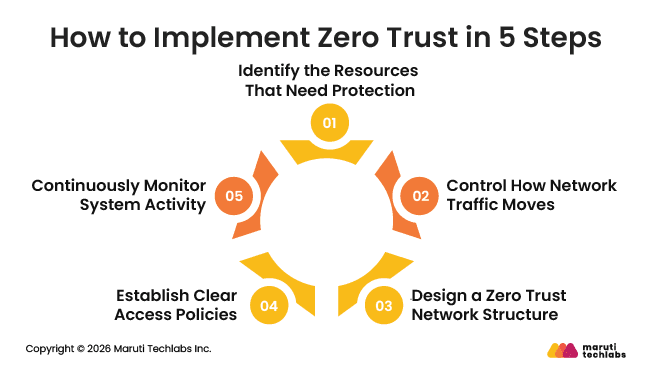
How to Implement Zero Trust in 5 Steps
Implementing Zero Trust involves a structured approach focused on securing critical assets, controlling access, and continuously verifying activity across the environment.
1. Identify the Resources That Need Protection
The first step is to understand what needs the most protection in your environment. Instead of trying to secure everything at once, organizations focus on their most important digital assets.
These typically include:
Sensitive data such as customer information, employee records, or proprietary business data
Critical applications that support essential business operations
Physical assets such as point-of-sale systems, IoT devices, or specialized equipment
Corporate services that support everyday business functions and customer interactions
Clearly defining this attack surface helps organizations focus their Zero Trust efforts where security risks are highest.
2. Control How Network Traffic Moves
Once important assets are identified, the next step is to understand how systems communicate with each other. Many applications depend on other systems, such as databases that store sensitive information.
Security teams map these connections to see how requests move through the network. This visibility helps them place security controls in the right locations so that traffic can be inspected and verified before reaching sensitive systems.
3. Design a Zero Trust Network Structure
After understanding traffic flows, organizations design a network that supports Zero Trust principles. Instead of allowing open communication across the network, resources are separated into smaller segments.
Tools such as next-generation firewalls and multifactor authentication are often introduced at this stage. These controls help verify user identities and inspect network traffic before granting access to applications or systems.
4. Establish Clear Access Policies
With the network structure in place, organizations define rules that determine who can access specific resources. These policies usually consider factors such as user role, device type, location, and time of access.
Security teams often review access requests by asking simple questions such as who is requesting access, what they need, and why they need it. This helps ensure access decisions follow the Zero Trust approach.
5. Continuously Monitor System Activity
Monitoring plays an important role in maintaining a Zero Trust environment. Security teams track network activity to detect unusual behavior or potential threats.
They often rely on system reports, analytics, and activity logs to understand how users and devices interact with systems. These insights help identify suspicious activity early and allow organizations to strengthen security controls over time.
Common Challenges in Zero Trust Implementation
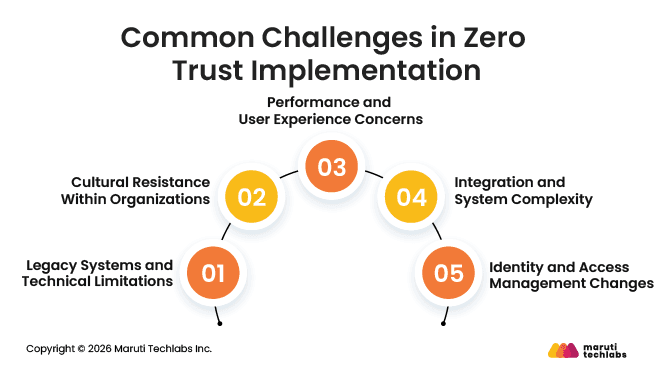
Common challenges in Zero Trust implementation include legacy system limitations, cultural resistance, performance concerns, integration complexity, and changes to identity and access management. These challenges can slow adoption and make implementation more complex.
1. Legacy Systems and Technical Limitations
Many organizations still rely on older infrastructure that was not designed for continuous verification or modern identity controls. Legacy systems modernization to support Zero Trust can be expensive and technically difficult. Security teams may also struggle to map data flows across complex environments, making it harder to identify which systems and assets need the strongest protection.
2. Cultural Resistance Within Organizations
Zero Trust requires a mindset change across the organization. Employees and teams who are used to traditional security models may find frequent authentication and monitoring inconvenient. Moving from a “trusted network” mindset to a “never trust, always verify” approach often requires training, communication, and strong leadership support.
3. Performance and User Experience Concerns
Security checks that occur during every access request can sometimes introduce delays. If not implemented carefully, authentication processes or security controls may affect system performance or slow down user workflows. Organizations must balance strong security with a smooth user experience.
4. Integration and System Complexity
Zero Trust environments involve multiple technologies working together, including identity management systems, network controls, monitoring tools, and security platforms. Integrating these tools with existing infrastructure can be challenging, especially when organizations rely on different vendors or older systems.
5. Identity and Access Management Changes
A strong identity and access management foundation is essential for Zero Trust. Many organizations need to redesign their IAM processes, implement stronger authentication methods, and manage access permissions more carefully. These changes require planning, investment, and ongoing management to work effectively.
Best Practices for Implementing Zero Trust in Cloud Security Architecture
Implementing Zero Trust in a cloud environment requires more than deploying security tools. Organizations need a clear strategy, continuous monitoring, and practical security controls that work across users, devices, networks, and applications.
The core ideas behind Zero Trust, such as verifying identities, limiting access, securing workloads, and continuously monitoring activity, were discussed earlier in the section on how the Zero Trust framework works. When applying these ideas to a cloud security architecture, organizations should follow a few practical best practices.
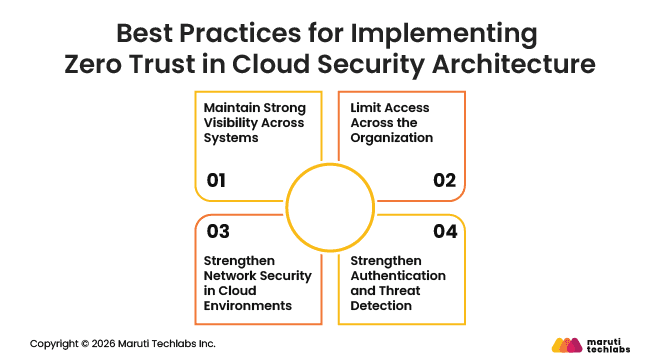
1. Maintain Strong Visibility Across Systems
Visibility is essential in a Zero Trust environment. Security teams must be able to monitor network traffic, user activity, and connected devices at all times. Continuous monitoring helps verify users and systems before granting access and also makes it easier to detect unusual behavior early.
Keeping devices updated is equally important. Security patches should be applied quickly to reduce vulnerabilities. If a device becomes outdated or fails security checks, the system should restrict its access until the issue is resolved.
2. Limit Access Across the Organization
The principle of least privilege should apply to everyone in the organization, including executives, employees, and IT teams. Users should only have the level of access required to complete their work.
This approach reduces the potential damage if an account becomes compromised. When permissions are limited and temporary, attackers have fewer opportunities to move across systems or access sensitive resources.
3. Strengthen Network Security in Cloud Environments
Another important practice is dividing the network into smaller segments. This approach, often called microsegmentation, separates workloads and systems into smaller security zones. If an attacker gains access to one area, segmentation helps prevent the threat from spreading across the entire network.
Organizations should also operate with the assumption that a traditional network perimeter may not exist. With cloud services, remote work, and multiple access points, systems must verify access requests regardless of where they originate.
4. Strengthen Authentication and Threat Detection
Strong authentication methods are critical for protecting access to cloud systems. Many organizations now use hardware-based security keys for multifactor authentication because they provide stronger protection than one-time passwords sent through email or SMS.
Security teams should also use threat intelligence to stay aware of emerging attack techniques. Threat intelligence feeds help identify suspicious activity earlier and allow organizations to respond faster.
Finally, security measures should not make daily work difficult for employees. If authentication processes become too complex, users may try to bypass them. Designing security controls that balance protection with usability helps ensure that Zero Trust practices remain effective across the organization.
Advantages of Zero Trust for Enterprise Cloud Security
As organizations rely more on cloud systems and remote access, strengthening enterprise cloud security becomes increasingly important. Zero Trust helps organizations protect their data, systems, and users by continuously verifying access and limiting unnecessary permissions. This approach provides several benefits for companies operating in modern cloud environments.
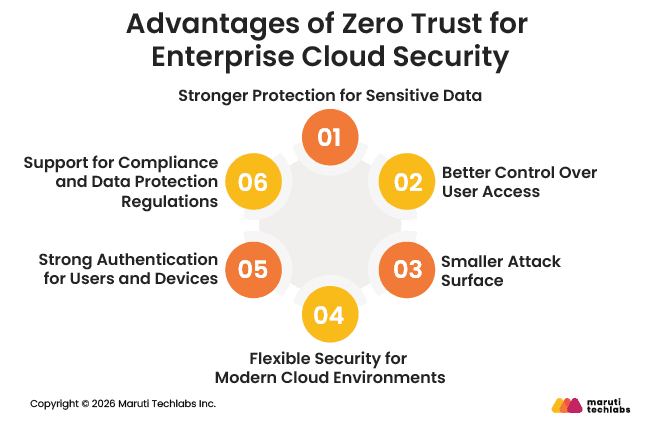
1. Stronger Protection for Sensitive Data
Data breaches remain one of the most serious cybersecurity threats. Zero Trust improves data protection by requiring authentication and authorization whenever someone attempts to access information. This continuous verification helps reduce the risk of unauthorized access and protects sensitive business and customer data.
2. Better Control Over User Access
Zero Trust improves how organizations manage access to systems and applications. Instead of trusting users once they enter the network, every request is verified. Users and devices only receive the minimum access required to complete their tasks, which helps reduce the chances of misuse or compromised accounts.
3. Smaller Attack Surface
Modern cloud environments often include remote users, cloud services, and edge systems, which can increase security risks. Zero Trust reduces this attack surface by limiting access and separating systems into smaller segments. If a threat enters one part of the network, it becomes much harder for it to spread.
4. Flexible Security for Modern Cloud Environments
Cloud environments are constantly changing as organizations add new services, users, and devices. Zero Trust security models are designed to adapt to these dynamic environments. Continuous verification and adaptive authentication help maintain security even as systems grow and evolve.
5. Strong Authentication for Users and Devices
Zero Trust relies on strong authentication methods to confirm user identities and device legitimacy. Techniques such as multifactor authentication and single sign-on help ensure that only authorized users can access cloud systems and resources.
6. Support for Compliance and Data Protection Regulations
Zero Trust practices also help organizations meet security and privacy requirements. Continuous monitoring, encryption, and strict access controls help protect sensitive data and support compliance with regulatory standards and data protection guidelines.
Conclusion
Adopting Zero Trust does not mean transforming the entire security environment at once. For many organizations, that approach can feel overwhelming, especially when dealing with complex systems and legacy infrastructure. A more practical approach is to start small and apply Zero Trust architecture to specific initiatives where stronger security is most needed.
Security and business leaders can begin by identifying use cases that benefit from stricter access control and continuous verification, such as cloud migrations, remote work, new digital services, or external partnerships. Starting with these focused areas makes adoption easier, and over time, organizations can expand Zero Trust practices across more systems while maintaining efficiency and minimizing disruption.
Why Maruti Techlabs
Maruti Techlabs helps organizations build secure, scalable, and reliable cloud environments that support long-term business growth. As an Amazon Web Services Advanced Tier Partner, we deliver tailored cloud solutions that help businesses modernize infrastructure, improve performance, and strengthen enterprise cloud security.
With deep experience in cloud consulting, migration, and security implementation, we help organizations design resilient cloud architectures and optimize their environments for efficiency and scalability. You can explore our expertise in Cloud Security and Security Architecture & Advisory Services.
In one recent project, we migrated a large automotive platform to AWS, delivering zero downtime during peak loads and significantly improving scalability and infrastructure reliability. The solution also reduced infrastructure costs and simplified monitoring and maintenance.
If you are planning to strengthen your cloud environment, talk to our experts about your project.
FAQs
1. What Is Zero Trust Cloud Security?
Zero Trust cloud security is a security approach that assumes no user, device, or system should be trusted by default. Every access request must be verified before it is allowed. This model protects cloud systems by continuously checking identities, devices, and permissions before granting access to data, applications, or resources.
2. How Does Zero Trust Cloud Security Work?
Zero Trust cloud security works by verifying every access request in real time. Users and devices must authenticate before accessing cloud resources. Security systems also monitor activity continuously, apply least-privilege access, and restrict suspicious behavior to reduce the chances of unauthorized access or data breaches.
3. What Are the Disadvantages of Zero Trust Security?
Zero Trust implementation can be complex and time-consuming. Organizations may need to update legacy systems, redesign access policies, and integrate multiple security tools. If not planned properly, frequent authentication checks can also affect user experience. However, with proper planning, these challenges can be managed effectively.
4. Does Zero Trust Security Replace Firewalls?
No, Zero Trust security does not replace firewalls. Instead, it works alongside them. Firewalls still protect networks by filtering traffic, while Zero Trust focuses on verifying users, devices, and access requests. Together, they create stronger security by protecting both the network and individual resources.
5. What Tools Support Zero Trust Cloud Security?
Several tools support Zero Trust security in cloud environments. These include identity and access management systems, multi-factor authentication tools, endpoint security platforms, network monitoring tools, and threat detection solutions. These technologies work together to verify users, monitor activity, and protect cloud systems from unauthorized access.
6. What Is an Example of Zero Trust Security?
A common example is requiring employees to use multi-factor authentication before accessing a cloud application. Even if the user is connected to the company network, they must verify their identity using multiple factors. The system may also check device health before granting access.
7. What Are the Seven Layers of Zero Trust Security?
The seven layers usually include user identity, devices, networks, applications, workloads, data, and visibility or analytics. Each layer focuses on protecting a different part of the environment. Together, they help organizations verify access, monitor activity, and secure systems across the entire cloud infrastructure.
8. How Does Zero Trust Security in the Cloud Address Insider Threat Risks?
Zero Trust reduces insider threat risks by limiting access and monitoring user activity. Employees only receive the permissions needed for their role, and all access requests are verified. Continuous monitoring also helps security teams detect unusual behavior early and respond before sensitive data is exposed.
Lalit Bhatt works across cloud infrastructure, DevOps, and project delivery, bringing 18+ years of experience across cloud migration, AWS architecture, infrastructure improvements, and team mentoring, depending on what clients need.
Stuck with a Tech Hurdle?
We fix, build, and optimize. The first consultation is on us!